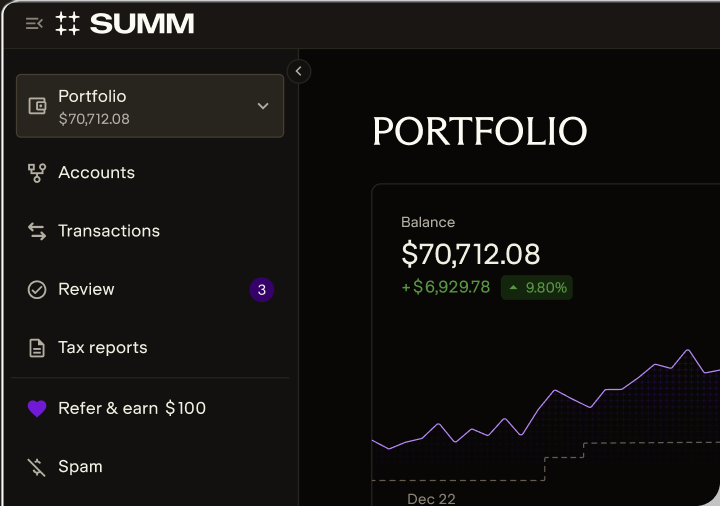
No items found.
No items found.
Integrations
13
 
Apr
 
2026
 - 
10
min read

How to Find Your Missing 1099-DA Cost Basis on [Exchange]

How to Fill Out Form 8949 with [Exchange] 1099-DA

Without accurate cost basis information, your crypto tax calculations will be incorrect, which could cost you thousands in overpayment. Here's how to find your missing cost basis.

Team Summ
Key takeaways
  • If your 1099-DA from [Exchange] shows blank or $0 cost basis, you could end up paying thousands in unnecessary taxes unless you correct it.
  • Missing cost basis typically occurs when you transfer crypto into [Exchange] from another wallet or exchange, because [Exchange] has no record of your original purchase price.
  • Use Summ to find your cost basis across all your exchanges and wallets, to replace missing or incorrect information on your 1099-DA. It also generates your Form 8949 and connects with TurboTax to make filing easy.

  • Your Form 8949 must accurately match the proceeds reported on your [Exchange] 1099-DA to avoid being flagged by the IRS and triggering a potential audit.
  • Even if your 1099-DA has missing or incorrect cost basis, you can report the accurate amounts on Form 8949 with proper documentation.
  • Summ (formerly Crypto Tax Calculator) automatically generates an IRS-compliant Form 8949 that reconciles with your 1099-DA, complete with all required fields and adjustment codes.

If you received a 1099-DA from [Exchange] and discovered that the cost basis fields are blank, showing $0, or seem incorrect, then you must correct them before filing your taxes.

Without accurate cost basis information, the IRS assumes your entire proceeds amount is taxable gain. This could result in you paying taxes on thousands of dollars you didn't actually earn – or even paying taxes when you actually had a loss.

You need to file your corrected information on Form 8949. This needs to be precise – if there is a mismatch between the proceeds you report on your 8949 and what was reported to the IRS on your 1099-DA by [Exchange], it will likely trigger an investigation, which may result in an audit.

Quick steps

  1. Check your [Exchange] transaction history for purchases made entirely on the platform.
  2. Connect your [Exchange] account to Summ along with all other exchanges and wallets you've used.
  3. Summ automatically tracks your cost basis across all platforms, even for crypto transferred between accounts.
  4. Generate your Form 8949 with complete, accurate cost basis that reconciles with your 1099-DA.
  5. File your tax return with confidence, knowing you have full documentation for IRS compliance.

Alternatively: Use manual methods like blockchain explorers, email receipts, and bank statements to reconstruct your purchase history and establish cost basis. We include instructions on how to use these below.

Received a consolidated 1099 Form?

You may receive a consolidated 1099 from [Exchange] that combines multiple reporting forms. If you receive a consolidated form, locate the 1099-DA section for your crypto transactions. All guidance in this article applies to the 1099-DA portion of consolidated forms.

Why is cost basis missing from my [Exchange] 1099-DA?

The most common reason for missing cost basis on your 1099-DA is that you transferred crypto into [Exchange] from another wallet or exchange.

Here's what happens:

  1. You buy Bitcoin on Exchange A for $30,000
  2. You transfer that Bitcoin to [Exchange]
  3. You sell it on [Exchange] for $40,000
  4. [Exchange] issues a 1099-DA showing $40,000 in proceeds but blank or $0 cost basis
  5. The IRS thinks you owe tax on the full $40,000 amount, instead of your actual $10,000 gain

Why? Because [Exchange] only knows you sold Bitcoin for $40,000. They have no record that you originally bought it for $30,000 on a different platform.

Other reasons for missing cost basis:

  • 2025 tax year limitation – For the first year of 1099-DA reporting (2025 tax year), brokers are only required to report gross proceeds, not cost basis
  • Purchases from non-covered sources – Assets acquired through DeFi, mining, airdrops, or person-to-person transactions
  • Incomplete records – The exchange may not have complete historical data for older accounts or assets that have been delisted

What happens if I don't fix it?

If you file your taxes using the 1099-DA as-is with blank cost basis, the IRS will treat your entire proceeds as taxable gain.

Using the example above:

  • What the IRS sees on your 1099-DA: $40,000 proceeds, $0 cost basis = $40,000 taxable gain
  • Your actual situation: $40,000 proceeds, $30,000 cost basis = $10,000 taxable gain

You'd be paying taxes on $30,000 of phantom gains that never existed. At a 24% tax rate, that's $7,200 in unnecessary taxes.

The solution: You must report your accurate cost basis on Form 8949, supported by documentation that proves your original purchase price. Crypto Tax Calculator is essential for this to ensure accurate reporting. Any mismatch between the proceeds reported on your 1099-DA and 8949 will raise a red flag, which may result in scrutiny of your taxes and an audit. 

Option 1: Check what's available on [Exchange]

Before looking elsewhere, start by seeing what cost basis information [Exchange] already has available. Even if it's not on your 1099-DA, the platform may have transaction records you can use.

Finding your [Exchange] transaction history

On [Exchange], follow these steps:

  1. Log into your [Exchange] account
  2. Find your transaction history. This is typically somewhere in your Account tab with a label like “Transaction History" or "Tax Center"
  3. Select the date range covering your purchase and sale dates. Consider setting the start date at the beginning of your transaction history on the exchange, and set the end date at the end of the tax year.
  4. Filter for relevant transaction types: buy, sell, deposit, staking rewards and any other acquisition types
  5. Look for transactions showing when you originally acquired the asset

Downloading [Exchange] transaction data

  1. In your transaction history, locate the Export/Download button
  2. Choose your preferred format (CSV is recommended for further analysis)
  3. Select the relevant date range. Make sure it covers the full period you've had an account
  4. Download the file to your computer

What you can find on [Exchange]:

✅ Transactions that occurred entirely on [Exchange] (bought and sold on the same platform)
✅ Historical prices at the time of your [Exchange] transactions
✅ Trading fees and other transaction costs
✅ Dates and times of all [Exchange] activity

What you WON'T find on [Exchange]:

❌ Cost basis for crypto you transferred into [Exchange]
❌ Your complete transaction history from other exchanges or wallets
❌ DeFi transactions or smart contract interactions

If your missing cost basis relates to crypto transferred into [Exchange], you'll need to track down the original purchase from wherever you first bought it. This is where Summ makes the process dramatically easier.

Option 2: Use Summ to find your cost Basis

The most efficient way to solve missing cost basis across all your crypto accounts — not just [Exchange] — is to use Summ.

Our platform automatically imports your complete transaction history from [Exchange] and all other exchanges, wallets, and DeFi protocols you've used. It then calculates accurate cost basis even for assets that have been moved between platforms multiple times.

How Summ finds your missing cost basis

1. Multi-platform aggregation

Summ connects to 3500+ exchanges, wallets, and blockchains. When you sell crypto on [Exchange] that was originally purchased elsewhere, our platform:

  • Tracks the original purchase from wherever you bought it
  • Follows the asset through any transfers between wallets/exchanges
  • Calculates the correct cost basis including all transaction fees
  • Generates Form 8949 showing accurate gains that reconcile with your 1099-DA proceeds

2. Automatic transfer matching

Summ automatically identifies when you've transferred assets between your own accounts. It knows that a withdrawal from Exchange A followed by a deposit to [Exchange] is a transfer, not a disposal – ensuring your cost basis carries forward correctly.

3. DeFi and smart contract tracking

Unlike [Exchange], Summ tracks your complete crypto activity including:

  • DeFi protocols (Uniswap, Aave, Compound, etc.)
  • NFT marketplaces
  • On-chain staking and rewards
  • Direct wallet-to-wallet transactions

If the crypto you sold on [Exchange] originated from DeFi or a personal wallet, Summ will find and calculate the cost basis.

4. Historical price data

For transactions where exact cost basis isn't available (airdrops, mining, old purchases), Summ uses historical price data from the date of acquisition to establish fair market value – which becomes your cost basis for tax purposes.

Setting up Summ

Step 1: Create your account

  1. Sign up for Summ or log in if you already have one

Step 2: Connect [Exchange]

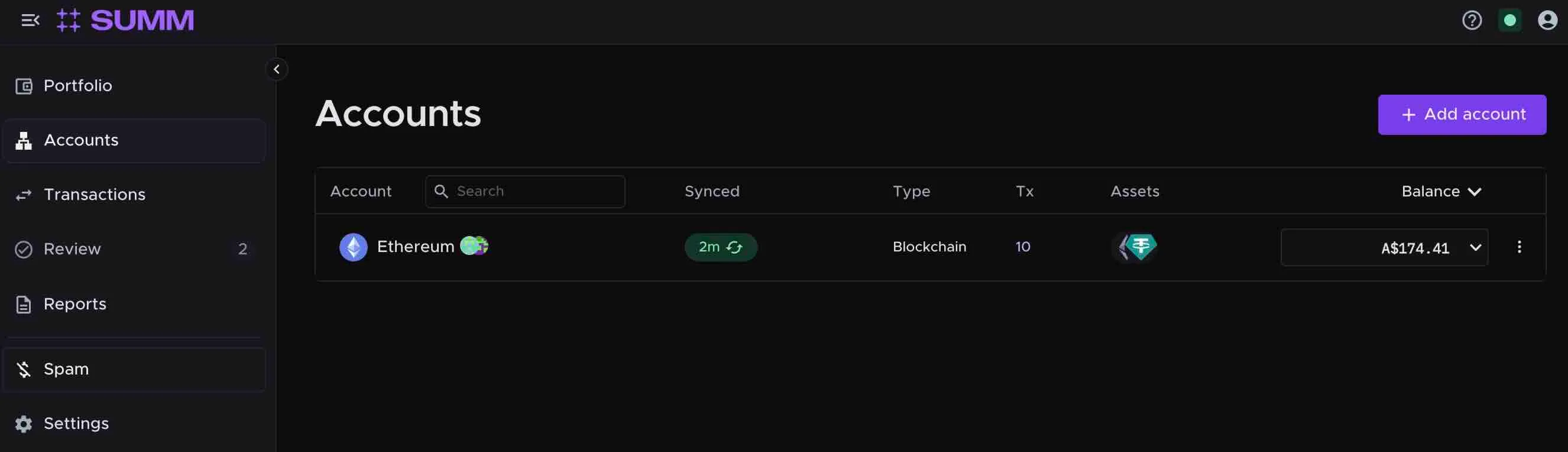
A screenshot showing the Accounts tab of Summ. This is where you can add your exchange and wallet accounts.
  1. Navigate to the Accounts tab
  2. Click + Add accounts
Option A: API Connection (Recommended)
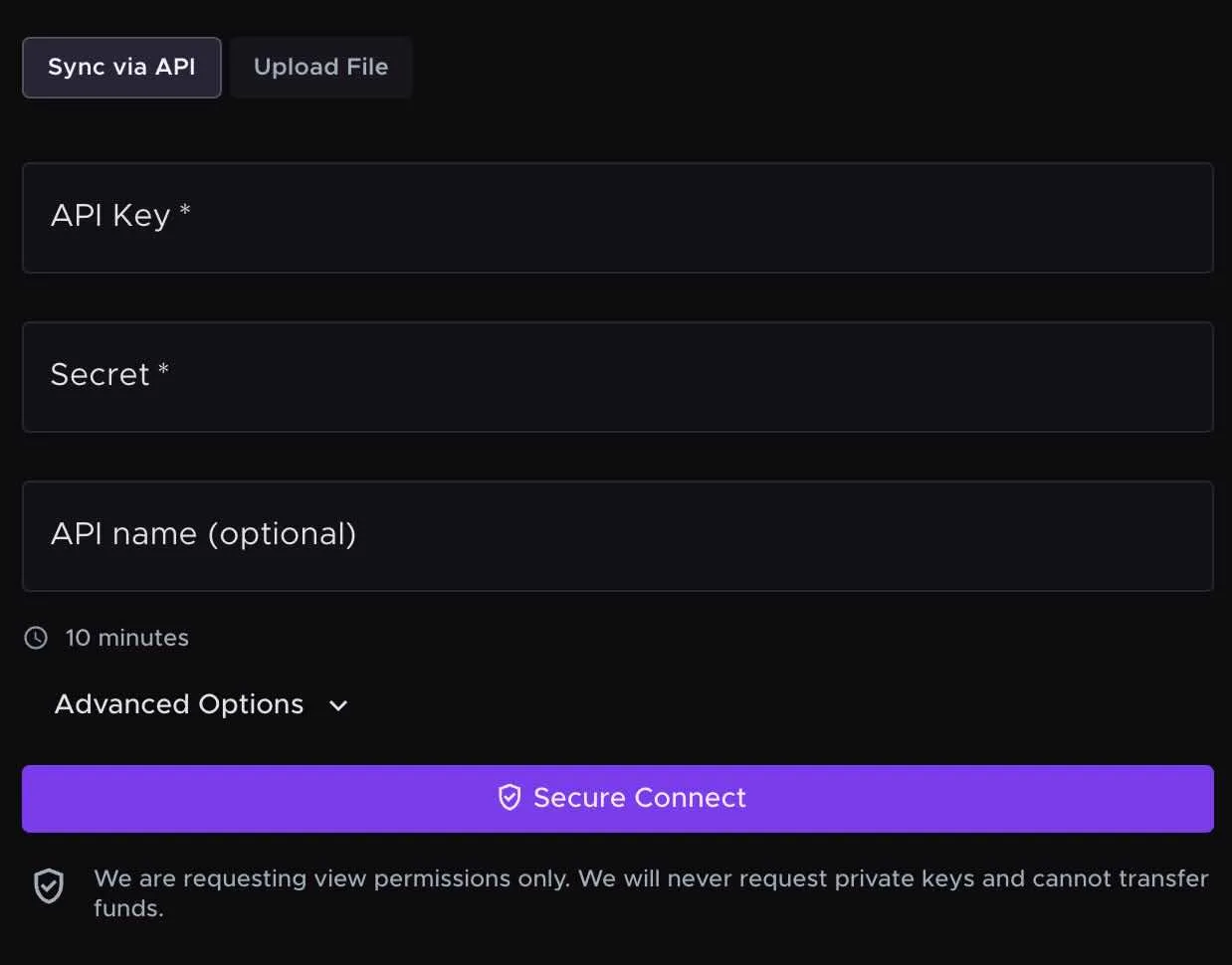
A screenshot of the API connection screen on Summ. You can use this to connect and exchange or wallet via an API. This ensures Summ receives new transactions any time you sync your account.
  1. Select [Exchange] from the list of exchanges
  2. Click Sync via API
  3. Follow the on-screen instructions to generate your API key on [Exchange]
    • API keys provide read-only access to your transaction history
    • Summ never has access to withdraw or trade your funds
  4. Input your API details and click Secure Connect
  5. Summ will automatically import your complete [Exchange] transaction history
Option B: CSV Upload
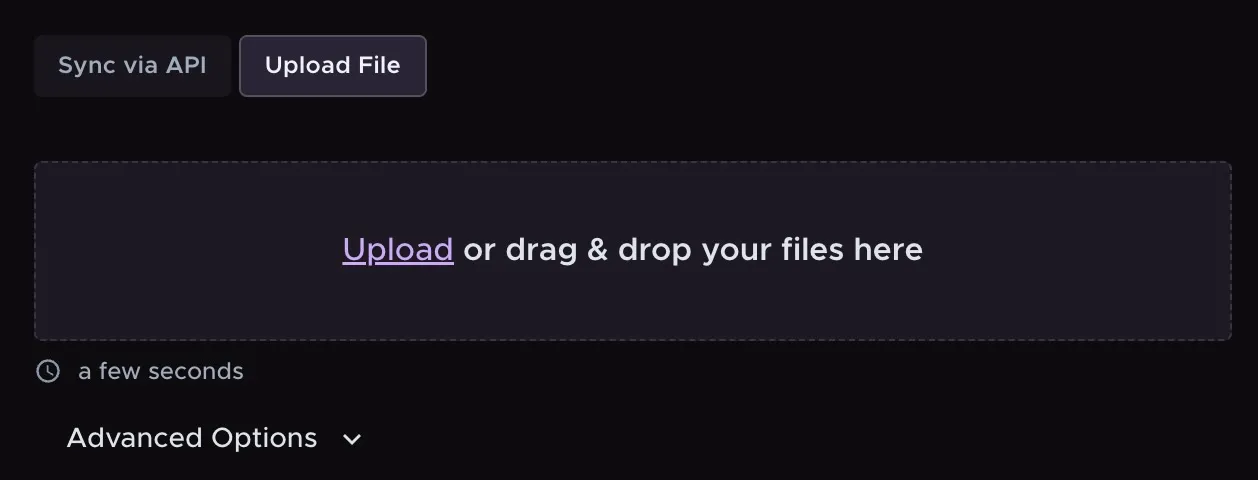
A screenshot showing the CSV upload option on Summ. You can use this to manually add transaction data from an exchange using a spreadsheet csv file.
  1. Select [Exchange] from the list of exchanges
  2. Click Upload File
  3. Follow the instructions to download your transaction CSV from [Exchange] (see Step 1 above)
  4. Upload the file to Summ
  5. Summ will parse and import all transactions

Step 3: Connect your other crypto accounts
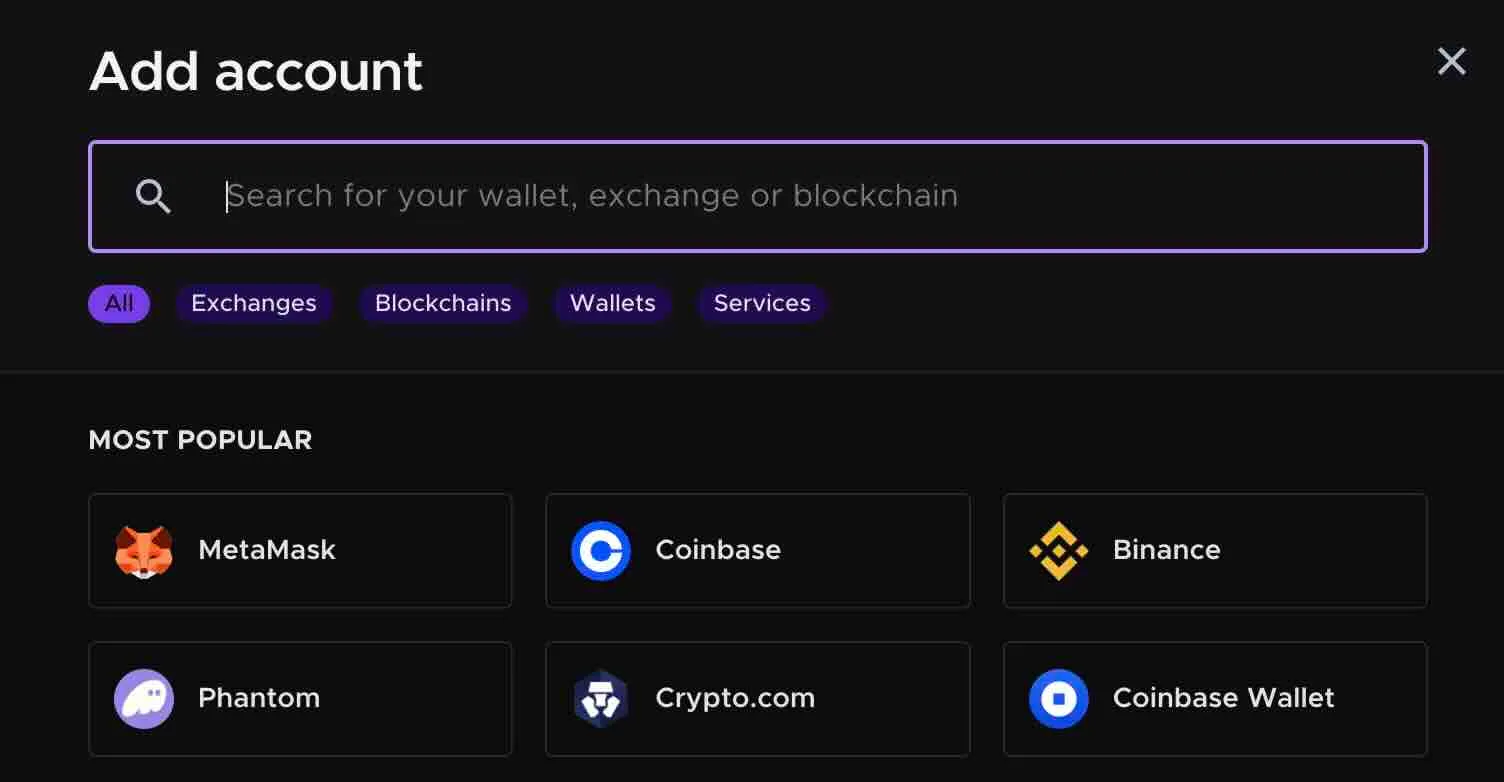
A screenshot of the Add account interface on Summ. This is where you add other crypto accounts that we support. Such as exchanges, wallets or DeFi protocols.

This is the critical step for finding your missing cost basis on [Exchange]. Connect every exchange, wallet, and DeFi platform you've ever used:

  • Centralized exchanges (Coinbase, Kraken, Gemini, Binance, etc.)
  • Hardware wallets (Ledger, Trezor)
  • Software wallets (MetaMask, Trust Wallet, Phantom, etc.)
  • DeFi protocols and liquidity pools

The more complete your import, the more accurate your cost basis tracking will be.

Step 4: Review and reconcile
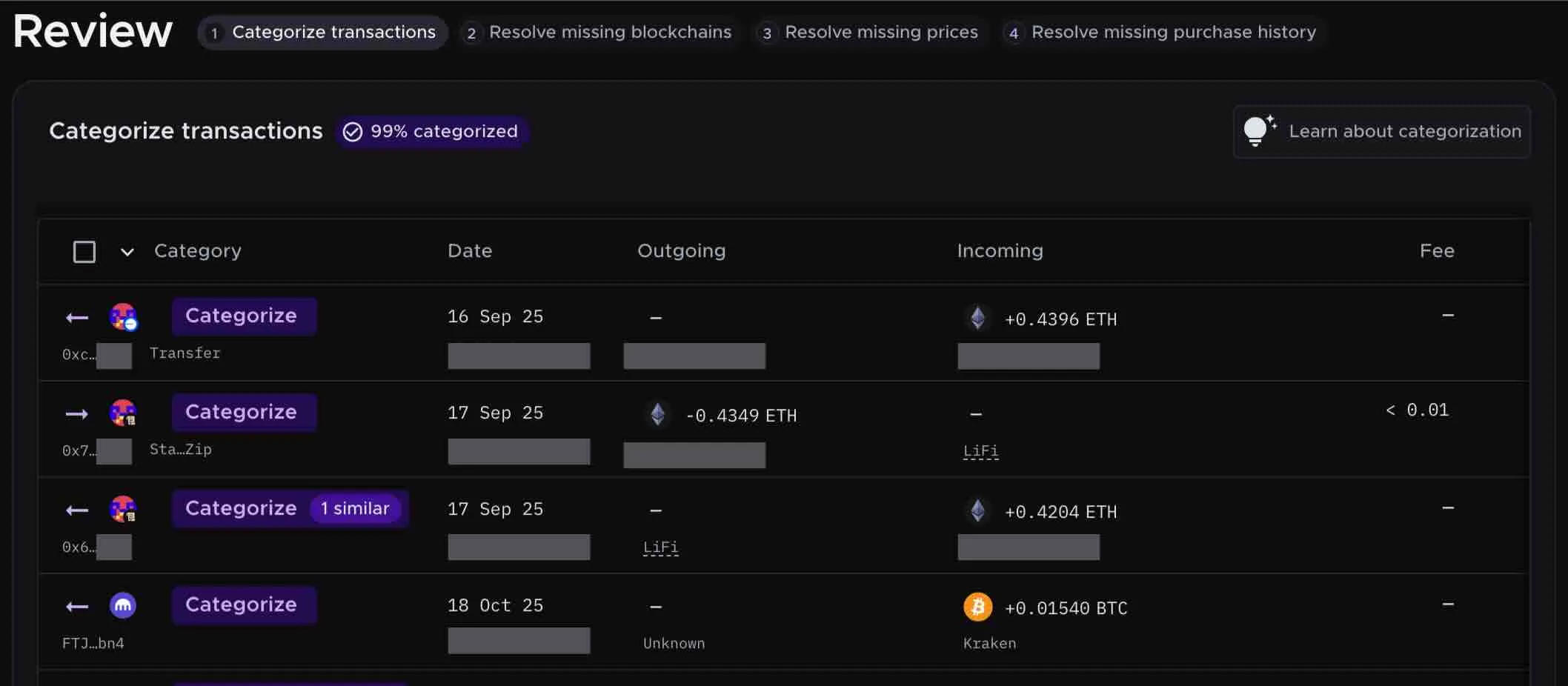
A screenshot of the Review tab on Summ. You can review any transactions that need additional information from you here.

Once all your accounts are connected:

  1. Navigate to the Review tab
  2. Summ will automatically categorize your transactions
  3. Review any flagged items that need clarification
  4. Summ matches transfers between accounts to ensure cost basis carries forward correctly

Step 5: Generate your tax report
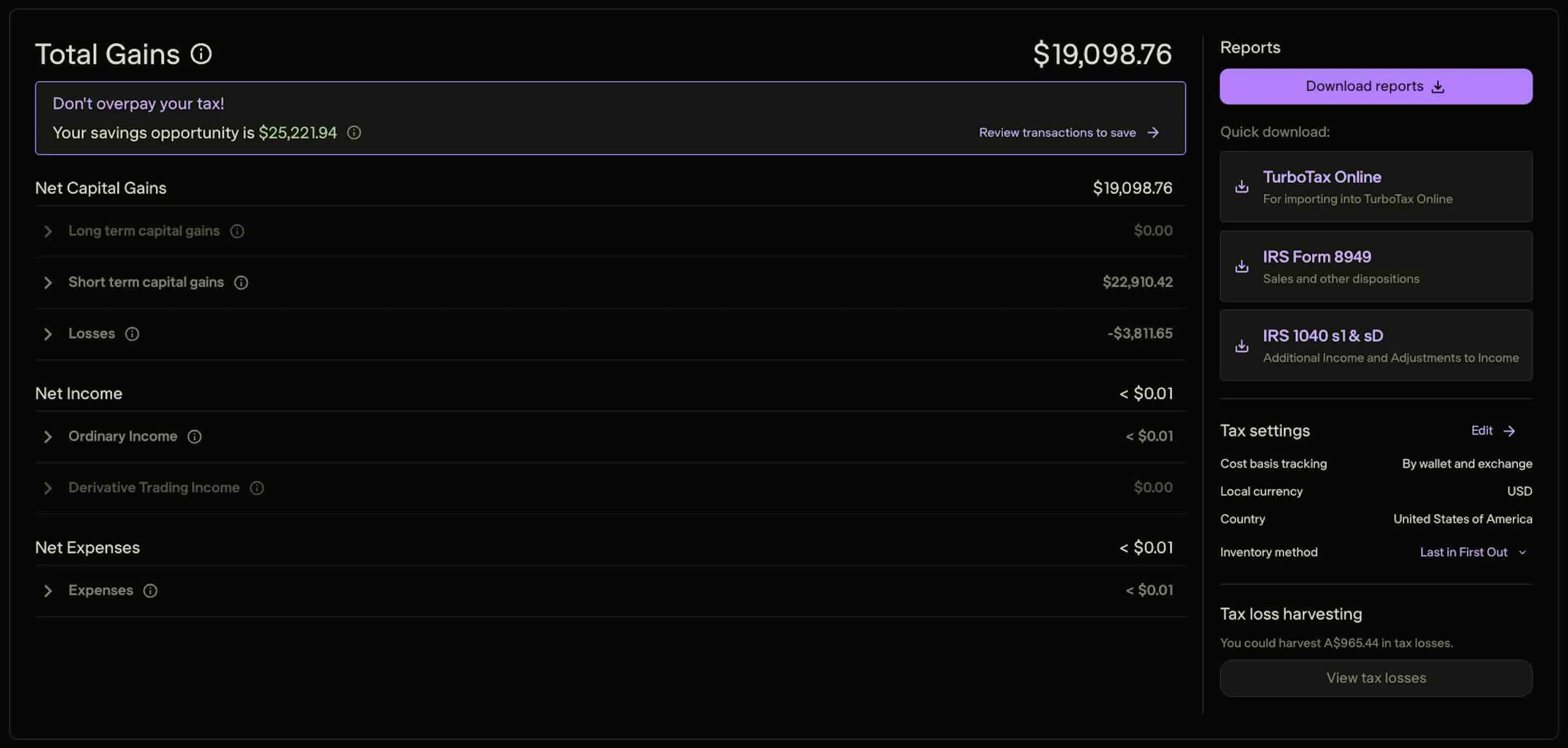
A screenshot of the Reports tab of Summ. Use this to download your tax report. There are many different types available, including a summary, TurboTax, 8949 and Schedule D
  1. Select your tax year (e.g., 2025)
  2. Click Generate Report
  3. Download your Form 8949 and Schedule D

Your Form 8949 will show:

  • All your crypto sales including those on [Exchange]
  • Complete cost basis for every transaction—even transferred assets
  • Proceeds that match your 1099-DA from [Exchange]. If the proceeds reported on your 8949 do not match what was already reported to the IRS on your 1099-DA, then that will likely trigger an investigation of your tax reporting by the IRS.
  • Accurate capital gains/losses with supporting documentation

Option 3: Manual methods for finding cost basis

If you're unable to connect certain accounts to Crypto Tax Calculator or need to manually verify specific transactions, here are alternative methods for reconstructing your cost basis.

Step 1: Using blockchain explorers

If you transferred crypto into [Exchange] from a personal wallet, you can trace the transaction on the blockchain to find the source.

How to use blockchain explorers:

  1. Find the transaction hash from your [Exchange] deposit history
  2. Look up the hash on the appropriate blockchain explorer:
  3. Trace the source by following the transaction trail backward to identify where you originally acquired the crypto
  4. Find the original purchase date and look up the fair market value on that date using market data from a reputable exchange or market aggregator like CoinGecko

Limitations:

  • This only works for on-chain transfers (not exchange-to-exchange internal transfers)
  • It can be time – consuming if you have many transactions
  • It doesn't automatically calculate cost basis – you still need to establish the original value

Step 2: Reconstructing purchase history

Email confirmations and receipts

Check your email for:

  • Purchase confirmations from exchanges
  • Withdrawal/deposit notifications
  • Trading confirmations
  • Account statements

Search your inbox for terms like:

  • "purchase confirmed"
  • "order filled"
  • "deposit received"
  • The name of your crypto (Bitcoin, Ethereum, etc.)

Bank and credit card statements

Review your financial statements for:

  • Charges from crypto exchanges
  • ACH transfers to trading platforms
  • Credit card purchases of crypto

These establish when you bought crypto and how much fiat you spent—which is your cost basis.

Historical exchange records

Log into every exchange you've ever used and download:

  • Complete transaction history
  • Order history
  • Deposit/withdrawal records
  • Tax documents from prior years

Even if you no longer actively use an exchange, your historical data should still be accessible.

Step 3: Establishing fair market value for special cases

For crypto acquired through non-purchase methods, you'll need to establish fair market value at the time of acquisition:

Airdrops and forks

  • Use historical price data from the date you received the tokens
  • Sources: CoinGecko, CoinMarketCap, exchange historical data
  • The FMV at receipt becomes your cost basis

Mining and staking rewards

  • Fair market value at the date and time of receipt
  • This is also your income amount for tax purposes
  • The FMV becomes your cost basis when you later sell

Gifts

  • If you received crypto as a gift: The giver's cost basis carries over to you
  • You'll need to ask the sender what they originally paid
  • Also need the date they acquired it

Inheritance

  • Cost basis is "stepped up" to fair market value on the date of the decedent's death

Step 4: Documentation best practices

Whatever method you use to find cost basis, maintain these records:

Transaction receipts showing date, amount, and price
Screenshots of transaction history from exchanges
Blockchain transaction hashes for on-chain transfers
Bank statements showing fiat purchases of crypto
Historical price data for establishing FMV
Email confirmations from exchanges and wallets

The IRS can audit crypto transactions up to 3 years after filing (or 6 years for significant underreporting). Having complete documentation protects you if questions arise.

Pro tip: Crypto Tax Calculator automatically maintains all this documentation for you. Every calculation includes a complete audit trail showing how cost basis was determined, with supporting transaction data from all your connected accounts.

What to do after you find your cost basis

Once you've determined your accurate cost basis—whether through [Exchange] records, Crypto Tax Calculator, or manual methods—here's how to properly report it:

1. Complete Form 8949

Form 8949 (Sales and Other Dispositions of Capital Assets) is where you report each crypto sale with accurate cost basis:

  • Column (a): Description of property (e.g., "1.5 Bitcoin")
  • Column (b): Date acquired
  • Column (c): Date sold (matches your 1099-DA)
  • Column (d): Proceeds (matches your 1099-DA)
  • Column (e): Cost basis (your corrected amount)
  • Column (f): Gain or loss

Even though your [Exchange] 1099-DA may show blank cost basis, you report the accurate cost basis on Form 8949.

Important: The proceeds on your Form 8949 must match what's on your 1099-DA from [Exchange]. The IRS cross-references these. Only the cost basis (and therefore gain) will differ.

2. Attach Form 8949 to your tax return

Form 8949 gets attached to your Form 1040 along with Schedule D. This documents the difference between what your 1099-DA shows and what you're actually reporting as taxable gain.

3. Maintain documentation

Keep all supporting records for at least 7 years:

  • Transaction history from all exchanges and wallets
  • Form 8949 and Schedule D
  • Complete calculation showing how you arrived at cost basis
  • Your 1099-DA forms from all brokers

If the IRS questions the discrepancy between your 1099-DA proceeds and your reported gains, your documentation proves the cost basis.

4. Use Crypto Tax Calculator's tax reports

If you used Crypto Tax Calculator, your reports include:

  • Pre-filled Form 8949 with all information ready to file
  • Schedule D with correct totals
  • Complete audit trail showing cost basis calculations
  • TurboTax/TaxAct compatible files for easy import
  • Detailed transaction history as supporting documentation

Simply download your reports and file with your return – Summ has already done the reconciliation work for you.

You've received your 1099-DA from [Exchange] – now comes the critical step of properly transferring that information to IRS Form 8949 (Sales and Other Dispositions of Capital Assets).

Getting Form 8949 wrong can trigger IRS notices, audits, or result in overpaying your taxes by thousands of dollars.

This is because the IRS automatically matches the proceeds on your 1099-DA against what you report on Form 8949. Any discrepancies can flag your return for review.

Read the steps below, then learn how Summ can handle the process for you.

5. Apply codes: Use adjustment codes (Code B or E) if your cost basis differs from what's on the 1099-DA.

Quick steps: How to report [Exchange] Transactions on Form 8949

4. Fill out Form 8949: Work through column by column, ensuring proceeds match your 1099-DA exactly.

1. Gather transaction history: Collect your \[Exchange\] 1099-DA, cost basis records, and complete transaction history.

3. Allocate holding period: Determine if your transactions are short-term (Part I) or long-term (Part II).

2. Check for errors: Verify your 1099-DA for accuracy and identify any missing or incorrect cost basis.

6. Fill out Schedule D: Transfer Form 8949 totals to Schedule D and verify all calculations.

7. File before deadline: File your tax return before the April 15th deadline.

Yes, There's an easier way – Download Your pre-filled 8949 from Summ

Summ calculates your crypto tax based on your activity across all your exchanges, wallets and DeFi – not just [Exchange]. This ensures your cost basis and tax liability is accurate, and helps prevent you overpaying due to an inaccurate or incomplete 1099-DA.

Filing is easy, with Form 8949, Schedule D and TurboTax forms available for download, with your information pre-filled based on your crypto trading activity for the tax year.

These use IRS-compliant formatting which includes adjustment codes, long vs short-term holding periods, and accounting methods (eg, FIFO, LIFO). File in minutes instead of days.

Received a consolidated 1099 Form?

You may receive a consolidated 1099 from [Exchange] that combines multiple reporting forms. If you receive a consolidated form, locate the 1099-DA section for your crypto transactions. All guidance in this article applies to the 1099-DA portion of consolidated forms.

Before you Begin: Check your 1099-DA is Accurate

Before filling out Form 8949, it's essential to understand how it relates to your 1099-DA and why accuracy matters.

Why your 1099-DA and Form 8949 must match

The IRS receives a copy of your 1099-DA directly from [Exchange]. They use automated systems to match the proceeds reported on your 1099-DA against the proceeds you report on Form 8949.

Here's what the IRS matching process looks like

  1. [Exchange] files your 1099-DA with the IRS (you receive a copy)
  2. You file your tax return including Form 8949
  3. IRS computers automatically compare the two documents
  4. If proceeds don't match: Your return is flagged for potential audit or you receive a CP2000 notice

What must match On Both Forms

  • Gross proceeds – The total sale amounts must be identical
  • Taxpayer information – Your SSN and name

What Y

You may submit different information on your 8949, to what is reported on your 1099-DA, for cost basis and gain/loss calculations. You may only do so provided you maintain proper documentation that demonstrates why the changes are necessary.

following information may differ between your 1099-DA and Form 8949, provided you maintain proper documentation.

In 2026, many 1099-DA's

Cost basis:

It's not uncommon for your true cost basis may differ to what is reported by the exchange. As such, you may have more accurate cost basis information than what's on the 1099-DA.

For instance, if you transferred assets in to [Exchange] from a different wallet or exchange, and then sold them on [Exchange], then [Exchange] is unaware of the actual amount you paid to acquire the asset.

Before filing your 8949, you need to reconcile any inaccuracies on your 1099-DA, or else risk signficicant overpayment or an audit due to incorrect data or mismatched records

  • Gains/losses – Will differ if you're correcting missing or incorrect cost basis

Common filing mistakes that create red flags

❌ Mistake #1: Not reporting transactions at all
Some taxpayers mistakenly think if they just don't file anything, the IRS won't notice. The IRS has your 1099-DA showing proceeds—not reporting it is the fastest way to trigger an audit.

❌ Mistake #2: Reporting different proceeds amounts
Your Form 8949 proceeds must match the 1099-DA exactly. Even rounding errors can trigger a mismatch.

❌ Mistake #3: Accepting blank cost basis as accurate
If your 1099-DA shows $0 or blank cost basis, don't just accept it—you'll pay taxes on phantom gains. You must research and report your actual cost basis.

❌ Mistake #4: Using the wrong short-term vs. long-term designation
Assets held ≤ 1 year go on Part I (short-term). Assets held > 1 year go on Part II (long-term). Getting this wrong means incorrect tax rates.

❌ Mistake #5: Forgetting to check the correct box
Form 8949 has three boxes (A, B, C) indicating whether cost basis was reported to the IRS. Checking the wrong box creates confusion.

How IRS automation triggers audits

The IRS uses the Automated Underreporter (AUR) program to identify discrepancies:

  • When proceeds on your 1099-DA don't match your Form 8949, the system flags it
  • You'll typically receive a CP2000 notice (not technically an audit, but requires response)
  • The notice proposes additional tax, penalties, and interest
  • You must respond with documentation proving your reported amounts are correct

The good news: If you properly complete Form 8949 with accurate cost basis and documentation, you can resolve any notices quickly. This is where Summ's audit trail documentation becomes invaluable.

Checklist: How to Verify your [Exchange] 1099-DA

Before using your 1099-DA data, verify its accuracy:

✅ Check #1: Identify reportable vs. non-reportable transactions

Your 1099-DA should only include:

  • Sales of crypto for fiat (e.g., selling Bitcoin for USD)
  • Crypto-to-crypto trades (e.g., trading ETH for BTC)

It should NOT include:

  • ❌ Transfers between your own wallets (not a sale)
  • ❌ Purchases of crypto (not a disposition)
  • ❌ Receiving staking rewards (reported on 1099-MISC, not 1099-DA)

If you see incorrect items, contact [Exchange] for a corrected form.

✅ Check #2: Understand gross proceeds vs. net proceeds

Your 1099-DA will typically show gross proceeds (sale price before fees). However, you're entitled to reduce your proceeds by transaction fees, which increases your cost basis and reduces your gain.

Different exchanges handle this differently:

  • Some show gross proceeds and report fees separately
  • Some show net proceeds (already reduced by fees)
  • Some don't report fees at all

✅ Check #3: Spot common 1099-DA reporting errors

Common issues to look for on your [Exchange] 1099-DA:

  • Missing transactions: Compare your 1099-DA to your downloaded transaction history –Every sale should be included
  • Duplicate transactions: Sometimes system errors cause double-reporting
  • Wrong dates: Verify sale dates match your records
  • Incorrect proceeds: Check that sale amounts match what you actually received

✅ Check #4: Identify the reporting category

Your 1099-DA will indicate whether [Exchange] reported cost basis to the IRS. This determines which box to check on Form 8949:

  • Cost basis reported to IRS: Check Box A (short-term) or Box D (long-term)
  • Cost basis NOT reported: Check Box B (short-term) or Box E (long-term)
  • 1099-DA not received but should have been: Check Box C (short-term) or Box F (long-term)

For 2025 tax year (first year of 1099-DA), most transactions will fall under Box B or E since cost basis reporting wasn't required yet.

If you find errors on your 1099-DA

Option 1: Request a corrected 1099-DA from [Exchange]Contact [Exchange] support and explain the error. They may issue a corrected form (Form 1099-DA-C). However, this can take weeks.Option 2: File with accurate information and document the discrepancyYou're not required to report incorrect information just because it's on your 1099-DA. You can:

  • Report the accurate amounts on Form 8949
  • Use adjustment codes to explain differences
  • Attach a statement explaining the discrepancy
  • Keep documentation for potential IRS inquiries

Summ automatically handles these adjustments and generates supporting statements.

Step-by-step: How to fill out form 8949 using your [exchange] 1099

Step 1: Gather and reconcile your documents

Before touching Form 8949, you need to assemble all relevant documents and verify the data.

Documents you'll need

1. Your [Exchange] 1099-DA

Your 1099-DA will show:

  • Capital loss carryforwards
  • Prior year transactions affecting current year cost basis
  • Box 1f: Proceeds from digital asset sales
  • Box 1g: Cost or other basis (may be blank)
  • Box 2: Date of each sale
  • Box 3: Description and quantity of digital assets sold
  • Additional boxes for adjustments, wash sales, etc.

You may need last year's Schedule D if you have:

2. Complete cost basis records

5. Prior year tax returns

If your 1099-DA has missing cost basis, you need documentation showing:

If you trade on multiple platforms, you'll receive separate 1099-DAs from each. All must be reconciled on your Form 8949.

  • Original purchase date
  • Original purchase price
  • Transaction fees
  • Source of the crypto (which exchange/wallet)

4. 1099-DAs from other exchanges (if applicable)

Need help finding missing cost basis? See our guide: How to Find 1099-DA Missing Cost Basis on [Exchange]

  • All reported transactions appear on your 1099-DA
  • No transactions were incorrectly included or excluded
  • Dates and amounts match your records

3. Transaction history from [Exchange]

Download your complete transaction history from [Exchange] to verify:


Step 2: How to fill out Form 8949 column by column

Now that you've verified your data, let's walk through filling out Form 8949 using your [Exchange] 1099-DA.Part I vs. Part II: Short-term vs. long-termForm 8949 has two main parts:Part I – Short-Term Capital Gains and Losses

  • For assets held 1 year or less
  • Gains taxed as ordinary income (10% to 37% based on your tax bracket)

Part II – Long-Term Capital Gains and Losses

  • For assets held more than 1 year
  • Gains taxed at preferential rates (0%, 15%, or 20%)

You'll need to separate your [Exchange] transactions based on holding period. If you held Bitcoin for 8 months before selling, it goes in Part I. If you held for 18 months, it goes in Part II.Selecting the correct checkboxAt the top of each part, check ONE box:Part I Boxes (Short-Term):

  • (A) – Short-term with cost basis reported to IRS on Form 1099-DA
  • (B) – Short-term with cost basis NOT reported to IRS
  • (C) – Short-term for which you didn't receive a 1099-DA

Part II Boxes (Long-Term):

  • (D) – Long-term with cost basis reported to IRS on Form 1099-DA
  • (E) – Long-term with cost basis NOT reported to IRS
  • (F) – Long-term for which you didn't receive a 1099-DA

For [Exchange] 1099-DA transactions:

  • Most 2025 tax year transactions will be (B) or (E) since cost basis wasn't required for reporting
  • Starting with 2026 tax year, some may be (A) or (D) if cost basis was reported
  • Your 1099-DA should indicate which category applies

If you have transactions in multiple categories, you'll need multiple Form 8949 pages (one for each box checked).Column-by-column instructions[Screenshot: Blank Form 8949 with columns labeled]Column (a): Description of PropertyEnter a brief description of the digital asset sold:Examples from [Exchange]:

  • "0.5 Bitcoin (BTC)"
  • "10 Ethereum (ETH)"
  • "500 Cardano (ADA)"

Tips:

  • Use the quantity and ticker symbol from your 1099-DA
  • Be specific—"Bitcoin" not just "crypto"
  • If you have many transactions, you can attach a statement and write "See attached statement for details"

Column (b): Date AcquiredThis is the date you originally acquired the crypto—not the date you transferred it to [Exchange].Example:

  • You bought Bitcoin on Coinbase on January 15, 2024
  • You transferred it to [Exchange] on March 1, 2024
  • You sold it on [Exchange] on June 1, 2025
  • Column (b) date: January 15, 2024

If you can't determine the exact date:

  • Write "VARIOUS" if you're selling crypto acquired on multiple dates
  • Make sure your cost basis calculation uses the appropriate inventory method (FIFO, LIFO, or Specific ID)

Where to find this:

  • Your original purchase records from wherever you first bought the crypto
  • Summ automatically tracks acquisition dates across all platforms

Don't have acquisition date records? See: How to Find 1099-DA Missing Cost Basis on [Exchange]Column (c): Date Sold or DisposedThis is the date shown on your [Exchange] 1099-DA for when you sold the crypto.Copy this directly from:

  • Box 2 on your 1099-DA (or equivalent field)
  • Your [Exchange] transaction confirmation

Important: Use the exact date from the 1099-DA—even if your records show a slightly different time due to time zones. The IRS matches against what [Exchange] reported.Column (d): ProceedsThis is the amount you received from the sale (before subtracting cost basis).Copy this directly from:

  • Box 1f on your 1099-DA (or equivalent field labeled "Proceeds")

Critical: The amount in Column (d) must match what's on your 1099-DA exactly. This is what the IRS will cross-reference.Important notes:

  • Some 1099-DAs show gross proceeds (before fees)
  • Some show net proceeds (after fees)
  • [Exchange-specific note on how [Exchange] reports proceeds]
  • Don't adjust this number—if fees weren't deducted, you'll account for them in cost basis

Example:

  • You sold 1 ETH for $3,000 on [Exchange]
  • Transaction fee was $30
  • If [Exchange] reports gross proceeds: Column (d) = $3,000
  • If [Exchange] reports net proceeds: Column (d) = $2,970

Column (e): Cost or Other BasisThis is your original purchase price plus any transaction fees.Where this comes from:

  • Your cost basis records (what you originally paid for the crypto)
  • Transaction fees when you purchased
  • Transaction fees when you sold (if not already deducted from proceeds)

Example:

  • You bought 1 ETH for $2,000
  • Paid $25 purchase fee
  • Paid $30 sale fee (not deducted from proceeds)
  • Column (e) = $2,055 ($2,000 + $25 + $30)

If your 1099-DA shows blank or $0 cost basis:This is the most common issue. Your 1099-DA may not have cost basis, but you must report it on Form 8949.Sources for cost basis:

  • Your original purchase records from any exchange/wallet
  • Blockchain transaction history
  • Historical price data for the acquisition date
  • Summ complete transaction tracking

Need help? See: How to Find 1099-DA Missing Cost Basis on [Exchange]Special cases:

  • Mining/staking rewards: Cost basis = fair market value when received (also your income amount)
  • Gifts received: Cost basis = giver's original cost basis
  • Inheritance: Cost basis = fair market value on date of death
  • Airdrops: Cost basis = fair market value when received

Column (f): Code(s) from Instructions & Column (g): Amount of AdjustmentThese columns are for adjustments to your proceeds or cost basis, using IRS codes.Common codes for crypto transactions:

  • Code B – Cost basis reported on 1099-DA is incorrect
  • Code E – Cost basis is being reported by you (wasn't on 1099-DA)
  • Code W – Wash sale adjustment

When to use adjustment codes:Scenario 1: Missing cost basis on 1099-DA

  • Your 1099-DA shows $0 cost basis but you know it's $2,000
  • Column (e): Enter $2,000
  • Column (f): Enter "E"
  • Column (g): Leave blank or enter the $2,000 again

Scenario 2: Incorrect cost basis on 1099-DA

  • Your 1099-DA shows cost basis of $1,000
  • Your records prove it's actually $2,500
  • Column (e): Enter $2,500
  • Column (f): Enter "B"
  • Column (g): Enter the $1,500 difference

Scenario 3: Transaction fees not reflected

  • Your proceeds and cost basis don't include fees you paid
  • Column (e): Include fees in your cost basis
  • Column (g): Enter the fee amount if it's an adjustment

For most [Exchange] users with missing cost basis (common in 2025), you'll use Code E.Column (h): Gain or (Loss)This is calculated automatically:Column (h) = Column (d) - Column (e) - Column (g)Or more simply:
Gain/Loss = Proceeds - Cost Basis - AdjustmentsExample:

  • Proceeds: $5,000
  • Cost basis: $3,200
  • Adjustments: $0
  • Gain = $1,800

Reporting losses:If your cost basis exceeds proceeds, you have a loss. Write it as a negative number in parentheses:Example:

  • Proceeds: $2,000
  • Cost basis: $3,000
  • Loss = ($1,000)

Losses are valuable—they offset gains and up to $3,000 of ordinary income.[Exchange]-specific scenarios[This section will be customized per exchange with relevant screenshots]Handling consolidated transaction reportingSome exchanges report each individual transaction separately on the 1099-DA. Others consolidate similar transactions. [Exchange] typically [describe specific approach].If [Exchange] consolidates transactions:

  • You can report them individually on Form 8949 (more detailed)
  • Or report the consolidated total matching the 1099-DA format
  • Attach a statement with transaction details

FIFO vs. other inventory methodsBy default, [Exchange] uses FIFO (First In, First Out) to calculate which specific units you sold. This means the first crypto you bought is considered the first crypto sold.Important: Your Form 8949 should use the same inventory method as [Exchange] reported on your 1099-DA. Otherwise, your cost basis won't match.Alternative methods:

  • LIFO (Last In, First Out) – May reduce gains in rising markets
  • HIFO (Highest In, First Out) – Minimizes taxable gains
  • Specific Identification – You choose which specific units to sell

You can elect different methods, but you must:

  • Document your election before the sale
  • Be consistent across similar holdings
  • Use adjustment codes on Form 8949 if it differs from your 1099-DA

Summ allows you to select inventory methods per account and automatically reconciles with your 1099-DA.Step 3: Using Summ (formerly Crypto Tax Calculator) for automated Form 8949Manually filling out Form 8949 is time-consuming and error-prone, especially if you have multiple transactions across different platforms. Crypto Tax Calculator automates the entire process.How CTC generates Form 8949 from your [Exchange] 1099-DA[Screenshot: CTC dashboard showing 1099-DA import feature]Step 1: Import your [Exchange] data

  1. Sign up for Summ or log in
  2. Navigate to Accounts and click + Add accounts
  3. Select [Exchange] and connect via API or CSV upload
  4. CTC imports all your transaction history automatically

Step 2: CTC reconciles with your 1099-DA[Screenshot: CTC reconciliation screen showing 1099-DA matching]Summ automatically:

  • Identifies which transactions appear on your 1099-DA
  • Matches proceeds amounts exactly
  • Fills in missing cost basis from your complete transaction history across all platforms
  • Applies the correct inventory method
  • Identifies transfers vs. sales
  • Calculates accurate gains and losses

Step 3: Generate Form 8949[Screenshot: Generated Form 8949 in CTC]

  1. Navigate to the Reports section
  2. Select your tax year (e.g., 2025)
  3. Click Generate Report
  4. Download your completed Form 8949

Your Form 8949 will include:

  • ✅ All columns properly filled out
  • ✅ Proceeds matching your 1099-DA
  • ✅ Complete cost basis (even for transferred assets)
  • ✅ Proper adjustment codes (Code E for missing basis)
  • ✅ Correct short-term vs. long-term designations
  • ✅ Accurate gain/loss calculations

Step 4: Get your complete tax package[Screenshot: CTC tax report download options]Along with Form 8949, CTC generates:

  • Schedule D – Summary of capital gains/losses
  • TurboTax/TaxAct files – Direct import to tax software
  • Complete audit trail – Detailed transaction history supporting your cost basis
  • Supporting statement – If you have many transactions, CTC creates the detailed attachment
  • Prior year comparisons – If you have carryover losses

CTC's advanced reconciliation featuresMulti-exchange aggregationIf you received 1099-DAs from multiple exchanges:

  • Connect all exchanges to CTC
  • CTC consolidates everything on one Form 8949
  • Ensures no duplicate reporting
  • Properly tracks transfers between platforms

DeFi and wallet integrationYour 1099-DA won't include:

  • DeFi transactions
  • Wallet-to-wallet trades
  • NFT sales
  • On-chain staking

CTC tracks all these activities and includes them on your Form 8949, ensuring complete reporting.Automated transfer matchingWhen you transfer crypto between platforms, it's not a taxable sale—but it affects cost basis tracking. CTC automatically:

  • Identifies transfers vs. sales
  • Carries cost basis forward through transfers
  • Prevents double-counting

Example:

  • Buy Bitcoin on Coinbase for $30,000
  • Transfer to [Exchange]
  • Sell on [Exchange] for $40,000

Without CTC: [Exchange] 1099-DA shows $0 cost basis → you'd pay taxes on full $40,000With CTC: Form 8949 shows correct $30,000 cost basis → you pay taxes on actual $10,000 gain

  • Missing transactions: Compare your 1099-DA to your downloaded transaction history—every sale should be included
  • Duplicate transactions: Sometimes system errors cause double-reporting
  • Wrong dates: Verify sale dates match your records
  • Incorrect proceeds: Check that sale amounts match what you actually received

Step 4: Manual reconciliation and error resolution

Even with careful preparation, you may encounter discrepancies between your 1099-DA and your records. Here's how to handle some common discrepency scenarios:

Discrepancy #1: Proceeds don't match between 1099-DA and your records

Causes:

  • [Exchange] reported gross proceeds, your records show net proceeds
  • Currency conversion differences (if you trade internationally)
  • [Exchange] system error
  • You're looking at the wrong transaction

Resolution:

  • Verify you're comparing the same transaction
  • Check if fees were included vs. excluded
  • Review your [Exchange] transaction history for the exact sale
  • Report the amount on your 1099-DA in Column (d) – this is what the IRS will match
  • If [Exchange] is wrong, request a corrected 1099-DA or attach an explanation

Discrepancy #2: Different dates for the same transaction

Causes:

  • Time zone differences
  • Trade execution date vs. settlement date
  • Different transaction timestamps in your records

Resolution:

  • Use the date on your 1099-DA in Column (c) – this ensures IRS matching
  • For acquisition date (Column b), use your best records
  • If concerned, attach a brief statement explaining any date uncertainty

Discrepancy #3: Transaction appears on 1099-DA but you don't recall it

Causes:

  • Small transactions you forgot
  • Dust conversions or consolidations
  • Automatic conversions by [Exchange]
  • Erroneous reporting by [Exchange]

Resolution:

  • Log into [Exchange] and review transaction history for that date
  • Check your email for transaction confirmations
  • If it's legitimate but you have no cost basis records, use historical price data
  • If it's an [Exchange] error, request a corrected 1099-DA

Discrepancy #4: Transaction in your records but NOT on 1099-DA

Causes:

  • Transaction was on a different exchange
  • It was a transfer, not a sale (not reportable on 1099-DA)
  • Transaction occurred in a different tax year
  • [Exchange] reporting error

Resolution:

  • Verify which exchange/wallet the transaction occurred on
  • Confirm it was a sale (not just a transfer)
  • Check the transaction date—may be in different tax year
  • If [Exchange] should have reported it but didn't, check Box C or F on Form 8949 (no 1099-DA received)

When to contact [Exchange] for a corrected form

Request a corrected 1099-DA (Form 1099-DA-C) if:

  • ✅ A transaction was reported in the wrong tax year
  • ✅ Proceeds amount is clearly incorrect
  • ✅ A non-sale (like a transfer) was incorrectly reported as a sale
  • ✅ Duplicate transactions appear
  • ✅ Someone else's transaction was attributed to your account

How to request correction from [Exchange]

  1. Gather evidence of the error (screenshots, transaction history)
  2. Contact [Exchange] support via [specific method]
  3. Request a corrected Form 1099-DA-C
  4. Allow 2-4 weeks for processing

If the correction doesn't arrive before the filing deadline

  • File with accurate information using adjustment codes
  • Attach a statement explaining the discrepancy
  • Keep all documentation for potential IRS inquiry
  • File the corrected 1099-DA when it arrives (may require amended return if significantly different)

Using adjustment codes to explain differences

When your Form 8949 differs from your 1099-DA, use adjustment codes and attach a supporting statement.

Statement format:

"The proceeds reported on Form 8949 match the amounts on Form 1099-DA received from [Exchange]. However, the cost basis reported on the 1099-DA was incomplete. The taxpayer has provided accurate cost basis based on complete records from all crypto transactions across multiple platforms. Supporting documentation is available upon request. Adjustment Code E is used to indicate basis not reported to the IRS."

Summ automatically generates these statements for you.

Step 5: Final review and filing checklist

Before submitting your tax return, perform these final checks.

Cross-checking totals

[Screenshot: Form 8949 summary totals and Schedule D]

Verify Form 8949 totals

  1. Add up all gains and losses in Column (h)
  2. Verify subtotals for Part I (short-term) and Part II (long-term)
  3. Check that totals transfer correctly to Schedule D

Verify Schedule D

Form 8949 totals carry over to Schedule D:

  • Part I total → Schedule D, Line 1b (short-term)
  • Part II total → Schedule D, Line 8b (long-term)
  • Final gain/loss → Schedule D, Line 16

Match against all 1099-DAs

If you received multiple 1099-DAs:

  • Verify every 1099-DA is accounted for on Form 8949
  • Add up all proceeds from all 1099-DAs
  • Confirm your Form 8949 Column (d) total matches

Found an error? Check for these common math errors

Error #1: Forgetting to include negative adjustments

When using adjustment codes, make sure negative adjustments reduce your gain (or increase your loss).

Error #2: Mixing up short-term and long-term

Double-check every transaction's holding period. One year and one day is long-term. One year exactly is short-term.

Error #3: Incorrect subtotals

If you have multiple pages of Form 8949, ensure:

  • Each page is properly labeled (Part I or Part II, Box A/B/C or D/E/F)
  • Subtotals are correct on each page
  • Final totals include all pages

Error #4: Not accounting for prior year loss carryovers

If you had net capital losses in prior years exceeding $3,000, you have carryovers. These go on Schedule D (not Form 8949) but reduce your current year tax.

Step 6: Filing your 8949 Using Tax software

Most major tax software accepts Form 8949 data. Here's how to upload it using popular applications.

TurboTax

  • Go to "Wages & Income" → "Investment Income" → "Stocks, Cryptocurrency, Mutual Funds, Bonds, Other"
  • Enter manually or import from Summ

TaxAct

  • Navigate to "Federal" → "Income" → "Investments Income" → "Sale of Stocks, Bonds, etc."
  • Import CTC file or enter manually

FreeTaxUSA

  • "Federal Return" → "Income" → "Capital Gains and Losses"
  • Manual entry required

H&R Block

  • "Income" → "Investments and Savings" → "Stocks, Bonds, etc."
  • Enter data from Form 8949

Filing a Summ Tax Report Using Software

  • Summ generates files compatible with all major tax software
  • Direct import saves hours of manual entry
  • Automatically formats everything correctly

Get tax software-ready reports from Summ

Optional Step: Filing an amended return

You may need to file Form 1040-X (Amended Return) if:

  • You discover a significant error after filing
  • You receive a corrected 1099-DA after filing
  • You omitted transactions that should have been reported
  • Your cost basis was materially incorrect

Time limits for amendments:

  • 3 years from original filing date, or
  • 2 years from when you paid the tax (whichever is later)

Summ can generate amended returns with corrected Form 8949 and Schedule D.

Post-filing: what to expect and how to respond

After filing your return, here's what may happen and how to handle it.

IRS matching timeline

The IRS matching process typically takes:

  • 3-6 months after filing for initial automated matching
  • 6-12 months for CP2000 notices to be sent if discrepancies are found
  • Up to 3 years for full audits (though crypto issues often surface sooner)

Most crypto-related issues result in CP2000 notices rather than full audits.

Understanding CP2000 notices

A CP2000 (Underreporter Inquiry) is not technically an audit, but it requires a response.

What it means:

  • The IRS automated system found a mismatch between your 1099-DA and your Form 8949
  • They're proposing additional tax, penalties, and interest
  • You have 30 days to respond

Common reasons crypto investors receive CP2000

  • Proceeds mismatch – Your Form 8949 proceeds don't match 1099-DA
  • Missing cost basis – IRS assumes $0 cost basis if you didn't report it
  • Unreported 1099-DA – You received a 1099-DA but didn't report those transactions

How to respond to a CP2000 notice

Step 1: Don't panic: A CP2000 is not a tax bill—it's a proposal. You can contest it with proper documentation.

Step 2: Review the notice carefully

  • Identify which transactions triggered the notice
  • Verify the IRS's proposed changes
  • Check if their calculation is correct or if you have documentation proving otherwise

Step 3: Gather your documentation

  • Your complete Form 8949 and Schedule D
  • The 1099-DA in question
  • Cost basis records supporting your reported amounts
  • CTC's audit trail documentation

Step 4: Respond using Form 8949

If you have documentation supporting your reported amounts:

  • Complete the response form included with the CP2000
  • Check "I disagree with the proposed changes"
  • Attach your supporting documentation:
    • Form 8949 showing complete cost basis
    • Transaction records proving acquisition prices
    • CTC's detailed audit trail
  • Mail within 30 days of the notice date

Step 5: Consider professional help

If the proposed tax adjustment is substantial (over $5,000), consider hiring:

  • A crypto tax professional
  • An Enrolled Agent (EA)
  • A CPA specializing in cryptocurrency

CTC's support team can also help you understand the notice and prepare your response.

Record retention requirements

The IRS can audit returns for up to 3 years after filing (6 years for substantial underreporting). Keep these records:

Keep for at least 3 years (preferably 6-7):

  • All 1099-DA forms
  • Form 8949 and Schedule D
  • Complete transaction history from all exchanges and wallets
  • Cost basis calculations and supporting documentation
  • Email confirmations and receipts
  • Bank/credit card statements showing crypto purchases
  • Any correspondence with exchanges about corrections

Keep indefinitely:

  • Records of crypto acquired through mining, airdrops, or forks (needed to prove cost basis when sold)
  • Records of gifts given or received (affects basis for future sales)
  • Records supporting loss carryforwards

Digital storage tips:

  • Use secure cloud storage (Google Drive, Dropbox, etc.)
  • Keep multiple backups
  • Organize by tax year
  • Export transaction data regularly (exchanges may delete old data)

With Summ:

  • All transaction data is permanently stored
  • Complete audit trail documentation is always available
  • You can regenerate reports for any prior year
  • No risk of losing data if an exchange shuts down

Ongoing audit support with Summ (formerly Crypto Tax Calculator)

Summ provides:

  • Complete transaction documentation – Every calculation is backed by detailed records
  • Audit trail reports – Show exactly how every gain/loss was calculated
  • Expert support – Help understanding IRS notices and preparing responses
  • Historical data preservation – Your transaction history is permanently saved
  • Amended return generation – If you need to correct a prior year

Get audit-ready reports with full documentation

Frequently asked questions

Do I need a separate Form 8949 for each exchange?

No. You can combine all your transactions from multiple exchanges on the same Form 8949, as long as they fall into the same category (same checkbox).

However, you may want to organize by exchange for clarity:

  • Use separate pages per exchange (all still Part I or Part II)
  • Or mix transactions from different exchanges on the same page

Either way, ensure all proceeds match your respective 1099-DAs.

What if I have more transactions than fit on one Form 8949?

Each Form 8949 has space for 14 transactions. If you have more:

Option 1: Use multiple Form 8949 pages

  • Fill out as many pages as needed
  • Label each page (e.g., "1 of 3", "2 of 3", "3 of 3")
  • Sum the totals from all pages
  • Report the combined total on Schedule D

Option 2: Attach a statement

  • Write "See attached statement" in Column (a)
  • Attach a detailed spreadsheet with all transactions
  • Report the total on Form 8949
  • This is acceptable if you have dozens or hundreds of transactions

With Summ:

  • Summ automatically handles large transaction volumes
  • Generates properly formatted statements
  • Ensures all totals are correct across multiple pages

Can I round numbers on Form 8949?

For proper reconciliation with your 1099-DA, it's generally best to use the same inventory method that [Exchange] uses (typically FIFO). However:

  • You're not legally required to match their method
  • You can use Specific ID if you made timely elections
  • The key is that your proceeds must match the 1099-DA
  • Your cost basis and gain may differ based on your method

CTC allows you to select inventory methods per account for accurate reporting.Generally, no—especially for proceeds amounts that must match your 1099-DA.

  • Proceeds (Column d): Must match 1099-DA exactly, including cents
  • Cost basis (Column e): Use exact amounts; don't round
  • Gain/loss (Column h): Will be exact if you don't round proceeds and basis

The IRS matching system is precise—even small rounding errors can trigger mismatches.

What if I used Specific Identification but my exchange used FIFO?

If you made a timely election to use Specific Identification:

  • You can report based on your elected method
  • Your proceeds will match the 1099-DA (good)
  • Your cost basis may differ from what the exchange calculated (if they reported basis)
  • Use adjustment Code B to indicate corrected cost basis
  • Keep documentation of your Specific ID election and identification of which units you sold

Important: Specific ID elections must be made by the settlement date of the sale. You can't choose retroactively.

CTC supports Specific Identification and helps you maintain proper documentation.

Do I report staking rewards on Form 8949?

Not directly. Staking rewards are reported as income when received:

  • Reported on 1099-INT or 1099-MISC (from your exchange)
  • Included as "Other Income" on Schedule 1

However, when you later sell staking rewards:

  • The sale goes on Form 8949
  • Your cost basis = the value when you received them (the amount you reported as income)

Example:

  • Received 1 ETH staking reward worth $2,000 (reported as income)
  • Later sold that ETH for $2,500
  • Form 8949: Proceeds $2,500, Cost basis $2,000, Gain $500

Can I deduct crypto losses?

Yes. Crypto losses offset:

  • Crypto gains (unlimited)
  • Other capital gains from stocks, real estate, etc. (unlimited)
  • Ordinary income (up to $3,000 per year)

Loss carryforward:

  • Losses exceeding $3,000 can be carried forward indefinitely
  • Applied to future years' gains and ordinary income

Properly completing Form 8949 ensures you claim all eligible losses—which can save thousands in taxes.

What if my 1099-DA includes transactions from another person?

Yes. Crypto losses offset:

  • Crypto gains (unlimited)
  • Other capital gains from stocks, real estate, etc. (unlimited)
  • Ordinary income (up to $3,000 per year)

Loss carryforward:

  • Losses exceeding $3,000 can be carried forward indefinitely
  • Applied to future years' gains and ordinary income

Properly completing Form 8949 ensures you claim all eligible losses—which can save thousands in taxes.This can happen if:

  • Joint account holders
  • Incorrectly attributed transactions
  • Exchange error

If it's truly not your transaction:

  • Contact [Exchange] immediately to request correction
  • Provide evidence the transaction wasn't yours
  • Request a corrected 1099-DA

If you can't get it corrected in time:

  • File your Form 8949 with only your actual transactions
  • Attach a statement explaining the discrepancy
  • Keep all documentation

How long does it take to complete Form 8949 manually?

Time varies dramatically based on transaction volume:

  • Simple (1-10 transactions): 30 minutes to 2 hours
  • Moderate (11-50 transactions): 2-8 hours
  • Complex (51-200 transactions): 8-20+ hours
  • High volume (200+ transactions): 20-40+ hours or impractical without software

With Summ:

  • Any volume: 15-30 minutes to review and download
  • CTC does all calculations automatically
  • Form 8949 is generated instantly
  • Professional-grade accuracy regardless of volume

Save 20+ hours with automated Form 8949 generation

Take action: File your Form 8949 correctly

You now have everything you need to properly fill out Form 8949 using your [Exchange] 1099-DA. Here's your action plan:

If you choose the manual route:

  1. ✅ Gather all documents (1099-DAs, cost basis records, transaction history)
  2. ✅ Verify your 1099-DA accuracy and identify discrepancies
  3. ✅ Fill out Form 8949 column by column following this guide
  4. ✅ Double-check all proceeds match your 1099-DA
  5. ✅ Transfer totals to Schedule D
  6. ✅ File before April 15th deadline
  7. ✅ Keep all documentation for 3-7 years

If you want accuracy and efficiency:

  1. ✅ Sign up for Summ (formerly Crypto Tax Calculator)
  2. ✅ Connect [Exchange] and all your other crypto accounts
  3. ✅ Let CTC automatically reconcile with your 1099-DA
  4. ✅ Review and download your complete Form 8949
  5. ✅ Import to your tax software or file with your CPA
  6. ✅ Rest easy knowing you have full audit trail documentation

Why Summ is worth it

Time savings:

  • Manual Form 8949: 8-40+ hours for moderate to high transaction volumes
  • With CTC: 15-30 minutes

Accuracy:

  • Manual calculation: High error risk, especially with transfers between platforms
  • With CTC: Professional-grade accuracy with built-in reconciliation

Audit protection:

  • Manual records: You must compile and organize everything yourself
  • With CTC: Complete audit trail automatically generated and stored

Cost basis tracking:

  • Manual tracking: Nearly impossible across multiple platforms and DeFi
  • With CTC: Automatic tracking across 3500+ platforms

Peace of mind:

  • Manual filing: Hope you didn't make mistakes
  • With CTC: Confidence in IRS-compliant, properly documented returns

Most importantly: The cost of using CTC (starting at $65) is typically recovered many times over through:

  • Accurate loss deductions you might miss manually
  • Avoiding overpayment from missing cost basis
  • Preventing costly mistakes that trigger audits
  • Saving 20+ hours of your time

Get your complete, accurate Form 8949 today

Don't let Form 8949 stress you out. Whether you have 5 transactions or 500, proper reporting is essential for IRS compliance and avoiding overpayment.

With the guidance in this article – or the automation from Summ – you can confidently file an accurate return that properly reconciles with your [Exchange] 1099-DA.

The April 15th deadline is firm. Start your Form 8949 today.

Disclaimer: This guide is for US taxpayers and is provided for general informational purposes only. It is not tax, legal, or financial advice. Cryptocurrency tax laws are complex and subject to change. Consult a qualified tax professional for advice tailored to your specific circumstances.

NFT Tax Guide
Tried your hand at NFT trading? This complete guide that breaks down the details of NFT taxes in US so you can file with confidence.
US Tax Guide
Unsure about your crypto tax obligations? This comprehensive guide helps you understand and file your crypto taxes in US.
DeFi Tax Guide
Have you been dabbling with DeFi? This in-depth guide breaks down the details of DeFi taxes in US so you can file with confidence.
How are airdrops taxed?
How The IRS Knows You've Traded Crypto
Is buying crypto taxable?
Using different inventory methods

Frequently asked questions

Why did I receive a consolidated 1099 from [exchange]?

Some exchanges issue a consolidated 1099 if you had multiple types of reportable transactions. Your consolidated form will have separate sections for:

  • 1099-DA: Digital asset transactions (crypto sales/trades)
  • 1099-B: Traditional securities (stocks, ETFs) if applicable

For missing cost basis issues, focus on the 1099-DA section of your consolidated form. All the guidance in this article applies – the only difference is that your digital asset information is combined with other tax reporting on one form rather than a standalone 1099-DA.

The proceeds, cost basis fields, and reporting requirements are identical whether you receive a standalone 1099-DA or a consolidated 1099 with a 1099-DA section.

I can't find my [exchange] cost basis anywhere

If you've exhausted all methods (exchange records, blockchain explorers, bank statements, email confirmations) and still can't establish cost basis, you have a few options:

  1. Use fair market value at acquisition date – If you know when you acquired the crypto, you can use historical price data from that date
  2. Conservative estimation – Make a good-faith estimate based on price ranges during the period you likely purchased
  3. Consult a crypto tax professional – They may have additional methods for reconstructing cost basis
  4. Worst case: Report zero cost basis and pay higher taxes (not ideal, but better than not reporting at all)

Crypto Tax Calculator's support team can help you work through difficult cases.

Do I need to match the same inventory method as [Exchange]?

For proper reconciliation with your 1099-DA, it's generally best to use the same inventory method that [Exchange] uses (typically FIFO). However:

  • You're not legally required to match their method
  • You can use Specific ID if you made timely elections
  • The key is that your proceeds must match the 1099-DA
  • Your cost basis and gain may differ based on your method

CTC allows you to select inventory methods per account for accurate reporting.

What if [Exchange] reports the wrong cost basis (not just missing)?

If [Exchange] reports cost basis, but it's incorrect, you should:

  1. Contact [Exchange] support to request a corrected 1099-DA
  2. If they won't correct it, report the accurate figures on Form 8949
  3. On Form 8949, check Box 2 and use Code B or E to indicate a basis adjustment
  4. Maintain complete documentation showing why the exchange's cost basis was wrong

What if I use [Exchange] but also trade on other platforms?

This is extremely common—and exactly why missing cost basis occurs. The solution:

  • Connect all your platforms to Crypto Tax Calculator
  • CTC aggregates everything and tracks cost basis as assets move between platforms
  • Your final tax report includes proper reconciliation with all your 1099-DAs

Don't try to file taxes separately for each exchange—you'll miss transfers and duplicate transactions.

Disclaimer: This guide is for US taxpayers and is provided for general informational purposes only. It is not tax, legal, or financial advice. Cryptocurrency tax laws are complex and subject to change. Consult a qualified tax professional for advice tailored to your specific circumstances.

Table of contents

More resources

CryptoTax Calculator thumbnail
Integrations-1099
20
 
Jan
 
2026
Backpack Exchange

Without accurate cost basis information, your crypto tax calculations will be incorrect, which could cost you thousands in overpayment.

Without accurate cost basis information, your crypto tax calculations will be incorrect, which could cost you thousands in overpayment.

Read More
CryptoTax Calculator thumbnail
Integrations-1099
20
 
Jan
 
2026
BinanceUS

Without accurate cost basis information, your crypto tax calculations will be incorrect, which could cost you thousands in overpayment.

Without accurate cost basis information, your crypto tax calculations will be incorrect, which could cost you thousands in overpayment.

Read More
CryptoTax Calculator thumbnail
Integrations-1099
13
 
Apr
 
2026
OKX

Without accurate cost basis information, your crypto tax calculations will be incorrect, which could cost you thousands in overpayment. Here's how to find your missing cost basis.

Without accurate cost basis information, your crypto tax calculations will be incorrect, which could cost you thousands in overpayment. Here's how to find your missing cost basis.

Read More
CryptoTax Calculator thumbnail
Integrations-1099
20
 
Jan
 
2026
Paypal

Without accurate cost basis information, your crypto tax calculations will be incorrect, which could cost you thousands in overpayment.

Without accurate cost basis information, your crypto tax calculations will be incorrect, which could cost you thousands in overpayment.

Read More
CryptoTax Calculator thumbnail
Integrations-1099
20
 
Jan
 
2026
RobinHood

Without accurate cost basis information, your crypto tax calculations will be incorrect, which could cost you thousands in overpayment.

Without accurate cost basis information, your crypto tax calculations will be incorrect, which could cost you thousands in overpayment.

Read More
CryptoTax Calculator thumbnail
Integrations-1099
20
 
Jan
 
2026
Nexo

Without accurate cost basis information, your crypto tax calculations will be incorrect, which could cost you thousands in overpayment.

Without accurate cost basis information, your crypto tax calculations will be incorrect, which could cost you thousands in overpayment.

Read More
CryptoTax Calculator thumbnail
Integrations-1099
20
 
Jan
 
2026
Ledn

Without accurate cost basis information, your crypto tax calculations will be incorrect, which could cost you thousands in overpayment.

Without accurate cost basis information, your crypto tax calculations will be incorrect, which could cost you thousands in overpayment.

Read More
CryptoTax Calculator thumbnail
Integrations-1099
20
 
Jan
 
2026
Kraken

Without accurate cost basis information, your crypto tax calculations will be incorrect, which could cost you thousands in overpayment.

Without accurate cost basis information, your crypto tax calculations will be incorrect, which could cost you thousands in overpayment.

Read More
CryptoTax Calculator thumbnail
Integrations-1099
20
 
Jan
 
2026
Itbit

Without accurate cost basis information, your crypto tax calculations will be incorrect, which could cost you thousands in overpayment.

Without accurate cost basis information, your crypto tax calculations will be incorrect, which could cost you thousands in overpayment.

Read More
CryptoTax Calculator thumbnail
Integrations-1099
20
 
Jan
 
2026
INX One

Without accurate cost basis information, your crypto tax calculations will be incorrect, which could cost you thousands in overpayment.

Without accurate cost basis information, your crypto tax calculations will be incorrect, which could cost you thousands in overpayment.

Read More
CryptoTax Calculator thumbnail
Integrations-1099
20
 
Jan
 
2026
Figure Markets

Without accurate cost basis information, your crypto tax calculations will be incorrect, which could cost you thousands in overpayment.

Without accurate cost basis information, your crypto tax calculations will be incorrect, which could cost you thousands in overpayment.

Read More
CryptoTax Calculator thumbnail
Integrations-1099
20
 
Jan
 
2026
Gemini

Without accurate cost basis information, your crypto tax calculations will be incorrect, which could cost you thousands in overpayment.

Without accurate cost basis information, your crypto tax calculations will be incorrect, which could cost you thousands in overpayment.

Read More
CryptoTax Calculator thumbnail
Integrations-1099
20
 
Jan
 
2026
Crypto.com

Without accurate cost basis information, your crypto tax calculations will be incorrect, which could cost you thousands in overpayment.

Without accurate cost basis information, your crypto tax calculations will be incorrect, which could cost you thousands in overpayment.

Read More
CryptoTax Calculator thumbnail
Integrations-1099
20
 
Jan
 
2026
Coinmetro

Without accurate cost basis information, your crypto tax calculations will be incorrect, which could cost you thousands in overpayment.

Without accurate cost basis information, your crypto tax calculations will be incorrect, which could cost you thousands in overpayment.

Read More
CryptoTax Calculator thumbnail
Integrations-1099
20
 
Jan
 
2026
Coinlist

Without accurate cost basis information, your crypto tax calculations will be incorrect, which could cost you thousands in overpayment.

Without accurate cost basis information, your crypto tax calculations will be incorrect, which could cost you thousands in overpayment.

Read More
CryptoTax Calculator thumbnail
Integrations-1099
8
 
Apr
 
2026
Coinbase

Without accurate cost basis information, your crypto tax calculations will be incorrect, which could cost you thousands in overpayment.

Without accurate cost basis information, your crypto tax calculations will be incorrect, which could cost you thousands in overpayment.

Read More
CryptoTax Calculator thumbnail
Integrations-1099
20
 
Jan
 
2026
Bullish

Without accurate cost basis information, your crypto tax calculations will be incorrect, which could cost you thousands in overpayment.

Without accurate cost basis information, your crypto tax calculations will be incorrect, which could cost you thousands in overpayment.

Read More
CryptoTax Calculator thumbnail
Integrations-1099
20
 
Jan
 
2026
Bitstamp

Without accurate cost basis information, your crypto tax calculations will be incorrect, which could cost you thousands in overpayment.

Without accurate cost basis information, your crypto tax calculations will be incorrect, which could cost you thousands in overpayment.

Read More
CryptoTax Calculator thumbnail
Integrations-1099
20
 
Jan
 
2026
Blockchain.com

Without accurate cost basis information, your crypto tax calculations will be incorrect, which could cost you thousands in overpayment.

Without accurate cost basis information, your crypto tax calculations will be incorrect, which could cost you thousands in overpayment.

Read More
CryptoTax Calculator thumbnail
Integrations-1099
20
 
Jan
 
2026
Bitgo

Without accurate cost basis information, your crypto tax calculations will be incorrect, which could cost you thousands in overpayment.

Without accurate cost basis information, your crypto tax calculations will be incorrect, which could cost you thousands in overpayment.

Read More
CryptoTax Calculator thumbnail
Integrations-1099
20
 
Jan
 
2026
Bitcoin.com

Without accurate cost basis information, your crypto tax calculations will be incorrect, which could cost you thousands in overpayment.

Without accurate cost basis information, your crypto tax calculations will be incorrect, which could cost you thousands in overpayment.

Read More
CryptoTax Calculator thumbnail
Integrations-1099
20
 
Jan
 
2026
BitMart

Without accurate cost basis information, your crypto tax calculations will be incorrect, which could cost you thousands in overpayment.

Without accurate cost basis information, your crypto tax calculations will be incorrect, which could cost you thousands in overpayment.

Read More

Try Summ today

Import your transactions and generate a free report preview.

No credit card required