How to Find Your Unknown 1099-DA Cost Basis on Bitstamp: Step-by-step
Without accurate cost basis information, your crypto tax calculations will be incorrect, which could cost you thousands in overpayment.
Key takeaways
- If your 1099-DA from Bitstamp shows blank or $0 cost basis, you could end up paying thousands in unnecessary taxes unless you correct it.
- Missing cost basis typically occurs when you transfer crypto into Bitstamp from another wallet or exchange, because Bitstamp has no record of your original purchase price.
- Use Summ to find your cost basis across all your exchanges and wallets, to replace missing or incorrect information on your 1099-DA. It also generates your Form 8949 and connects with TurboTax to make filing easy.

If you received a 1099-DA from Bitstamp and discovered that the cost basis fields are blank, showing $0, or seem incorrect, then you must correct them before filing your taxes.
Without accurate cost basis information, the IRS assumes your entire proceeds amount is taxable gain. This could result in you paying taxes on thousands of dollars you didn't actually earn – or even paying taxes when you actually had a loss.
You need to file your corrected information on Form 8949. This needs to be precise – if there is a mismatch between the proceeds you report on your 8949 and what was reported to the IRS on your 1099-DA by Bitstamp, it will likely trigger an investigation, which may result in an audit.
Why is cost basis unknown on my Bitstamp 1099-DA?
The most common reason for missing cost basis on your 1099-DA is that you transferred crypto into Bitstamp from another wallet or exchange.
Here's what happens:
- You buy Bitcoin on Exchange A for $30,000
- You transfer that Bitcoin to Bitstamp
- You sell it on Bitstamp for $40,000
- Bitstamp issues a 1099-DA showing $40,000 in proceeds but blank or $0 cost basis
- The IRS thinks you owe tax on the full $40,000 amount, instead of your actual $10,000 gain
Why? Because Bitstamp only knows you sold Bitcoin for $40,000. They have no record that you originally bought it for $30,000 on a different platform.
Other reasons for unknown cost basis:
- 2025 tax year limitation – For the first year of 1099-DA reporting (2025 tax year), brokers are only required to report gross proceeds, not cost basis
- Purchases from non-covered sources – Assets acquired through DeFi, mining, airdrops, or person-to-person transactions
- Incomplete records – The exchange may not have complete historical data for older accounts or assets that have been delisted
Option 1: Check what's available on Bitstamp
Before looking elsewhere, start by seeing what cost basis information Bitstamp already has available. Even if it's not on your 1099-DA, the platform may have transaction records you can use.
Finding your Bitstamp transaction history
On Bitstamp, follow these steps:
- Log into your Bitstamp account
- Find your transaction history. This is typically somewhere in your Account tab with a label like “Transaction History" or "Tax Center"
- Select the date range covering your purchase and sale dates. Consider setting the start date at the beginning of your transaction history on the exchange, and set the end date at the end of the tax year.
- Filter for relevant transaction types: buy, sell, deposit, staking rewards and any other acquisition types
- Look for transactions showing when you originally acquired the asset
Downloading Bitstamp transaction data
- In your transaction history, locate the Export/Download button
- Choose your preferred format (CSV is recommended for further analysis)
- Select the relevant date range. Make sure it covers the full period you've had an account
- Download the file to your computer
What you can find on Bitstamp:
✅ Transactions that occurred entirely on Bitstamp (bought and sold
on the same platform)
✅ Historical prices at the time of your Bitstamp transactions
✅ Trading fees and other transaction costs
✅ Dates and times of all Bitstamp activity
What you WON'T find on Bitstamp:
❌ Cost basis for crypto you transferred into Bitstamp
❌ Your complete transaction history from other exchanges or wallets
❌ DeFi transactions or smart contract interactions
If your missing cost basis relates to crypto transferred into Bitstamp, you'll need to track down the original purchase from wherever you first bought it. This is where Summ makes the process dramatically easier.
Option 2: Use Summ to find your cost Basis
The most efficient way to solve missing cost basis across all your crypto accounts — not just Bitstamp — is to use Summ.
Our platform automatically imports your complete transaction history from Bitstamp and all other exchanges, wallets, and DeFi protocols you've used. It then calculates accurate cost basis even for assets that have been moved between platforms multiple times.
How Summ finds your unknown cost basis
1. Multi-platform aggregation
Summ connects to 3500+ exchanges, wallets, and blockchains. When you sell crypto on Bitstamp that was originally purchased elsewhere, our platform:
- Tracks the original purchase from wherever you bought it
- Follows the asset through any transfers between wallets/exchanges
- Calculates the correct cost basis including all transaction fees
- Generates Form 8949 showing accurate gains that reconcile with your 1099-DA proceeds
2. Automatic transfer matching
Summ automatically identifies when you've transferred assets between your own accounts. It knows that a withdrawal from Exchange A followed by a deposit to Bitstamp is a transfer, not a disposal – ensuring your cost basis carries forward correctly.
3. DeFi and smart contract tracking
Unlike Bitstamp, Summ tracks your complete crypto activity including:
- DeFi protocols (Uniswap, Aave, Compound, etc.)
- NFT marketplaces
- On-chain staking and rewards
- Direct wallet-to-wallet transactions
If the crypto you sold on Bitstamp originated from DeFi or a personal wallet, Summ will find and calculate the cost basis.
4. Historical price data
For transactions where exact cost basis isn't available (airdrops, mining, old purchases), Summ uses historical price data from the date of acquisition to establish fair market value – which becomes your cost basis for tax purposes.
Setting up Summ
Step 1: Create your account
- Sign up for Summ or log in if you already have one
Step 2: Connect Bitstamp
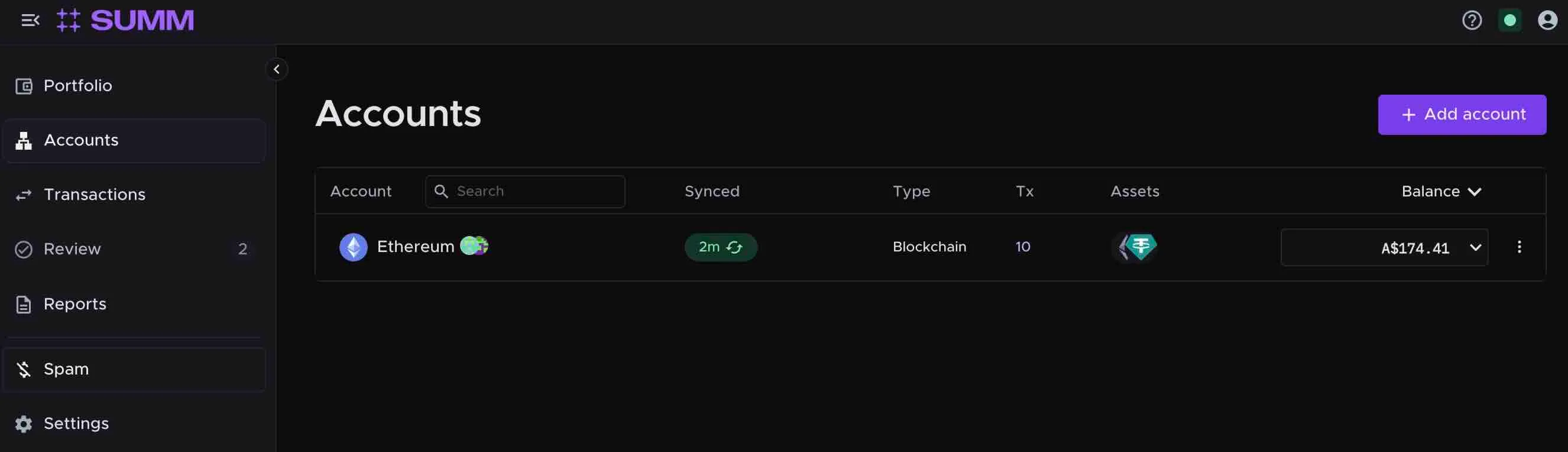
- Navigate to the Accounts tab
- Click + Add accounts
Option A: API Connection (Recommended)
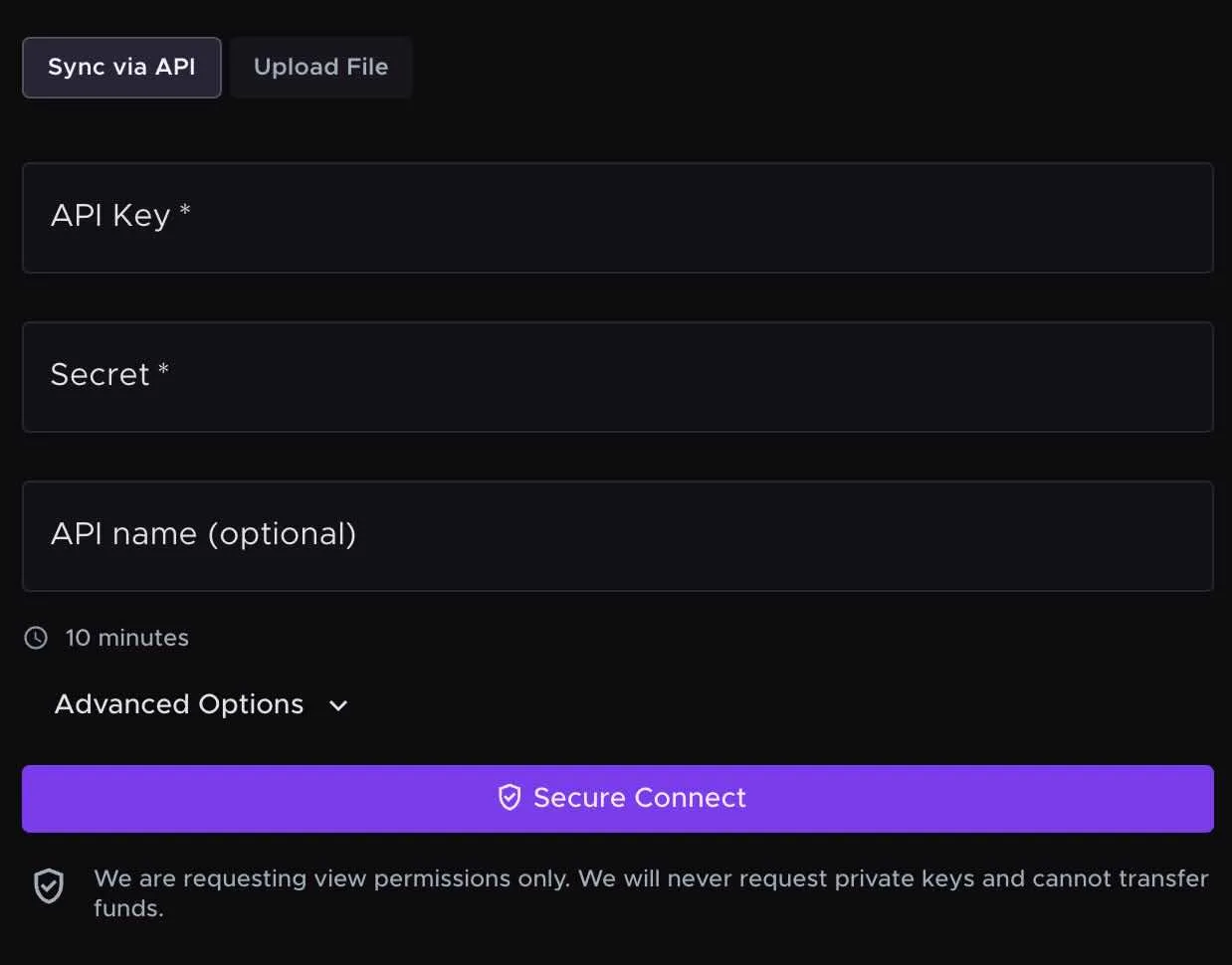
- Select Bitstamp from the list of exchanges
- Click Sync via API
-
Follow the on-screen instructions to generate your API key on Bitstamp
- API keys provide read-only access to your transaction history
- Summ never has access to withdraw or trade your funds
- Input your API details and click Secure Connect
- Summ will automatically import your complete Bitstamp transaction history
Option B: CSV Upload
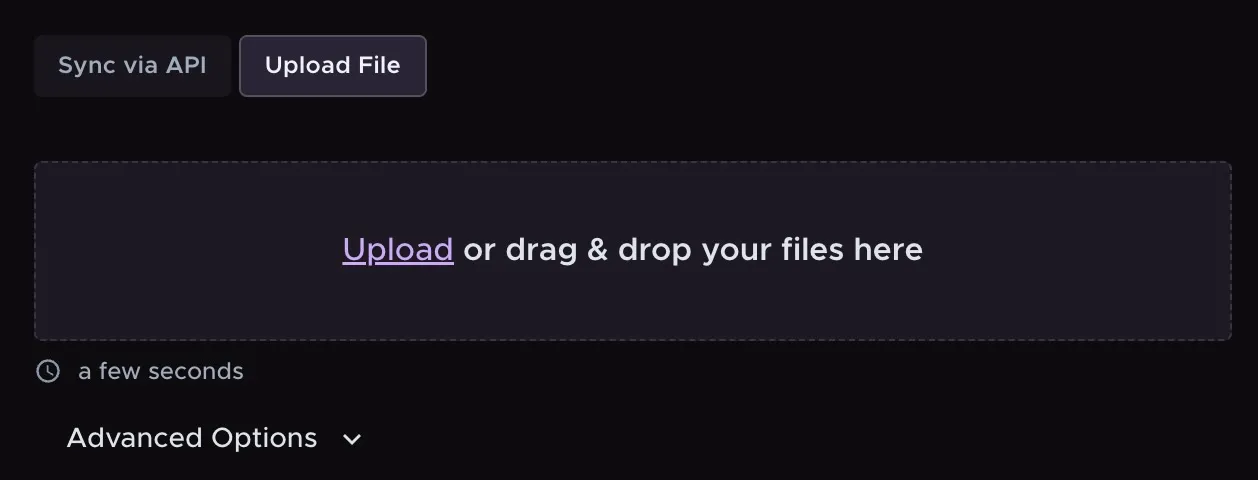
- Select Bitstamp from the list of exchanges
- Click Upload File
- Follow the instructions to download your transaction CSV from Bitstamp (see Step 1 above)
- Upload the file to Summ
- Summ will parse and import all transactions
Step 3: Connect your other crypto accounts
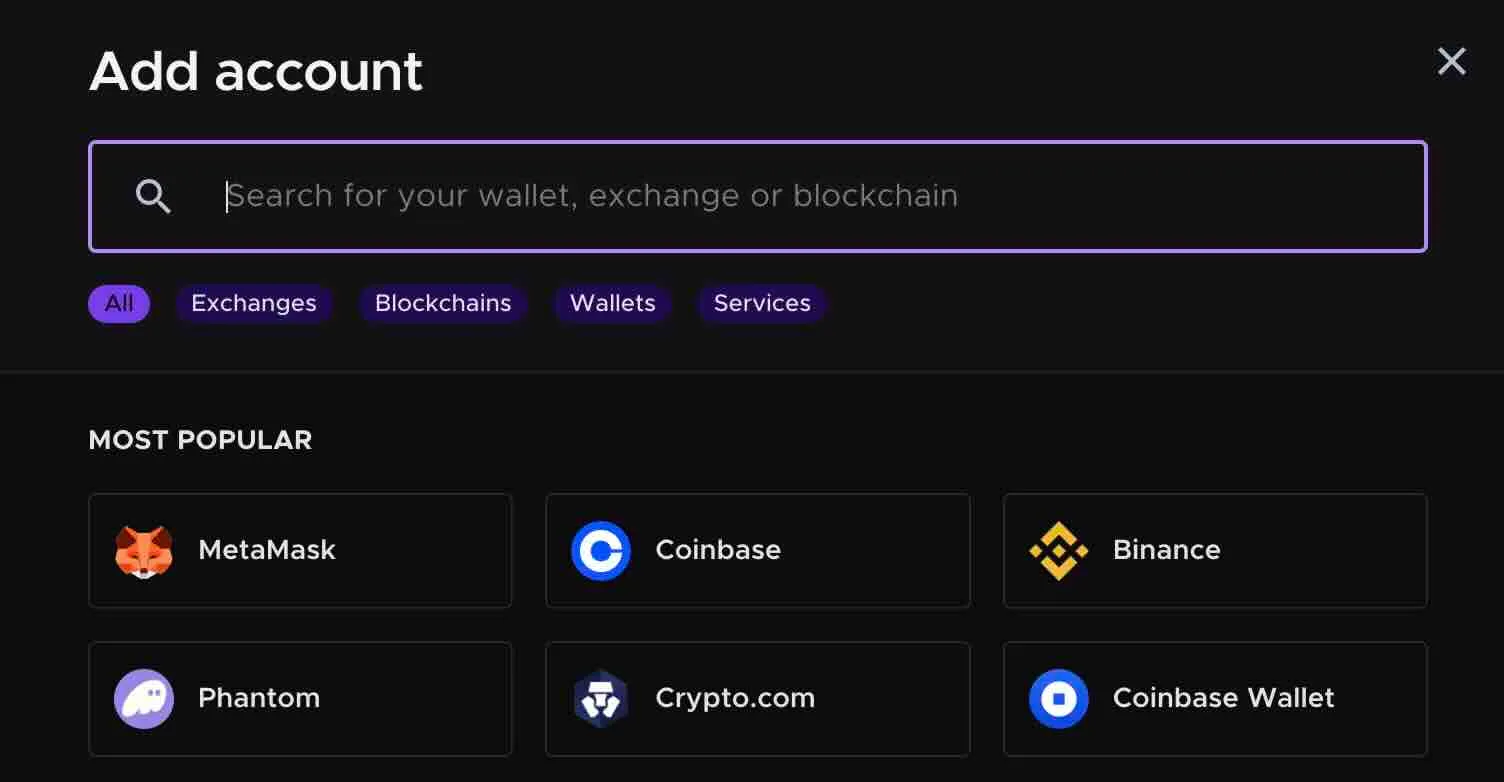
This is the critical step for finding your unknown cost basis on Bitstamp. Connect every exchange, wallet, and DeFi platform you've ever used:
- Centralized exchanges (Coinbase, Kraken, Gemini, Binance, etc.)
- Hardware wallets (Ledger, Trezor)
- Software wallets (MetaMask, Trust Wallet, Phantom, etc.)
- DeFi protocols and liquidity pools
The more complete your import, the more accurate your cost basis tracking will be.
Step 4: Review and reconcile
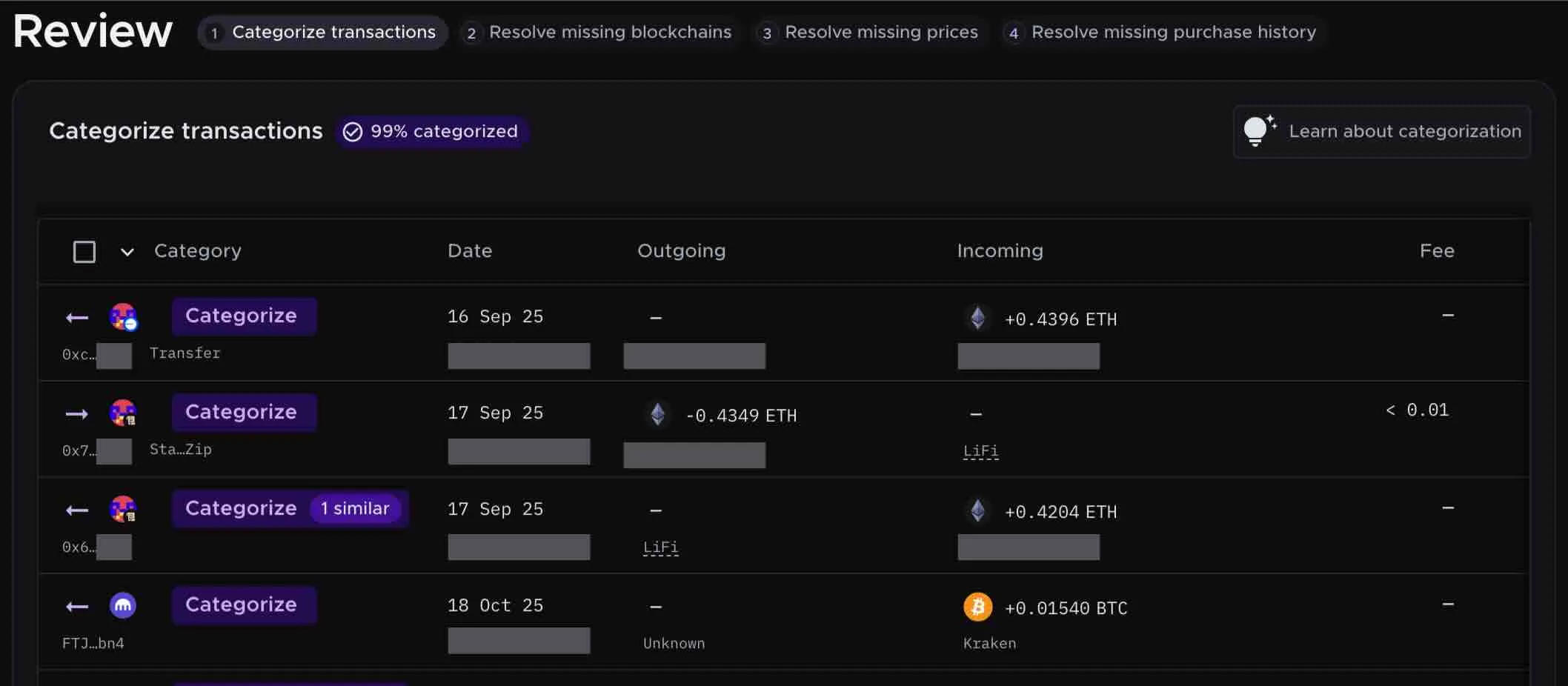
Once all your accounts are connected:
- Navigate to the Review tab
- Summ will automatically categorize your transactions
- Review any flagged items that need clarification
- Summ matches transfers between accounts to ensure cost basis carries forward correctly
Step 5: Generate your tax report
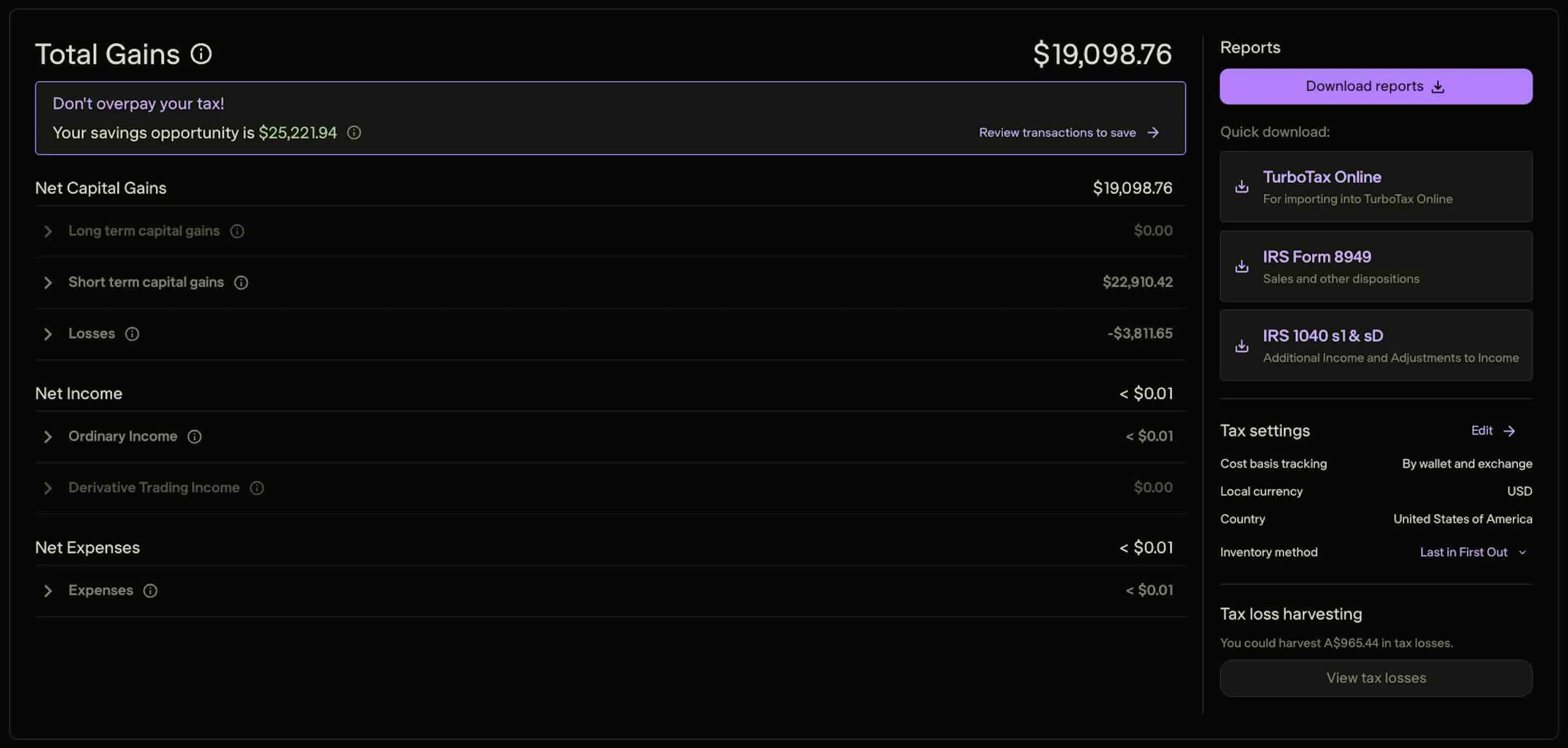
- Select your tax year (e.g., 2025)
- Click Generate Report
- Download your Form 8949 and Schedule D
Your Form 8949 will show:
- All your crypto sales including those on Bitstamp
- Complete cost basis for every transaction—even transferred assets
- Proceeds that match your 1099-DA from Bitstamp. If the proceeds reported on your 8949 do not match what was already reported to the IRS on your 1099-DA, then that will likely trigger an investigation of your tax reporting by the IRS.
- Accurate capital gains/losses with supporting documentation
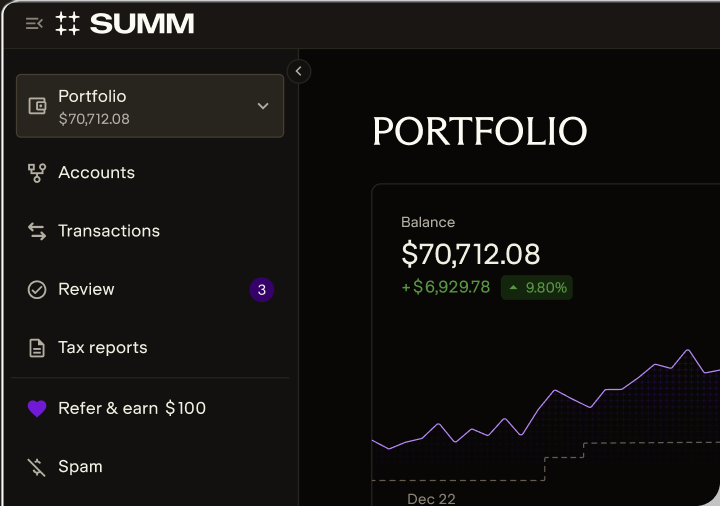
Get your accurate tax report with Summ
Option 3: Manual methods for finding cost basis
If you're unable to connect certain accounts to Crypto Tax Calculator or need to manually verify specific transactions, here are alternative methods for reconstructing your cost basis.
Step 1: Using blockchain explorers
If you transferred crypto into Bitstamp from a personal wallet, you can trace the transaction on the blockchain to find the source.
How to use blockchain explorers:
- Find the transaction hash from your Bitstamp deposit history
- Look up the hash on the appropriate blockchain explorer:
- Bitcoin: blockchain.com
- Ethereum: etherscan.io
- Other chains: Use the native explorer for that blockchain
- Trace the source by following the transaction trail backward to identify where you originally acquired the crypto
- Find the original purchase date and look up the fair market value on that date using market data from a reputable exchange or market aggregator like CoinGecko
Limitations:
- This only works for on-chain transfers (not exchange-to-exchange internal transfers)
- It can be time – consuming if you have many transactions
- It doesn't automatically calculate cost basis – you still need to establish the original value
Step 2: Reconstructing purchase history
Email confirmations and receipts
Check your email for:
- Purchase confirmations from exchanges
- Withdrawal/deposit notifications
- Trading confirmations
- Account statements
Search your inbox for terms like:
- "purchase confirmed"
- "order filled"
- "deposit received"
- The name of your crypto (Bitcoin, Ethereum, etc.)
Bank and credit card statements
Review your financial statements for:
- Charges from crypto exchanges
- ACH transfers to trading platforms
- Credit card purchases of crypto
These establish when you bought crypto and how much fiat you spent—which is your cost basis.
Historical exchange records
Log into every exchange you've ever used and download:
- Complete transaction history
- Order history
- Deposit/withdrawal records
- Tax documents from prior years
Even if you no longer actively use an exchange, your historical data should still be accessible.
Step 3: Establishing fair market value for special cases
For crypto acquired through non-purchase methods, you'll need to establish fair market value at the time of acquisition:
Airdrops and forks
- Use historical price data from the date you received the tokens
- Sources: CoinGecko, CoinMarketCap, exchange historical data
- The FMV at receipt becomes your cost basis
Mining and staking rewards
- Fair market value at the date and time of receipt
- This is also your income amount for tax purposes
- The FMV becomes your cost basis when you later sell
Gifts
- If you received crypto as a gift: The giver's cost basis carries over to you
- You'll need to ask the sender what they originally paid
- Also need the date they acquired it
Inheritance
- Cost basis is "stepped up" to fair market value on the date of the decedent's death
Step 4: Documentation best practices
Whatever method you use to find cost basis, maintain these records:
✅ Transaction receipts showing date, amount, and price
✅
Screenshots of transaction history from exchanges
✅ Blockchain transaction hashes for on-chain transfers
✅ Bank statements showing fiat purchases
of crypto
✅ Historical price data for establishing FMV
✅ Email confirmations from exchanges and wallets
The IRS can audit crypto transactions up to 3 years after filing (or 6 years for significant underreporting). Having complete documentation protects you if questions arise.
Pro tip: Crypto Tax Calculator automatically maintains all this documentation for you. Every calculation includes a complete audit trail showing how cost basis was determined, with supporting transaction data from all your connected accounts.
What to do after you find your cost basis
Once you've determined your accurate cost basis—whether through Bitstamp records, Crypto Tax Calculator, or manual methods—here's how to properly report it:
1. Complete Form 8949
Form 8949 (Sales and Other Dispositions of Capital Assets) is where you report each crypto sale with accurate cost basis:
- Column (a): Description of property (e.g., "1.5 Bitcoin")
- Column (b): Date acquired
- Column (c): Date sold (matches your 1099-DA)
- Column (d): Proceeds (matches your 1099-DA)
- Column (e): Cost basis (your corrected amount)
- Column (f): Gain or loss
Even though your Bitstamp 1099-DA may show blank cost basis, you report the accurate cost basis on Form 8949.
Important: The proceeds on your Form 8949 must match what's on your 1099-DA from Bitstamp. The IRS cross-references these. Only the cost basis (and therefore gain) will differ.
2. Attach Form 8949 to your tax return
Form 8949 gets attached to your Form 1040 along with Schedule D. This documents the difference between what your 1099-DA shows and what you're actually reporting as taxable gain.
3. Maintain documentation
Keep all supporting records for at least 7 years:
- Transaction history from all exchanges and wallets
- Form 8949 and Schedule D
- Complete calculation showing how you arrived at cost basis
- Your 1099-DA forms from all brokers
If the IRS questions the discrepancy between your 1099-DA proceeds and your reported gains, your documentation proves the cost basis.
4. Use Crypto Tax Calculator's tax reports
If you used Crypto Tax Calculator, your reports include:
- Pre-filled Form 8949 with all information ready to file
- Schedule D with correct totals
- Complete audit trail showing cost basis calculations
- TurboTax/TaxAct compatible files for easy import
- Detailed transaction history as supporting documentation
Simply download your reports and file with your return – Summ has already done the reconciliation work for you.
Disclaimer: This guide is for US taxpayers and is provided for general informational purposes only. It is not tax, legal, or financial advice. Cryptocurrency tax laws are complex and subject to change. Consult a qualified tax professional for advice tailored to your specific circumstances.

Nick is a licensed attorney and the Head of Tax at Summ (formerly Crypto Tax Calculator), with over 6 years of experience in the crypto tax space. He has previously held key roles at Deloitte and TurboTax, focusing on digital asset taxation and blockchain compliance. At Summ, Nick helps drive the development of a leading software that enables taxpayers around the world to accurately and efficiently complete their crypto taxes.
More resources
Backpack Exchange
Without accurate cost basis information, your crypto tax calculations will be incorrect, which could cost you thousands in overpayment.

BinanceUS
Without accurate cost basis information, your crypto tax calculations will be incorrect, which could cost you thousands in overpayment.
Bitcoin.com
Without accurate cost basis information, your crypto tax calculations will be incorrect, which could cost you thousands in overpayment.