How to Report Bitcoin on Your Taxes in 5 Steps

If you've engaged in Bitcoin transactions during the tax year, follow these steps to report them:

  1. Gather Relevant Documents and Data
  2. Calculate Your Gains and Losses Using Form 8949
  3. Report Your Gains and Losses on Schedule D
  4. Report Any Other Bitcoin Income on Schedule 1 (Form 1040) Line 8z
  5. Complete and File Your Income Tax Return

How to Report Your Bitcoin Taxes with Summ

Simplify the reporting process by using Summ (formerly Crypto Tax Calculator):

  1. Add Integrations and Import Transactions: Connect your exchanges, wallets, and platforms to import your Bitcoin transaction history.
  2. Review for Accurate Results: Check your data for errors or missing details to ensure accuracy.
  3. Get Your Tax Reports: Generate comprehensive tax reports ready for your accountant or tax authority.

For a detailed overview, refer to the Getting Started Guide.

2025-04-11

Pricing

  • Hobbyist: $49 (100 transactions) 
  • Investor: $99 (1,000 transactions) 
  • Pro: $199+ (3,000+ transactions)

Is there a free version?

Yes, CoinLedger offers a free version with portfolio tracking and unlimited transactions. To gain access to any reports, you’ll need to upgrade to a paid plan.

Pros and cons

Pros

  • Unlimited transaction plan available for high-volume investors. 
  • Known for its NFT support, including an integration for OpenSea. 
  • International tax reporting, with over 40 countries supported.

Cons

  • Doesn’t accept crypto as payment. 
  • Doesn’t offer specialized tax forms such as Schedule D.

Pricing

DIY Plans

  • Silver: $49 (100 transactions) 
  • Gold: $199 (5,000 transactions) 
  • Platinum: $399 (15,000 transactions)

Professional Consultation Plans

  • Premium Support Consultation: $275 (60 mins)
  • Tax Pro Prepared (single year): $2800
  • Tax Pro Prepared (multi-year): $5200

Is there a free version?

Yes, you can import your crypto transactions for free. However, to view, download, or access reports, you need to upgrade to a paid plan.

Pros and Cons

Pros

  • Integrates with tax platform TurboTax.
  • Offers professional tax consultations and services.
  • Offers a 14-day money-back guarantee/refund for all plans.

Cons

  • Doesn’t accept crypto as payment. 
  • High cost. If you have more than 100 transactions, you’ll need to pay $199.
  • Limited customer support. Some customers have reported issues with long wait times and a lack of helpful responses. 

Pricing

  • Newbie: $49 (100 transactions) 
  • Hodler: $99 (1,000 transactions)
  • Trader: $199 (3,000 transactions)
  • Pro: From $299 (10,000+ transactions)

Is there a free version?

Yes. Koinly provides a limited free version that allows you to track your portfolios. For access to any reports, you’ll need to upgrade to a paid plan.

Pros and Cons

Pros

  • Accepts crypto as payment, in addition to credit/debit card payments.
  • Provides an income overview, so you can see how much crypto you’ve earned from all your activities. 
  • Supports more complex crypto transactions like DeFi, NFT, and margin trading.

Cons

  • Limited security features. Compared to other crypto tax software, Koinly only mentions one layer of security – SSL.
  • Higher cost. Compared to other platforms, especially if you’re a high-volume trader. 
  • Usability. Some customers have reported potential syncing and labelling issues within the platform, while others said it wasn’t easy to navigate.

Pricing

  • Basic: $65 (100 transactions)
  • Premium: $199 (5,000 transactions)
  • Pro: $1,999 (20,000 transactions)
  • VIP: $3,499 (up to 30,000 CEX transactions)

Is there a free version?

No free version available. 

Pros and cons

Pros

  • Customer service. Live chat support is offered for every pricing tier.
  • Tax-loss harvesting. Offered for premium customers paying $199.
  • Multiple payment options. Accepts card or crypto payments. 

Cons

  • TokenTax costs a lot more than other crypto tax platforms. If you have over 100 transactions, you’ll have to pay at least $199. 
  • No refunds or money-back guarantee. 
  • No free version available.

Pricing

  • Rookie: $49 (up to 100 transactions)
  • Hobbyist: $99 (up to 1,000 transactions)
  • Investor: $249 (up to 10,000 transactions)
  • Trader: $499 (up to 100,000 transactions)
  • Advanced Trader: $999 (up to 200,000 transactions)

Summ also offers a 30-day, 100% money-back guarantee. If you’re not satisfied, you can receive a full refund by contacting the support team. 

Is there a free version?

Yes, Summ is free to use instantly when you sign up, allowing you to gain a full picture of your crypto portfolio, with support for up to 100,000 transactions. Take advantage of the smart suggestion and auto-categorization engine, portfolio tracking, unlimited integrations, DeFi and NFT support. 

To access the reports, the tax loss harvesting tool and priority support, you will need to upgrade to the appropriate paid plan.

Pros and Cons

Pros

  • Tax platform partnerships. Users can file reports directly with TurboTax and TaxAct.
  • 30-day money-back guarantee. Much higher than most competitors, which typically only offer 14 days.
  • Low price. Its starter ‘Rookie’ plan is one of the cheapest ones out there.
  • Tax loss harvesting tool. By identifying assets to sell at a loss, you can reduce your overall tax bill available on the or Investor and Trader plans.
  • Dedicated customer support. 24/7 support, including email and live chat support with a real person available for all customers.
  • Portfolio tracking mobile app. Connect your Summ account with the iOS mobile app and get a detailed view of your portfolio with accurate PnL & tax calculations.
  • Support for 200,000+ transactions. Perfect for high-volume traders.
  • Unlimited report downloads each year. Under the one plan subscription price you can download unlimited reports each year, perfect for users who make adjustments or are filing for multiple years at once.

Cons

  • Doesn’t currently accept crypto as a form of payment.
  • Mobile app not available on iOS
  • The tax optimization algorithm is only available on Investor and Trader plans

How Investing vs Trading impacts tax

In most cases of buying and selling cryptocurrency as a retail investor, you are participating in investing rather than trading. The two are treated differently for tax purposes.

  • Investing is subject to capital gains tax or income tax, depending on the nature of the transaction.
  • Trading in this case refers to self-employment which is subject to income tax and National Insurance Contributions.

The key difference between investing and trading – along with the different tax treatments, is how losses generated in the crypto-activity can be used.

In their guidance, HMRC have explicitly stated that they would expect it to be exceedingly rare that any crypto-activity constituting buying & selling crypto would be classified as “trading”.

If you are uncertain, speak to a tax advisor as there are always exceptions, including but not limited to, developing tokens and large scale mining.

How is crypto tax calculated in the United States?

You can be liable for both capital gains and income tax depending on the type of cryptocurrency transaction, and your individual circumstances. For example, you might need to pay capital gains on profits from buying and selling cryptocurrency, or pay income tax on interest earned when holding crypto.

All Countries

Thank you! Your submission has been received!
Oops! Something went wrong while submitting the form.
Selecting Country
Guides
Apr 11
,
 
2025
 - 
10
min read

How to report Bitcoin on your taxes

Reporting your Bitcoin transactions on your federal taxes is essential to comply with IRS regulations.

Key takeaways
This tax guide is regularly updated: Last Update  
CryptoTax Calculator thumbnail

Reporting your Bitcoin transactions on your federal taxes is essential to comply with IRS regulations.

Whether you've sold Bitcoin for a profit, received it as payment, or earned it through mining, it's important to accurately report these activities.

This guide provides a step-by-step approach to help you navigate the reporting process for the current tax year.

{{how-to-report-bitcoin-on-your-taxes-callout-1}}

{{how-to-report-bitcoin-on-your-taxes-cta-1}}

Step 1: Gather Your Documents

Accurate reporting starts with thorough record keeping.

Collect data summarizing your Bitcoin transactions throughout the year, including sales, purchases, mining, and payments.

Essential information for each transaction includes:

  • Description of property (i.e., Bitcoin)
  • Date acquired
  • Date sold or disposed of
  • Proceeds
  • Cost or other basis
  • Adjustments to your gain or loss
  • Total gain or loss

Utilizing tax software like Summ (formerly Crypto Tax Calculator) can streamline this process by analyzing your transaction history once you connect your exchange accounts or wallets.

Step 2: Calculate Your Gains and Losses Using Form 8949

Record all Bitcoin transactions on IRS Form 8949, separating short-term (held for one year or less) from long-term (held for more than one year) transactions.

This form helps calculate your total capital gains or losses.

IRSform8949 cryptotaxcalculator

Step 3: Report Your Gains and Losses on Schedule D

Transfer the totals from Form 8949 to Schedule D (Form 1040), which summarizes your overall capital gains and losses.
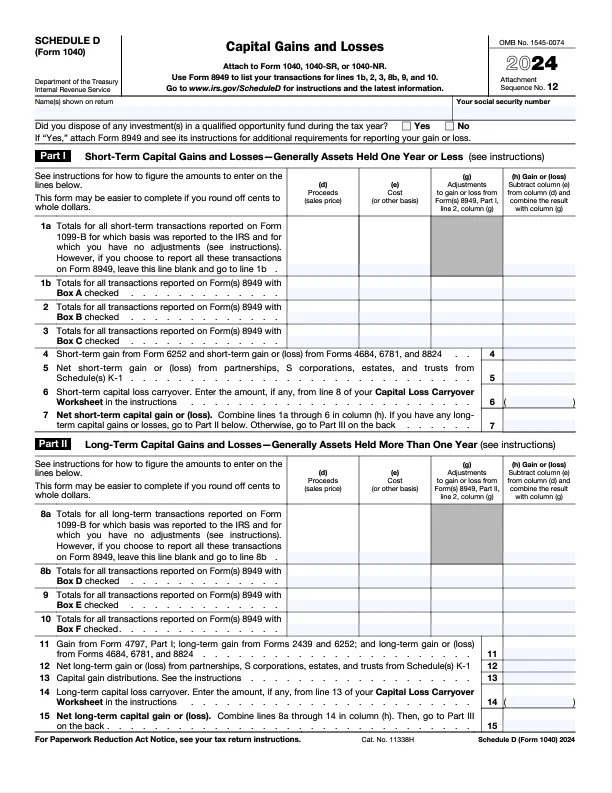
IRSscheduleDform cryptotaxcalculator

Step 4: Report Any Other Bitcoin Income

If you've earned Bitcoin through mining, staking, airdrops, or as payment for services, report this income on Schedule 1 (Form 1040), Line 8z.
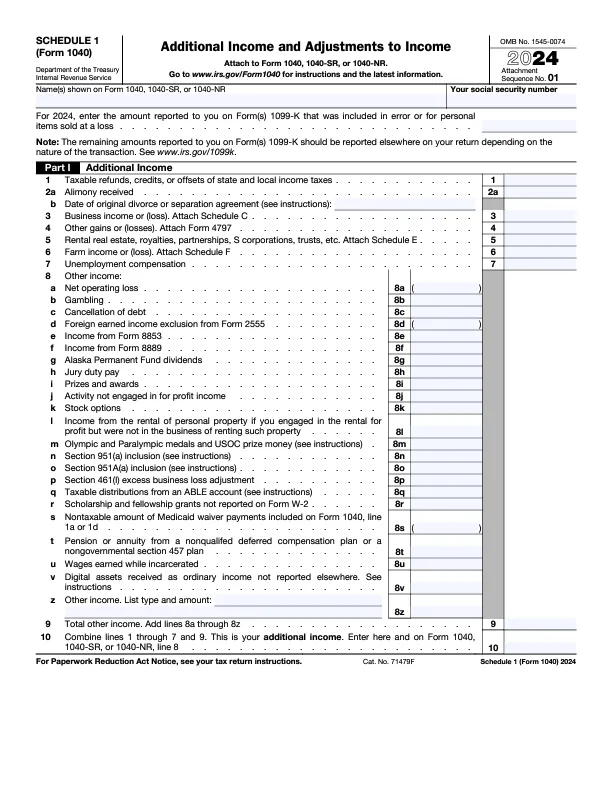
IRSschedule1form cryptotaxcalculator

For self-employed individuals receiving Bitcoin as payment, report this on Schedule C (Form 1040).

Step 5: Complete Your Income Tax Return

After accounting for all Bitcoin-related income and transactions, finalize your tax return by including any additional income sources and deductions. Ensure all information is accurate before submitting to the IRS.

{{how-to-report-bitcoin-on-your-taxes-callout-2}}

{{how-to-report-bitcoin-on-your-taxes-cta-2}}

How to Report Bitcoin Losses on Taxes

The IRS allows you to deduct Bitcoin losses to offset gains. For example, if you bought Bitcoin for $5,000 and sold it for $4,500, you can deduct the $500 loss. Report these losses on Form 8949 and Schedule D to ensure they're accurately accounted for.

In years where your losses exceed your gains, you can claim up to a $3,000 net loss to offset other income. Any excess losses can be carried forward to future years.

How to Report Bitcoin Mining Income on Taxes

Bitcoin earned through mining is considered taxable income. Report the fair market value of the mined Bitcoin at the time of receipt on Schedule 1 (Form 1040). If mining constitutes a trade or business, report this income on Schedule C (Form 1040), allowing for the deduction of related expenses.

How to Reduce Your Bitcoin Tax Liability

Consider the following strategies to minimize your Bitcoin tax liability:

  • Offset Gains with Losses: Sell underperforming assets to realize losses that can offset gains.
  • Hold Bitcoin for More Than One Year: Qualify for lower long-term capital gains tax rates by holding Bitcoin for over a year.
  • Invest Through Retirement Accounts: Utilize self-directed IRAs to benefit from tax-free growth on Bitcoin investments.
  • Donate Bitcoin: Donating appreciated Bitcoin to qualified charities can provide tax deductions and avoid capital gains taxes.

For personalized advice, consult with a tax professional familiar with cryptocurrency taxation.

By diligently following these steps and maintaining accurate records, you can ensure compliance with IRS regulations and effectively manage your Bitcoin tax obligations.

The information provided on this website is general in nature and is not tax, accounting or legal advice. It has been prepared without taking into account your objectives, financial situation or needs. Before acting on this information, you should consider the appropriateness of the information having regard to your own objectives, financial situation and needs and seek professional advice. Summ (formerly Crypto Tax Calculator) disclaims all and any guarantees, undertakings and warranties, expressed or implied, and is not liable for any loss or damage whatsoever (including human or computer error, negligent or otherwise, or incidental or Consequential Loss or damage) arising out of, or in connection with, any use or reliance on the information or advice in this website. The user must accept sole responsibility associated with the use of the material on this site, irrespective of the purpose for which such use or results are applied. The information in this website is no substitute for specialist advice.

FAQ

No items found.
Table of contents

More resources

CryptoTax Calculator thumbnail
Guides
19
 
Dec
 
2025
The best crypto tax software in the USA

Compare crypto tax software on features like supported exchanges, DeFi integrations, price and downloadable IRS forms.

Read More
December 19, 2025
CryptoTax Calculator thumbnail
Guides
10
 
Oct
 
2025
Is swapping crypto taxable? IRS rules for 2025

Swapping one crypto for another is a taxable event, and you will need to work out the USD value of your capital gain or loss to report on your taxes.

Read More
October 10, 2025
CryptoTax Calculator thumbnail
Guides
10
 
Oct
 
2025
Liquidity Pools and LP tokens – How to calculate your taxes

A guide to liquidity pools, LP tokens and how to report them on your taxes.

Read More
October 10, 2025

Try Summ today

Import your transactions and generate a free report preview.