Using specialised tax software like Summ (formerly Crypto Tax Calculator) to calculate your Hyperliquid taxes is much easier than doing it manually.
Summ will automatically categorise your Hyperliquid transactions, meaning that it can identify things like liquidity pools, bridging, fees and staking in addition to all of your buy and sell activity.
It will then produce an accurate report which can be exported in a format that meets the reporting standards of local tax authorities like the IRS, ATO and HMRC. Here’s how to get started:
Add your Hyperliquid wallet and import transactions: Connect all of your exchanges, wallets, and platforms to import your transaction history. Make sure to include all of your transactions and trading history beyond just Hyperliquid to accurately establish the cost-basis of assets and ensure you receive an accurate tax report.
Review for accuracy.: While Summ does the hard work for you, it may flag some missing data or errors which you you will need to review to ensure accuracy.
Get your tax report: Generate a comprehensive tax report ready for your accountant or local tax authority.
If you're new to Summ, start with our Getting Started Guide for an overview of how the platform works.
Hyperliquid
2025-02-07
Integrations
7
Feb
2025
-
10
min read
Hyperliquid Tax Guide 2025: Everything you need to know
How to do your [exchange-name] taxes in [Year]
James Edwards
Key takeaways
These actions will usually be subject to either income taxes or capital gains taxes, depending on the specific transaction and your local tax rules.
Activity on Hyperliquid is completely public, so it is advisable to track your tax obligations using software like Crypto Tax Calculator and report them on your tax return.
This tax guide is regularly updated: Last Update
Key takeaways
Tax agencies can track your %blockchainName% transactions, so it’s essential to file your crypto taxes properly. You owe tax any time you sell, swap or dispose of your %blockchainCode% for a profit.
Transaction data from the %blockchainName% can be downloaded using a block explorer, but analysing this data yourself can be difficult, time consuming and prone to errors.
Alternatively, you can use Summ, which automatically syncs with the %blockchainName% blockchain and other platforms like exchanges to provide you with a comprehensive tax report.
If you’ve been using %blockchainName%, it’s important to understand how to report your crypto taxes. Like most blockchains, %blockchainName% does not automatically report, calculate, or issue tax forms for you. It’s up to users to report their gains, losses, and income based on their activity. This must include all blockchains and exchanges you’ve transacted on, not just %blockchainName%. The good news is that Summ makes calculating your %blockchainName% and crypto taxes quick and easy by automatically importing your data and generating comprehensive tax reports.
Quick steps
1. Create an account on Summ or log in if you already have one.
2. Select %blockchainName% in the Accounts list.
3. Import your %blockchainName% transactions using API or CSV.
4. Let our software calculate your gains, losses, and income.
5. Download your tax report and file it with your taxes.
Disclaimer: The information in this guide is general in nature and not written for a specific tax jurisdiction or audience.
Do I need to pay taxes on %blockchainName%?
If you have been transacting on %blockchainName% during the tax year, or sold any %blockchainCode%, then it’s likely you will need to pay tax based on your trading activity.
Typically, anytime you sell crypto for fiat, trade crypto-to-crypto, or earn crypto income (e.g., through staking or rewards on %blockchainName%), it is considered a taxable event in most countries.
The exact tax you owe (capital gains or income tax) will depend on your local regulations and the specifics of each transaction. Check our list of local crypto tax guides for details on how cryptocurrency is taxed in your jurisdiction.
Do I have to pay tax if I only bought %blockchainCode% but didn’t sell?
In most parts of the world, you do not pay any tax when you purchase crypto.
It is only when you later dispose of that crypto – i.e., sell it or trade it for another asset – that a taxable event occurs and you need to report it on your tax.
What %blockchainName% transactions are taxable?
The following are common transactions on blockchains like %blockchainName% which are relevant to tax:
Event
Tax implication
Selling %blockchainCode%
Capital gains tax
Crypto-to-crypto swaps
Capital gains tax
Rewards from staking, interest or yield
Income tax
Selling NFTs
Capital gains tax
Providing liquidity to DeFi pools
May involve multiple taxable steps
Most countries typically tax proceeds earned from selling investments differently from money earned as income. In crypto, you may be subject to both capital gains and income tax, depending on the nature of your transaction:
Capital Gains tax events from %blockchainName%
Whenever you sell %blockchainCode% or make a crypto-to-crypto swap using the %blockchainName% blockchain, you are disposing of an asset.
If the value of the crypto at the time of sale/trade is higher than when you acquired it, you have a taxable capital gain.
If it’s lower, you have a capital loss (which can often be used to offset other gains).
Summ will automatically calculate these gains and losses for each trade using your imported transaction data. It will also account for fees according to your local tax rules.
Income tax from %blockchainName%
If you received crypto as a reward on %blockchainName%for activities such as staking, lending, or yield farming – those tokens are usually considered income.
The value of the crypto at the time and date you received needs to be reported as income. It also forms the cost basis if you later sell the asset.
Summ will automatically categorise income tax events and treat them according to your local tax rules.
Remember that the exact rules for how transactions on %blockchainName% are taxed will depend on your tax jurisdiction. To learn more, check out our list of local tax guides
Supports complex activity
Trading on the wild side of crypto? Your activity is supported, no matter how far you’ve fallen down the rabbit hole.
Be confident in the numbers
Easily see what’s going on across all your wallets and exchanges so you can make the best decisions at all times.
Make compliance a breeze
Fully automated from start to finish. Seamlessly import all your transactions, follow the automated workflow and get your audit-proof tax reports with ease.
First, you will need to import your %blockchainName% transaction data to Summ. Here’s how:
Sync via API
This method uses a secure API feed to transfer your transaction data from the %blockchainName% to Summ. Using an API ensures that your data will be updated over time, so that any change in your %blockchainName% balance is reflected in Summ.
Sign in to Summ or create an account. Navigate to the Accounts tab and click + Add accounts.
Select %blockchainName% from the list of integrations. Click on Sync via API.
Enter your Ethereum wallet address. Add an optional nickname, and click 'Add Wallet'.
Summ automatically imports your %blockchainName% transaction history from the blockchain. This may take a few seconds to a few minutes depending on the number of transactions. You’ll see a confirmation when all data is imported.
Generate your tax report
Once your %blockchainName% data is imported to Summ, you can calculate your taxes with a few clicks.
Import accounts. Add any other exchange accounts, wallets or transaction data to Summ. You will need to upload your entire crypto transaction history for an accurate report. This includes all wallets, blockchains and exchange accounts.
Review transactions While Summ does the hard work for you, it may flag some missing data or errors, which you will need to review to ensure accuracy.
Get your tax report Generate a comprehensive tax report ready for your accountant or local tax authority.
If you're new to Summ, try our Getting Started Guide for an overview of how the platform works. If you need assistance at any stage, click the chat icon in the bottom right corner to begin a live chat with our expert customer service team.
Here’s what to do with your exciting and new crypto tax report:
Review your tax report. After importing, you can generate a tax report for %blockchainName% and any other accounts you linked. This report will detail your net capital gains, losses, and income from crypto for your chosen financial year. Review it to make sure everything looks correct. If something looks off, return to the Review tab to ensure all transactions are categorized correctly; check the Accounts tab to ensure all your accounts and their transactions have been added.
Download and complete the necessary tax forms. Summ can produce specific forms or summaries needed for filing. For example, if you live in the US, it can produce a report ready to upload to TurboTax. There are also specific forms like Form 8949 and Schedule D that contain the relevant information for crypto. Summ’s reports are designed to be tax-office compliant, making this straightforward.
File before the deadline. Make sure you file your taxes before the deadline in your country. Properly reporting your %blockchainName% crypto activity will keep you compliant and help you avoid any penalties.
Summ analyses all of your %blockchainName% transactions to calculate capital gains, income and expenses. You can add as many accounts as you like from other supported blockchain, exchanges, wallets and defi protocols, which streamlines the tax process, saving you from a headache.
There’s no need to worry about meeting the reporting standards of your local tax authority either. Summ generates tax reports that comply with the requirements of numerous tax authorities, including the IRS, HMRC, ATO, CRA, and many more.
With a single account, you have all your transaction data in one place, and the heavy lifting will be done for you for years to come.
But don’t just take our word for it. Summ has a 4.8-star rating on Trustpilot, with countless positive reviews. It is trusted by accountants worldwide and is the official tax partner of Coinbase and MetaMask, two of the largest crypto platforms in the world.
Are my %blockchainName% transactions tracked by the government?
It is very likely that the government can view and monitor your %blockchainName% transactions if they want to.
Even if they do not currently share information, increasing regulatory requirements may obligate them to do so at a later date. If your local tax authority discovers you have misreported your crypto tax in previous years, you could face tough penalties, including fines and legal punishment.
Even if you have used non-KYC exchanges and DeFi protocols for trading, blockchains are public databases that make it easy for authorities to track and connect your transactions with your real-world identity.
In life, only 4 things are certain – Life, death, taxes and the volatility of bitcoin.
Does [exchange-name] provide tax documents, statements or summaries?
[exchange-name] does not currently provide a comprehensive tax report that covers all your gains and losses. Instead, they will let you download a CSV or send you a summary of transactions, but this isn’t a ready-to-file tax form.
Summ fills that gap by using your data to create a complete tax report.
Do I have to pay taxes on crypto if I never cashed out to my bank from [exchange-name]?
Even if you didn’t withdraw fiat to your bank account, many countries will tax you when you sell your crypto. This includes crypto-to-crypto trades or anything that classifies as a disposal of a capital asset.
For example, trading two stablecoins – such as USDC for USDT – on [exchange-name] is taxable because you sold one crypto for another.
The same goes for using crypto to buy something or spending it using a crypto debit card.
Transferring between your own wallets/exchanges (without changing ownership or value) might not be taxable, but if gas fees are involved, it may trigger a taxable event. Always consider what counts as a taxable event in your jurisdiction.
What if I only bought crypto on [exchange-name] but didn’t sell?
Generally, buying crypto with fiat is not a taxable event.
If you haven’t sold or traded the crypto you bought, you likely don’t have gains or losses to report for those holdings yet. However, you should still keep records.
And if you earned any crypto (through staking or rewards on [exchange-name]), those could be taxable as income even if you haven’t sold them.
Additionally, if you used [exchange-name] to purchase crypto but then moved it into another wallet or exchange, you may need to pay tax on the gas fees used if they were paid in crypto.
Summ tracks your cost basis for all linked accounts so that when you eventually sell, your prior purchases on [exchange-name] are accounted for.
Can I avoid paying taxes on my [exchange-name] trades?
If you have taxable transactions, you’re legally required to report them in most jurisdictions.
There’s no loophole to completely avoid taxes on your crypto profits besides using allowed methods to reduce your overall tax obligation, like offsetting gains with losses.
Summ will help ensure you’re claiming all your eligible losses and deductions, and it even suggests tax-minimisation methods you may not be aware of, like tax loss harvesting.
If you want to learn more about the legal ways to reduce your crypto tax, then read our dedicated guide, which was written by a specialised crypto tax lawyer.
No matter what a friend or anonymous person on the internet might say, you must not evade taxes. It will catch up with you.
Key takeaways
Tax agencies can track your %exchangeName% transactions, so you need to file your crypto taxes properly. You owe tax any time you sell, swap or dispose of your crypto for a profit.
%exchangeName% does not issue tax reports, so you will need to gather the data and calculate taxes yourself.
Alternatively, you can use Summ, which automatically syncs with your %exchangeName% and other crypto platforms to provide you with a comprehensive tax report.
If you’ve been using %exchangeName%, it’s important to understand how to report your crypto taxes. Like most exchanges, %exchangeName% does not automatically report, calculate, or issue tax forms for you. It’s up to users to report their gains, losses, and income from the platform.
The good news is that Summ makes calculating your %exchangeName% taxes quick and easy by automatically importing your data and generating comprehensive tax reports.
Quick steps
1. Create an account on Summ or log in if you already have one.
2. Select %exchangeName% in the Accounts list.
3. Import your %exchangeName% transactions using API or CSV.
4. Let our software calculate your gains, losses, and income.
5. Download your tax report and file it with your taxes.
Disclaimer: The information in this guide is general in nature and not written for a specific tax jurisdiction or audience.
Do I need to pay taxes on %exchangeName%?
Yes, you will likely need to pay tax if you used %exchangeName% during the tax year.
You will owe capital gains tax or income tax, depending on the nature of your transactions, and whether or not you receive any token rewards from %exchangeName%.
The exact tax you owe will depend on your local regulations and the specifics of each transaction. See our list of local crypto tax guides for details on how cryptocurrency is taxed in your jurisdiction.
How are %exchangeName% transactions taxed?
The taxation of DeFi platforms like %exchangeName% can vary depending on your tax jurisdiction.
Most countries typically tax proceeds earned from selling investments differently from money earned as income. You may be subject to both capital gains (CGT) and income tax, depending on the nature of your transaction.
Here’s how transactions on DeFi platforms like %exchangeName% might be treated:
%exchangeName% capital gains tax (CGT) events
Event
Description
Crypto-to-crypto trades/swaps
Swapping one cryptocurrency for another. CGT is charged on the proceeds from the sale.
Providing liquidity
Depositing crypto into a liquidity pool. May be treated as a disposal.
Wrapping tokens
Exchanging one crypto for a wrapped version. May be treated as a swap.
Bridging tokens
Moving assets from one chain to another. May be treated as a swap.
Paying gas fees
Disposing of crypto to pay network fees. Treated as a sale.
%exchangeName% income tax events
Event
Description
Staking, Yield Farming, or Liquidity Provider rewards
Receiving income for deposited assets. Income tax owed on the fair market value of rewards when received. CGT is owed if you sell the rewards.
Interest payments from lending
Receiving interest payments for lending assets. Income tax owed on the fair market value of rewards when received. CGT is owed if you sell the rewards.
%exchangeName% that are not taxed
Event
Description
Borrowing
Borrowing crypto is not typically a taxable event.
Staking
Staking crypto is not typically a taxable event. However, any rewards you receive may be subject to income tax when received, and CGT when sold.
Remember that the exact rules for transactions on %exchangeName% will depend on your tax jurisdiction. To learn more, check out our list of country-specific tax guides.
Does %exchangeName% report to the IRS?
%exchangeName% is not required to report user activity to the IRS, however, that does not mean your transactions can’t be traced.
Blockchains are public ledgers, which makes it easy to track a wallet's activity. The IRS uses sophisticated data collection and analysis to match your real-world identity with your on-chain activity.
Supports complex activity
Trading on the wild side of crypto? Your activity is supported, no matter how far you’ve fallen down the rabbit hole.
Be confident in the numbers
Easily see what’s going on across all your wallets and exchanges so you can make the best decisions at all times.
Make compliance a breeze
Fully automated from start to finish. Seamlessly import all your transactions, follow the automated workflow and get your audit-proof tax reports with ease.
First, you will need to import your %blockchainName% transaction data to Summ. Here’s how:
Sync via API
This method uses a secure API feed to transfer your transaction data from the %blockchainName% to Summ. Using an API ensures that your data will be updated over time.
Sign in to Summ or create an account. Navigate to the Accounts tab and click + Add accounts.
Select %blockchainName% from the list of integrations. Click on Sync via API.
Enter your Ethereum wallet address. Add an optional nickname, and click 'Add Wallet'.
Summ automatically imports your %blockchainName% transaction history from the blockchain. This may take a few seconds to a few minutes depending on the number of transactions. You’ll see a confirmation when all data is imported.
2. Generate your tax report
Once your %blockchainName% data is imported to Summ, you can calculate your taxes with a few clicks.
Import accounts. Add any other exchange accounts, wallets or transaction data to Summ. You will need to upload your entire crypto transaction history for an accurate report. This includes all wallets, blockchains and exchange accounts.
Review transactions While Summ does the hard work for you, it may flag some missing data or errors, which you will need to review to ensure accuracy.
Get your tax report Generate a comprehensive tax report ready for your accountant or local tax authority.
If you're new to Summ, try our Getting Started Guide for an overview of how the platform works. If you need assistance at any stage, click the chat icon in the bottom right corner to begin a live chat with our expert customer service team.
Here’s how to file your crypto tax report with your local tax authority:
1. Review your tax report
After importing, you can generate a tax report for %blockchainName% and any other accounts you linked. This report will detail your net capital gains, losses, and income from crypto for your chosen financial year.
Review it to make sure everything looks correct. If something looks off, return to the Review tab to ensure all transactions are categorized correctly; check the Accounts tab to ensure all your accounts and their transactions have been added.
2. Download and complete the necessary tax forms
Summ can produce specific forms or summaries needed for filing. Simply check the options in the Downloads section of the tax report and choose the one you need.
For example, if you live in the US, it can produce a report ready to upload to TurboTax, as well as forms like Form 8949 and Schedule D that are pre-filled and contain the relevant information for crypto.
Summ’s reports are designed to be tax office compliant and make this straightforward.
3. File before the deadline
Make sure you file your taxes before the deadline in your country. Properly reporting your %blockchainName% crypto activity will keep you compliant and help you avoid any penalties.
Summ analyses all of your %exchangeName% transactions to calculate capital gains,
income and expenses. You can add as many accounts as you like from other supported exchanges, wallets
and defi protocols, streamlining the tax process and saving you a headache.
There’s no need to worry about meeting the reporting standards of your local tax authority either.
Summ generates tax reports that comply with the requirements of numerous tax
authorities, including the IRS, HMRC, ATO, CRA, and many more.
With a single account, you have all your transaction data in one place, and the heavy lifting will be
done for you for years to come.
But don’t just take our word for it. Summ has a 4.8-star rating on Trustpilot,
with countless positive reviews. It is trusted by accountants worldwide and is the official tax partner
of Coinbase and MetaMask, two of the largest crypto platforms in the world.
Does %exchangeName% report my transactions to the tax authorities?
DeFi protocols like %exchangeName% are unlikely to share individual user data with authorities, unless
required by law.
However, even if you have used non-KYC exchanges and DeFi protocols for trading, blockchains are public
databases that make it easy for authorities to track and connect your transactions with your real-world
identity.
Regardless, any time you dispose of crypto, make a capital gain or receive income, you are required to
report it on your taxes.
Does %exchangeName% send me a tax form or report?
No. DeFi apps and DEXs like %exchangeName% do not issue tax forms.
Instead, you can use Summ to analyse your transactions and generate a crypto tax
report.
Are %exchangeName% rewards taxed even if I don’t sell them?
Yes. If you receive tokens as a reward, those tokens are typically treated as income. They are taxed
based on the fair market value at the time you received them.
If you later sell those tokens, any change in price since you received them becomes a capital gain or
loss.
So you might end up paying income tax when you first receive them, and then capital gains when you
eventually sell them.
Key takeaways
Tax agencies can track your %exchangeName% transactions, so it’s essential to file your crypto taxes properly. You owe tax any time you sell, swap or dispose of your crypto for a profit.
%exchangeName% does not issue tax reports, so you will need to gather the data and calculate taxes yourself.
Alternatively, you can use Summ, which syncs with your %exchangeName% account and other crypto platforms to provide you with a comprehensive tax report.
If you’ve been using %exchangeName%, it’s important to understand how to report your crypto taxes. Like most exchanges, %exchangeName% does not automatically report, calculate, or issue tax forms for you. It’s up to users to report their gains, losses, and income from the platform.
The good news is that Summ makes calculating your %exchangeName% taxes quick and easy by automatically importing your data and generating comprehensive tax reports.
Quick steps
1. Create an account on Summ or log in if you already have one.
2. Select %exchangeName% in the Accounts list.
3. Import your %exchangeName% transactions using CSV.
4. Let our software calculate your gains, losses, and income.
5. Download your tax report and file it with your taxes.
Disclaimer: The information in this guide is general in nature and not written for a specific tax jurisdiction or audience.
Do I need to pay taxes on %exchangeName%?
If you have been transacting on %exchangeName% during the tax year, then it’s likely you will need to pay tax based on your trading activity.
Typically, anytime you sell crypto for fiat, trade crypto-to-crypto, or earn crypto income (e.g., through staking or rewards on %exchangeName%), it is considered a taxable event in most countries.
The exact tax you owe (capital gains or income tax) will depend on your local regulations and the specifics of each transaction. Check our country-specific crypto tax guides for details on how cryptocurrency is taxed in your jurisdiction.
Do I have to pay tax if I only bought crypto on %exchangeName% but didn’t sell?
In most parts of the world, you do not pay any tax when you purchase crypto.
It is only when you later dispose of that crypto – i.e., sell it or trade it for another asset – that a taxable event occurs.
What %exchangeName% transactions are taxable?
The following are common transactions on cryptocurrency exchanges like %exchangeName% which are relevant to tax:
Event
Tax implication
Selling crypto
Capital gains tax
Crypto-to-crypto swaps
Capital gains tax
Rewards from staking, interest or yield
Income tax
Most countries typically tax proceeds earned from selling investments differently from money earned as income. In crypto, you may be subject to both capital gains and income tax, depending on the nature of your transaction:
Capital Gains tax events on %exchangeName%
Whenever you sell or make a crypto-to-crypto swap on %exchangeName%, you are disposing of an asset.
If the value of the crypto at the time of sale/trade is higher than when you acquired it, you have a taxable capital gain.
If it’s lower, you have a capital loss (which can often be used to offset other gains).
Summ will automatically calculate these gains and losses for each trade using your imported transaction data. It will also account for fees according to your local tax rules.
Income tax on %exchangeName%
If you received crypto as a reward on %exchangeName% for activities such as staking, lending, or referral bonuses – those tokens are usually considered income.
The value of the crypto at the time and date you received needs to be reported as income. It also forms the cost basis if you later sell the asset.
Summ will automatically categorise income tax events and treat them according to your local tax rules.
Remember that the exact rules for transactions on %exchangeName% will depend on your tax jurisdiction. To learn more, check out our list of country-specific tax guides.
Does %exchangeName% report to the IRS?
If you registered with %exchangeName% as a resident of the United States, then starting in the 2025 tax year, the exchange is required to report your customer data and transactions to the IRS.
Other tax authorities around the globe, like the ATO, HMRC, CRA are also engaged in data-sharing programmes with exchanges like %exchangeName%. They may also use blockchain analytics tools, data-sharing between banks and KYC and AML data to match your identity with your trading activity on %exchangeName%.
Where do I find %exchangeName% tax forms?
Exchanges like %exchangeName% do not provide tax forms with a neat breakdown of your tax obligations. This is because tax rules vary between countries and jurisdictions, which requires specialised software to handle additional complexities of crypto tax. Additionally, any assets you transfer onto the platform will be missing an accurate cost basis.
Fortunately, you can upload your transaction data using CSV. Summ will then combine this data with any other accounts or wallets you connect to provide you with an accurate tax report ready to submit to your tax agent, accountant or local tax authority.
You can connect as many supported exchange accounts, wallets or blockchains as you like, with reports available for all previous years on a single plan.
Supports complex activity
Trading on the wild side of crypto? Your activity is supported, no matter how far you’ve fallen down the rabbit hole.
Be confident in the numbers
Easily see what’s going on across all your wallets and exchanges so you can make the best decisions at all times.
Make compliance a breeze
Fully automated from start to finish. Seamlessly import all your transactions, follow the automated workflow and get your audit-proof tax reports with ease.
First, you will need to import your %exchangeName% transaction data to Summ. Here are the two main methods:
CSV File Upload
Not all exchanges provide easy API access; some users might prefer CSV. Sign in to Summ or create an account. Navigate to the Accounts tab and click + Add accounts.
Select %exchangeName% from the list of exchanges. Click on Upload File.
Follow the instructions on the right-hand side to find and download your transaction data on %exchangeName%.
Click Import %exchangeName% CSV to upload your transaction data. Choose your file using the browser or drag and drop it into the window.
Click Import %exchangeName% CSV to complete the upload.
Verify the data. The software will parse the CSV and import all transactions. Double-check that the transaction details match your expectations from %exchangeName%. Summ will alert you if any data seems missing or if there are errors in the file.
Note: Some exchanges split different types of transactions into multiple files or have separate histories for sub-accounts. Make sure to import all relevant files to cover your complete trading history.
2. Generate your tax report
Once your %exchangeName% data is imported to Summ via CSV, you can calculate your taxes with a few clicks.
Import accounts. Add any other exchange accounts, wallets or transaction data to Summ. You will need to upload your entire crypto transaction history for an accurate report.
Review transactions While Summ does the hard work for you, it may flag some missing data or errors, which you will need to review to ensure accuracy.
Get your tax report Generate a comprehensive tax report ready for your accountant or local tax authority.
If you're new to Summ, try our Getting Started Guide for an overview of how the platform works. If you need assistance at any stage, click the chat icon in the bottom right corner to begin a live chat with our expert customer service team.
Here’s what to do with your exciting and new crypto tax report:
Review your tax report. After importing, you can generate a tax report for %exchangeName% and any other accounts you linked. This report will detail your net capital gains, losses, and income from crypto for your chosen financial year. Review it to make sure everything looks correct. If something looks off, return to the Review tab to ensure all transactions are categorized correctly; check the Accounts tab to ensure all your accounts and their transactions have been added.
Download and complete the necessary tax forms. Summ can produce specific forms or summaries needed for filing. For example, if you live in the US, it can produce a report ready to upload to TurboTax. There are also specific forms like Form 8949 and Schedule D that contain the relevant information for crypto. Summ’s reports are designed to be tax-office compliant, making this straightforward.
File before the deadline. Make sure you file your taxes before the deadline in your country. Properly reporting your %exchangeName% crypto activity will keep you compliant and help you avoid any penalties.
Ready to make tax filing simple?
If you haven’t already, sign up for Summ to get your %exchangeName% tax report in minutes.
With a single account, you have all your transaction data in one place, and the heavy lifting will be done for you for years to come.
Make sure to review your report and then confidently file your taxes knowing you’ve covered your crypto activity. Keeping accurate records and reporting your crypto gains/income is crucial for staying compliant with tax laws.
If you have any issues or questions, our support team is here to help (reach out via chat or email). Crypto taxes are much easier when you have the right tools – and we’re happy to provide that for you.
Ready to get started? Generate your %year% crypto tax report for %exchangeName% now and put your mind at ease for tax season!
Disclaimer: This guide is for general information only and is not tax advice. Cryptocurrency tax laws vary by region. Please consult a tax professional for advice tailored to your circumstances.”
Key takeaways
Tax agencies can track your %blockchainName% transactions, so it’s essential to file your crypto taxes properly. You owe tax any time you sell, swap or dispose of your crypto for a profit.
Wallets like %blockchainName% do not issue tax reports, so you will need to gather the data and calculate taxes yourself manually.
Alternatively, you can use crypto tax software like Summ, which syncs with %blockchainName% and your other crypto accounts to calculate your crypto tax.
%blockchainName% is a popular crypto wallet that lets you store and manage your cryptocurrency. If you made trades, earned rewards, or interacted with DeFi using %blockchainName%, you may need to report those transactions on your taxes.
%blockchainName% does not automatically report, calculate, or issue tax forms for you.
The good news is that Summ makes calculating your %blockchainName% and crypto taxes quick and easy by automatically importing your data to generate a comprehensive tax report.
Quick steps
1. Sign up or log in to Summ.
2. Select %blockchainName% in the Accounts list.
3. Follow the instructions on screen to sync your %blockchainName% transactions from the blockchain.
4. Let our software calculate your gains, losses, and income.
5. Download your tax report and file it with your taxes.
Disclaimer: The information in this guide is general in nature and not written for a specific tax jurisdiction or audience.
If you have been using %blockchainName% to trade crypto or use DeFi, then you will likely need to pay tax on those transactions.
The exact tax you owe will depend on whether your transactions are classified as capital gains or income. Check our list of local crypto tax guides for details on how cryptocurrency is taxed in your jurisdiction.
Do I have to pay tax if I only sent crypto to %blockchainName% but didn’t sell?
If you sent crypto to your %blockchainName% wallet and paid transaction fees in crypto (such as Ethereum Gas), then that transaction is a taxable event.
This is because you are taxed any time you dispose of your crypto.
When you pay a network fee in crypto, it is treated as though you sold (i.e., dispose) of your crypto. So even if you only paid a small fee, you will still need to pay a small amount of tax on that transaction.
Summ makes it easy to calculate the total tax owed from your %blockchainName% transactions over the tax year.
What %blockchainName% transactions are taxable?
These are how some common transactions using %blockchainName% are taxed:
Event
Tax implication
Selling %blockchainCode%
Capital gains tax
Crypto-to-crypto swaps
Capital gains tax
Rewards from staking, interest or yield
Income tax
Selling NFTs
Capital gains tax
Providing liquidity to DeFi pools
May involve multiple taxable steps
Most countries typically tax proceeds earned from selling investments differently from money earned as income. In crypto, you may be subject to both capital gains and income tax, depending on the nature of your transaction.
Summ categorizes these events for you, based on your tax jurisdiction. This helps ensure that you pay the correct tax rate based on your %blockchainName% transactions, and receive any sort of discounts or allowances based on your local tax rules.
Capital Gains tax events from %blockchainName%
Whenever you dispose of crypto using %blockchainName% you are charged capital gains tax.
Disposals include things like selling crypto, swapping crypto-to-crypto, depositing crypto into DeFi, or paying network fees using crypto.
If the value of the crypto at the time of disposal is higher than when you acquired it, you have a taxable capital gain.
If it’s lower, you have a capital loss (which can often be used to offset other gains).
Summ will automatically calculate these gains and losses for each trade using your imported transaction data. It will account for fees according to your local tax rules.
Income tax events from %blockchainName%
If you received crypto as a reward for activities such as staking, lending, or yield farming – those tokens are usually considered income.
The value of the crypto at the time and date you received needs to be reported as income. It also forms the cost basis if you later sell the asset.
Summ will automatically categorise income tax events and treat them according to your local tax rules.
Supports complex activity
Trading on the wild side of crypto? Your activity is supported, no matter how far you’ve fallen down the rabbit hole.
Be confident in the numbers
Easily see what’s going on across all your wallets and exchanges so you can make the best decisions at all times.
Make compliance a breeze
Fully automated from start to finish. Seamlessly import all your transactions, follow the automated workflow and get your audit-proof tax reports with ease.
How to calculate your %blockchainName% taxes with Summ
1. Import your data
First, you will need to import your %blockchainName% transaction data to Summ. Here’s how:
Sync via API
In Summ, click “Add Account” and select %blockchainName% or the relevant blockchain (e.g., Ethereum, Solana).
Copy your wallet’s public address.
Paste your address.
Summ will scan the blockchain and import all your taxable events: trades, transfers, airdrops, NFT sales, staking rewards, yield farming etc.
Do this for each address in your wallet.
Upload CSV
If you have a CSV export from a blockchain explorer or the %blockchainName% software, you can upload it manually. However, using the API sync method is usually simpler.
In Summ, click “Add Account” and select %blockchainName% or the relevant blockchain (e.g., Ethereum, Solana).
Click Import %blockchainName% CSV to upload your transaction data. Choose your file using the browser or drag and drop it into the window.
Click Import %blockchainName% CSV to complete the upload.
Verify the transaction details match your expectations from your %blockchainName% activity. Summ will alert you if any data seems missing or if there are errors in the file.
Note: If you downloaded your CSV from a block explorer, then you will need to upload a CSV for each public address you have in the wallet.
2. Generate your tax report
Once your %blockchainName% data is imported to Summ, you can calculate your taxes with a few clicks.
Import accounts. Add any other exchange accounts, wallets or transaction data to Summ. You will need to upload your entire crypto transaction history for an accurate report. This includes all wallets, blockchains and exchange accounts.
Review transactions While Summ does the hard work for you, it may flag some missing data or errors, which you will need to review to ensure accuracy.
Get your tax report Generate a comprehensive tax report ready for your accountant or local tax authority.
Need help? Click the chat icon in the bottom right corner to start a live chat with our expert customer service team. Otherwise, try our Getting Started Guide for an overview of how the platform works.
How to file your %blockchainName% tax report
1. Review your tax report
After importing, you can generate a tax report for %blockchainName% and any other accounts you linked. This report will detail your net capital gains, losses, and income from crypto for your chosen financial year.
Review it to make sure everything looks correct. If something looks off, return to the Review tab to ensure all transactions are categorized correctly; check the Accounts tab to ensure all your accounts and their transactions have been added.
2. Download and complete the necessary tax forms
Summ can produce specific forms or summaries needed for filing. Simply check the options in the Downloads section of the tax report and choose the one you need.
For example, if you live in the US, it can produce a report ready to upload to TurboTax, as well as forms like Form 8949 and Schedule D that are pre-filled and contain the relevant information for crypto.
Summ’s reports are designed to be tax office compliant and make this straightforward.
3. File before the deadline
Make sure you file your taxes before the deadline in your country. Properly reporting your %blockchainName% crypto activity will keep you compliant and help you avoid any penalties.
Summ analyses all of your %blockchainName% transactions to calculate capital gains, income and expenses. You can add as many accounts as you like from other supported blockchain, exchanges, wallets and defi protocols, which streamlines the tax process, saving you from a headache.
There’s no need to worry about meeting the reporting standards of your local tax authority either. Summ generates tax reports that comply with the requirements of numerous tax authorities, including the IRS, HMRC, ATO, CRA, and many more.
With a single account, you have all your transaction data in one place, and the heavy lifting will be done for you for years to come.
But don’t just take our word for it. Summ has a 4.6-star rating on Trustpilot, with countless positive reviews. It is trusted by accountants worldwide and is the official tax partner of Coinbase and MetaMask, two of the largest crypto platforms in the world.
Does %blockchainName% share data with tax authorities?
Most wallet providers don’t directly report your transactions, because they are just software interfaces that let you interact with the blockchain. However, data stored on a blockchain is public, so authorities can see on-chain activity very easily.
What if I only use %blockchainName% to store crypto I bought on an exchange?
Even if you only use %blockchainName% for storage and not trading, you may still owe taxes. This is because most blockchain transactions are taxable events, as you need to sell a bit of crypto to pay for network fees. So you will likely owe a small amount of tax on those transactions in the tax year they were made.
How do I add multiple %blockchainName% addresses?
Simply add each address in Summ. The software will combine everything for one complete tax report.
Where can I find %blockchainName% tax documents?
%blockchainName% don’t provide tax documents. Instead you need to use crypto tax software like Summ or download all of your %blockchainName% from a block explorer and calculate your taxes manually.
Key takeaways
Tax agencies can track your %exchangeName% transactions, so you need to file your crypto taxes properly. You owe tax any time you sell, swap or dispose of your crypto for a profit.
%exchangeName% does not issue tax reports, so you will need to gather the data and calculate taxes yourself.
Alternatively, you can use Summ, which automatically syncs with your %exchangeName% and other crypto platforms to provide you with a comprehensive tax report.
If you’ve been using %exchangeName%, it’s important to understand how to report your crypto taxes. Like most exchanges, %exchangeName% does not automatically report, calculate, or issue tax forms for you. It’s up to users to report their gains, losses, and income from the platform.
The good news is that Summ makes calculating your %exchangeName% taxes quick and easy by automatically importing your data and generating comprehensive tax reports.
Quick steps
1. Create an account on Summ or log in if you already have one.
2. Select %exchangeName% in the Accounts list.
3. Import your %exchangeName% transactions using API or CSV.
4. Let our software calculate your gains, losses, and income.
5. Download your tax report and file it with your taxes.
Disclaimer: The information in this guide is general in nature and not written for a specific tax jurisdiction or audience.
Do I need to pay taxes on %exchangeName%?
Yes, you will likely need to pay tax if you used %exchangeName% during the tax year.
You will owe capital gains tax or income tax, depending on the nature of your transactions, and whether or not you receive any token rewards from %exchangeName%.
The exact tax you owe will depend on your local regulations and the specifics of each transaction. See our list of local crypto tax guides for details on how cryptocurrency is taxed in your jurisdiction.
How are %exchangeName% transactions taxed?
The taxation of DeFi platforms like %exchangeName% can vary depending on your tax jurisdiction.
Most countries typically tax proceeds earned from selling investments differently from money earned as income. You may be subject to both capital gains (CGT) and income tax, depending on the nature of your transaction.
Here’s how transactions on DeFi platforms like %exchangeName% might be treated:
%exchangeName% capital gains tax (CGT) events
Event
Description
Crypto-to-crypto trades/swaps
Swapping one cryptocurrency for another. CGT is charged on the proceeds from the sale.
Providing liquidity
Depositing crypto into a liquidity pool. May be treated as a disposal.
Wrapping tokens
Exchanging one crypto for a wrapped version. May be treated as a swap.
Bridging tokens
Moving assets from one chain to another. May be treated as a swap.
Paying gas fees
Disposing of crypto to pay network fees. Treated as a sale.
%exchangeName% income tax events
Event
Description
Staking, Yield Farming, or Liquidity Provider rewards
Receiving income for deposited assets. Income tax owed on the fair market value of rewards when received. CGT is owed if you sell the rewards.
Interest payments from lending
Receiving interest payments for lending assets. Income tax owed on the fair market value of rewards when received. CGT is owed if you sell the rewards.
%exchangeName% that are not taxed
Event
Description
Borrowing
Borrowing crypto is not typically a taxable event.
Staking
Staking crypto is not typically a taxable event. However, any rewards you receive may be subject to income tax when received, and CGT when sold.
Remember that the exact rules for transactions on %exchangeName% will depend on your tax jurisdiction. To learn more, check out our list of country-specific tax guides.
Does %exchangeName% report to the IRS?
%exchangeName% is not required to report user activity to the IRS, however, that does not mean your transactions can’t be traced.
Blockchains are public ledgers, which makes it easy to track a wallet's activity. The IRS uses sophisticated data collection and analysis to match your real-world identity with your on-chain activity.
Supports complex activity
Trading on the wild side of crypto? Your activity is supported, no matter how far you’ve fallen down the rabbit hole.
Be confident in the numbers
Easily see what’s going on across all your wallets and exchanges so you can make the best decisions at all times.
Make compliance a breeze
Fully automated from start to finish. Seamlessly import all your transactions, follow the automated workflow and get your audit-proof tax reports with ease.
First, you will need to import your %blockchainName% transaction data to Summ. Here’s how:
Sync via API
This method uses a secure API feed to transfer your transaction data from the %blockchainName% to Summ. Using an API ensures that your data will be updated over time.
Sign in to Summ or create an account. Navigate to the Accounts tab and click + Add accounts.
Select %blockchainName% from the list of integrations. Click on Sync via API.
Enter your Ethereum wallet address. Add an optional nickname, and click 'Add Wallet'.
Summ automatically imports your %blockchainName% transaction history from the blockchain. This may take a few seconds to a few minutes depending on the number of transactions. You’ll see a confirmation when all data is imported.
2. Generate your tax report
Once your %blockchainName% data is imported to Summ, you can calculate your taxes with a few clicks.
Import accounts. Add any other exchange accounts, wallets or transaction data to Summ. You will need to upload your entire crypto transaction history for an accurate report. This includes all wallets, blockchains and exchange accounts.
Review transactions While Summ does the hard work for you, it may flag some missing data or errors, which you will need to review to ensure accuracy.
Get your tax report Generate a comprehensive tax report ready for your accountant or local tax authority.
If you're new to Summ, try our Getting Started Guide for an overview of how the platform works. If you need assistance at any stage, click the chat icon in the bottom right corner to begin a live chat with our expert customer service team.
Here’s how to file your crypto tax report with your local tax authority:
1. Review your tax report
After importing, you can generate a tax report for %blockchainName% and any other accounts you linked. This report will detail your net capital gains, losses, and income from crypto for your chosen financial year.
Review it to make sure everything looks correct. If something looks off, return to the Review tab to ensure all transactions are categorized correctly; check the Accounts tab to ensure all your accounts and their transactions have been added.
2. Download and complete the necessary tax forms
Summ can produce specific forms or summaries needed for filing. Simply check the options in the Downloads section of the tax report and choose the one you need.
For example, if you live in the US, it can produce a report ready to upload to TurboTax, as well as forms like Form 8949 and Schedule D that are pre-filled and contain the relevant information for crypto.
Summ’s reports are designed to be tax office compliant and make this straightforward.
3. File before the deadline
Make sure you file your taxes before the deadline in your country. Properly reporting your %blockchainName% crypto activity will keep you compliant and help you avoid any penalties.
Summ analyses all of your %exchangeName% transactions to calculate capital gains,
income and expenses. You can add as many accounts as you like from other supported exchanges, wallets
and defi protocols, streamlining the tax process and saving you a headache.
There’s no need to worry about meeting the reporting standards of your local tax authority either.
Summ generates tax reports that comply with the requirements of numerous tax
authorities, including the IRS, HMRC, ATO, CRA, and many more.
With a single account, you have all your transaction data in one place, and the heavy lifting will be
done for you for years to come.
But don’t just take our word for it. Summ has a 4.8-star rating on Trustpilot,
with countless positive reviews. It is trusted by accountants worldwide and is the official tax partner
of Coinbase and MetaMask, two of the largest crypto platforms in the world.
Does %exchangeName% report my transactions to the tax authorities?
DeFi protocols like %exchangeName% are unlikely to share individual user data with authorities, unless
required by law.
However, even if you have used non-KYC exchanges and DeFi protocols for trading, blockchains are public
databases that make it easy for authorities to track and connect your transactions with your real-world
identity.
Regardless, any time you dispose of crypto, make a capital gain or receive income, you are required to
report it on your taxes.
Does %exchangeName% send me a tax form or report?
No. DeFi apps and DEXs like %exchangeName% do not issue tax forms.
Instead, you can use Summ to analyse your transactions and generate a crypto tax
report.
Are %exchangeName% rewards taxed even if I don’t sell them?
Yes. If you receive tokens as a reward, those tokens are typically treated as income. They are taxed
based on the fair market value at the time you received them.
If you later sell those tokens, any change in price since you received them becomes a capital gain or
loss.
So you might end up paying income tax when you first receive them, and then capital gains when you
eventually sell them.
Key takeaways
Tax agencies can track your %exchangeName% transactions, so you need to file your crypto taxes properly. You owe tax any time you sell, swap or dispose of your crypto for a profit.
%exchangeName% does not issue tax reports, so you will need to gather the data and calculate taxes yourself.
Alternatively, you can use Summ, which automatically syncs with your %exchangeName% and other crypto platforms to provide you with a comprehensive tax report.
If you’ve been using %exchangeName%, it’s important to understand how to report your crypto taxes. Like most exchanges, %exchangeName% does not automatically report, calculate, or issue tax forms for you. It’s up to users to report their gains, losses, and income from the platform.
The good news is that Summ makes calculating your %exchangeName% taxes quick and easy by automatically importing your data and generating comprehensive tax reports.
Quick steps
1. Create an account on Summ or log in if you already have one.
2. Select %exchangeName% in the Accounts list.
3. Import your %exchangeName% transactions using API (where supported) or CSV.
4. Let our software calculate your gains, losses, and income.
5. Download your tax report and file it with your taxes.
Disclaimer: The information in this guide is general in nature and not written for a specific tax jurisdiction or audience.
Do I need to pay taxes on %exchangeName%?
Yes, you will likely need to pay tax if you used %exchangeName% during the tax year.
You will owe capital gains tax or income tax, depending on the nature of your transactions, and whether or not you receive any token rewards from %exchangeName%.
The exact tax you owe will depend on your local regulations and the specifics of each transaction. See our list of local crypto tax guides for details on how cryptocurrency is taxed in your jurisdiction.
How are %exchangeName% transactions taxed?
The taxation of DeFi platforms like %exchangeName% can vary depending on your tax jurisdiction.
Most countries typically tax proceeds earned from selling investments differently from money earned as income. You may be subject to both capital gains (CGT) and income tax, depending on the nature of your transaction.
Here’s how transactions on DeFi platforms like %exchangeName% might be treated:
%exchangeName% capital gains tax (CGT) events
Event
Description
Crypto-to-crypto trades/swaps
Swapping one cryptocurrency for another. CGT is charged on the proceeds from the sale.
Providing liquidity
Depositing crypto into a liquidity pool. May be treated as a disposal.
Wrapping tokens
Exchanging one crypto for a wrapped version. May be treated as a swap.
Bridging tokens
Moving assets from one chain to another. May be treated as a swap.
Paying gas fees
Disposing of crypto to pay network fees. Treated as a sale.
%exchangeName% income tax events
Event
Description
Staking, Yield Farming, or Liquidity Provider rewards
Receiving income for deposited assets. Income tax owed on the fair market value of rewards when received. CGT is owed if you sell the rewards.
Interest payments from lending
Receiving interest payments for lending assets. Income tax owed on the fair market value of rewards when received. CGT is owed if you sell the rewards.
%exchangeName% that are not taxed
Event
Description
Borrowing
Borrowing crypto is not typically a taxable event.
Staking
Staking crypto is not typically a taxable event. However, any rewards you receive may be subject to income tax when received, and CGT when sold.
Remember that the exact rules for transactions on %exchangeName% will depend on your tax jurisdiction. To learn more, check out our list of country-specific tax guides.
Does %exchangeName% report to the IRS?
%exchangeName% is not required to report user activity to the IRS, however, that does not mean your transactions can’t be traced.
Blockchains are public ledgers, which makes it easy to track a wallet's activity. The IRS uses sophisticated data collection and analysis to match your real-world identity with your on-chain activity.
Supports complex activity
Trading on the wild side of crypto? Your activity is supported, no matter how far you’ve fallen down the rabbit hole.
Be confident in the numbers
Easily see what’s going on across all your wallets and exchanges so you can make the best decisions at all times.
Make compliance a breeze
Fully automated from start to finish. Seamlessly import all your transactions, follow the automated workflow and get your audit-proof tax reports with ease.
First, you will need to import your %blockchainName% transaction data to Summ. Here’s how:
Sync via API (Where Supported)
This method uses a secure API feed to transfer your transaction data from the %blockchainName% to Summ. Using an API ensures that your data will be updated over time.
Note: If an API connection is not available on your trading platform, you can always use a custom CSV file to import your transactions into Summ.
Sign in to Summ or create an account. Navigate to the Accounts tab and click + Add accounts.
Select %blockchainName% from the list of integrations. Click on Sync via API.
Enter your Ethereum wallet address. Add an optional nickname, and click 'Add Wallet'.
Summ automatically imports your %blockchainName% transaction history from the blockchain. This may take a few seconds to a few minutes depending on the number of transactions. You’ll see a confirmation when all data is imported.
2. Generate your tax report
Once your %blockchainName% data is imported to Summ, you can calculate your taxes with a few clicks.
Import accounts. Add any other exchange accounts, wallets or transaction data to Summ. You will need to upload your entire crypto transaction history for an accurate report. This includes all wallets, blockchains and exchange accounts.
Review transactions While Summ does the hard work for you, it may flag some missing data or errors, which you will need to review to ensure accuracy.
Get your tax report Generate a comprehensive tax report ready for your accountant or local tax authority.
If you're new to Summ, try our Getting Started Guide for an overview of how the platform works. If you need assistance at any stage, click the chat icon in the bottom right corner to begin a live chat with our expert customer service team.
Here’s how to file your crypto tax report with your local tax authority:
1. Review your tax report
After importing, you can generate a tax report for %blockchainName% and any other accounts you linked. This report will detail your net capital gains, losses, and income from crypto for your chosen financial year.
Review it to make sure everything looks correct. If something looks off, return to the Review tab to ensure all transactions are categorized correctly; check the Accounts tab to ensure all your accounts and their transactions have been added.
2. Download and complete the necessary tax forms
Summ can produce specific forms or summaries needed for filing. Simply check the options in the Downloads section of the tax report and choose the one you need.
For example, if you live in the US, it can produce a report ready to upload to TurboTax, as well as forms like Form 8949 and Schedule D that are pre-filled and contain the relevant information for crypto.
Summ’s reports are designed to be tax office compliant and make this straightforward.
3. File before the deadline
Make sure you file your taxes before the deadline in your country. Properly reporting your %blockchainName% crypto activity will keep you compliant and help you avoid any penalties.
Summ analyses all of your %exchangeName% transactions to calculate capital gains,
income and expenses. You can add as many accounts as you like from other supported exchanges, wallets
and defi protocols, streamlining the tax process and saving you a headache.
There’s no need to worry about meeting the reporting standards of your local tax authority either.
Summ generates tax reports that comply with the requirements of numerous tax
authorities, including the IRS, HMRC, ATO, CRA, and many more.
With a single account, you have all your transaction data in one place, and the heavy lifting will be
done for you for years to come.
But don’t just take our word for it. Summ has a 4.8-star rating on Trustpilot,
with countless positive reviews. It is trusted by accountants worldwide and is the official tax partner
of Coinbase and MetaMask, two of the largest crypto platforms in the world.
Does %exchangeName% report my transactions to the tax authorities?
DeFi protocols like %exchangeName% are unlikely to share individual user data with authorities, unless
required by law.
However, even if you have used non-KYC exchanges and DeFi protocols for trading, blockchains are public
databases that make it easy for authorities to track and connect your transactions with your real-world
identity.
Regardless, any time you dispose of crypto, make a capital gain or receive income, you are required to
report it on your taxes.
Does %exchangeName% send me a tax form or report?
No. DeFi apps and DEXs like %exchangeName% do not issue tax forms.
Instead, you can use Summ to analyse your transactions and generate a crypto tax
report.
Are %exchangeName% rewards taxed even if I don’t sell them?
Yes. If you receive tokens as a reward, those tokens are typically treated as income. They are taxed
based on the fair market value at the time you received them.
If you later sell those tokens, any change in price since you received them becomes a capital gain or
loss.
So you might end up paying income tax when you first receive them, and then capital gains when you
eventually sell them.
Hyperliquid is an exciting new blockchain that is improving the scalability and usability of decentralized finance (DeFi). It launched in 2024, building on the success of its existing decentralised perpetuals exchange. However, many users are confused as to how to handle their potential Hyperliquid tax obligations.
Although local tax authorities like the Internal Revenue Service (IRS) do not provide guidance that is specific to Hyperliquid, there is plenty of information related to DeFi taxation that can be used to understand when transactions on Hyperliquid may be taxable.
This guide explains how to calculate taxes related to the DeFi services Hyperliquid provides. It is general in nature and does not provide guidance for any specific tax jurisdiction. Read our crypto tax guide for your region and consult a local tax professional for further guidance.
How is Hyperliquid taxed?
Since Hyperliquid is a DeFi platform with its own blockchain that provides a variety of different services, there are many potential areas of DeFi taxation to consider. The main Hyperliquid application is a decentralized exchange (DEX), but there are also additional features that may come with their own potential tax implications such as:
Leverage trading
Lending
Bridging
Airdrops
Staking
In some cases, these DeFi activities may be taxed as income, while in other cases, capital gains taxes may apply.
Remember, the idea that crypto transactions are anonymous or untraceable is mostly a myth, as blockchain analytics can be used to trace user activity rather easily.
Interactions with any DeFi application can create multiple taxable events, and it’s critical to take a conservative approach with crypto taxes to avoid potential conflicts with the IRS. Something as innocuous and simple as bridging the same underlying crypto asset between two different blockchains can be considered a taxable event in DeFi.
{{hyperliquid-callout-1}}
{{hyperliquid-cta-1}}
Taxable events on Hyperliquid
How trading is taxed on Hyperliquid
In terms of trading activity on the Hyperliquid DEX, users will need to track any capital gains made on the platform. These gains are subject to capital gains taxes similar to activity on centralized crypto exchanges.
Whether trading between crypto-native assets and stablecoins or swapping between two different crypto assets, capital gains taxes will apply.
Even swaps made between two different forms of the same underlying crypto asset, such as bitcoin (BTC) and Wrapped Bitcoin (wBTC), are typically treated as taxable events.
How leverage trading is taxed on Hyperliquid
Taxes on crypto trading activity get a bit more complicated when leverage is involved.
Leverage trading involves the borrowing of cash to gain greater exposure to a particular asset that is being traded on a long or short basis. For example, someone trading with 10x leverage can effectively trade with the power of $1,000 while only putting down $100.
If you’re engaged in leverage trading on Hyperliquid, we recommend that you contact a tax professional in your local jurisdiction to make sure all your bases are covered.
The tax obligations involved may range from paying taxes on the gains made when trading on margin, to more complex things like how liquidation events are taxed. Additionally, these profits may count as income or capital gains depending on your legal structure.
If you are in the US, you can read our detailed guide on margin trading which includes guidance on how the IRS treats leverage trading, liquidation events, interest payments and more.
How staking is taxed on Hyperliquid
Since Hyperliquid operates as its own layer-one blockchain network, staking can be used to support the platform and earn rewards.
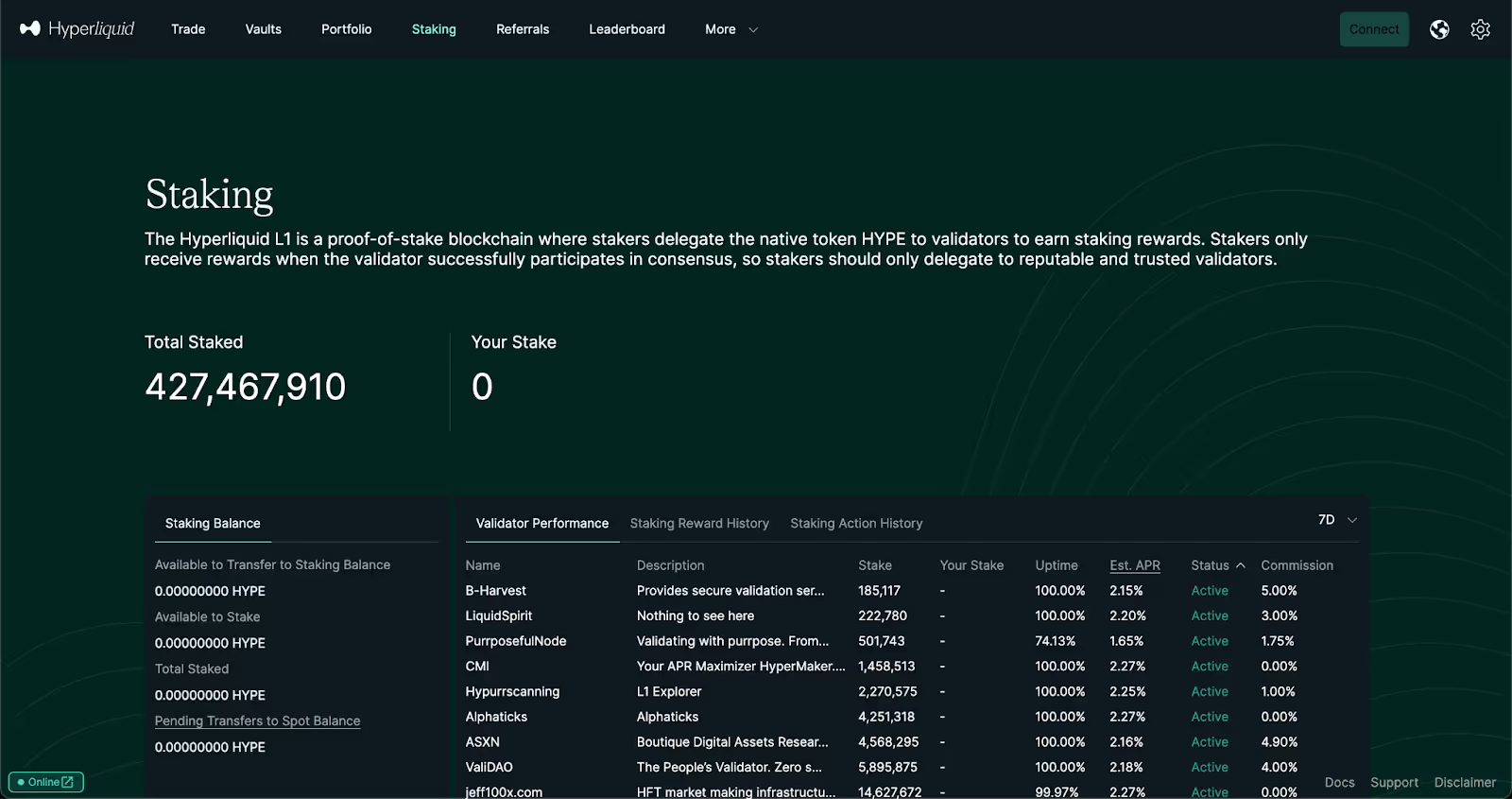
Validators on the network participate in the HyperBFT consensus process, and HYPE holders can delegate their stake to these validators to earn rewards. These rewards are paid out as new HYPE tokens to stakers.
Staking rewards are often treated as taxable income.
If you then sell those HYPE rewards for cash, bitcoin, or another crypto asset, you would then be creating another taxable event. Any profits made from the time the staking rewards were received to when they were sold for another asset would be subject to capital gains taxes.
How providing liquidity is taxed on Hyperliquid
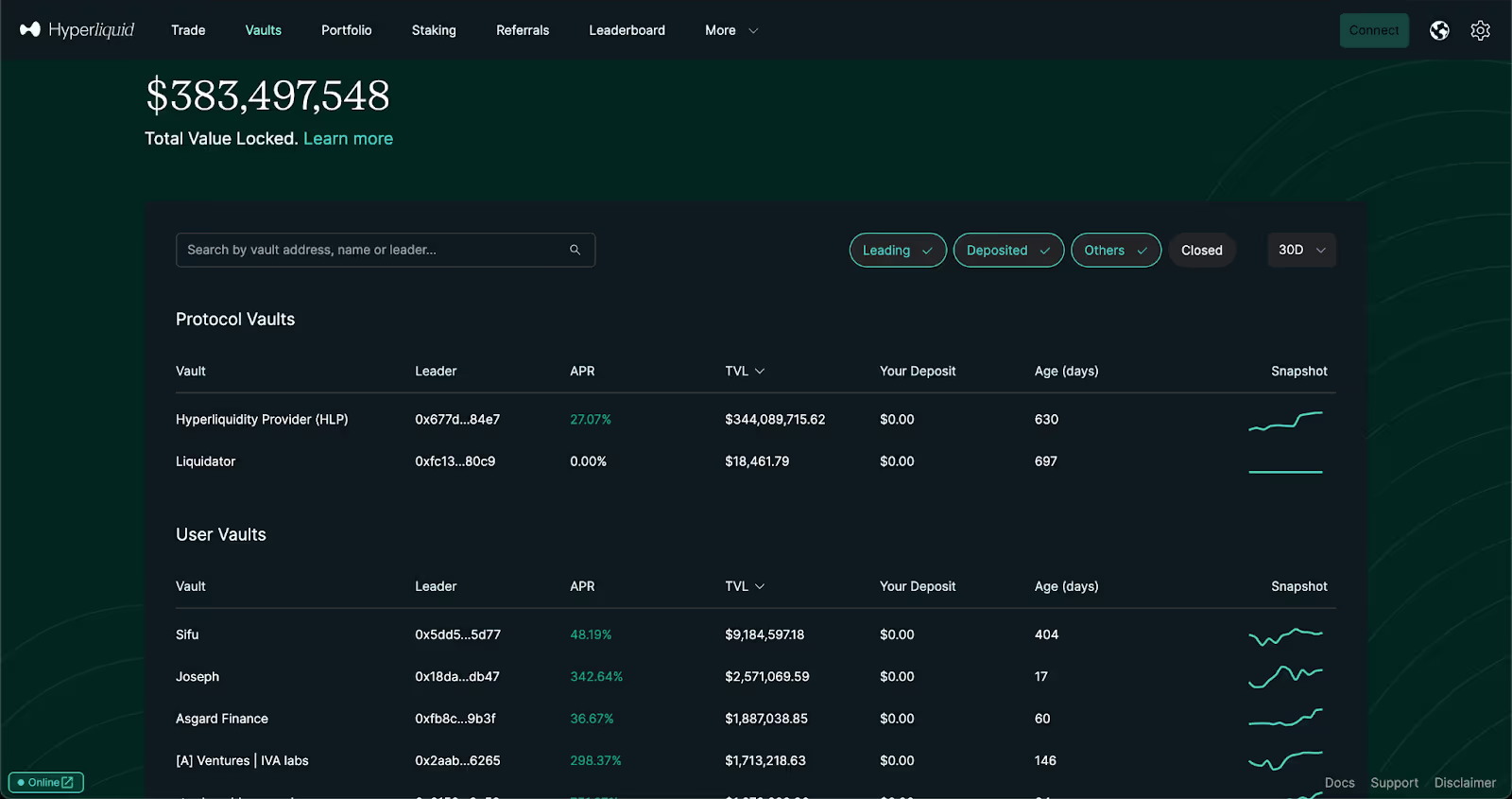
In addition to staking HYPE on the Hyperliquid blockchain, another way to earn yield via this DeFi app is by providing liquidity to the Hyperliquidity Provider (HLP) and other vaults. This liquidity allows traders to access price exposure to different crypto assets on the Hyperliquid DEX, and HLP depositors earn fees on these trades.
Firstly, the act of providing liquidity to the HLP vault will likely be considered a sale of crypto assets that is subject to capital gains taxes, as those who provide liquidity to the HLP vault will need to do so via USD Coin (USDC) which is added to a pool of assets.
Secondly, the profits that are subsequently generated by the liquidity pool are subject to income taxes.
This is the most complex activity on Hyperliquid from a tax perspective, so assistance from a tax professional is recommended.
How bridging to and from Hyperliquid is taxed
All deposits to Hyperliquid are converted to USDC upon bridging.
So even if you deposit another stablecoin such as USDT, it will be converted to USDC once it arrives on Hyperliquid. This means any assets other than USDC will be swapped, which triggers a taxable event akin to any other crypto-to-crypto trade, and incur capital gains tax.
If you bridge USDC, then things may actually get a little more complicated, depending on your local tax laws.
If you are in a jurisdiction where bridging is not a taxable event, then depositing USDC should be straightforward.
However, if you are somewhere like the US, then you may need to adopt a conservative approach just to be safe. This is because the IRS has not yet provided clear guidance on whether bridging the same asset is a taxable event or not.
As such, tax professionals tend to recommend treating these bridge transactions like crypto trades, just to be safe.
This means a capital gains tax event would occur when a crypto asset is bridged to another blockchain. This interpretation of the tax code would also apply when bridging an asset back to its blockchain of origin.
That said, there are multiple perspectives on whether this kind of DeFi activity constitutes a taxable event, as some experts see no difference between an underlying crypto asset and derivative tokens that are issued on other blockchains. Consult a tax professional if you are unsure about how to report it on your taxes.
How the Hyperliquid airdrop is taxed
Airdrops became commonplace in crypto during the early 2020s as a more regulator-friendly alternative to initial coin offerings (ICOs). In an airdrop, early users of DeFi apps are rewarded with new crypto tokens related to the apps rather than investors receiving initial coin distributions.
Despite the fact that airdrops are not necessarily investments made by crypto users, the reality is there are still multiple potential areas of concern here in terms of taxation. When the airdrop is initially received by a user, this should be considered income from a tax perspective, and the user’s income tax obligations should be calculated at the time that the airdrop was received.
On top of the income tax concerns, recipients also need to consider potential capital gains tax obligations related to the sale of the airdrop rewards after they have been received.
Of course, potential taxation related to staking also needs to be considered if the HYPE tokens are staked. Additionally, these tax considerations also need to be made for any other types of reward tokens that could potentially be airdropped to Hyperliquid users in the future.
The information provided on this website is general in nature and is not tax, accounting or legal advice. It has been prepared without taking into account your objectives, financial situation or needs. Before acting on this information, you should consider the appropriateness of the information having regard to your own objectives, financial situation and needs and seek professional advice. Summ (formerly Crypto Tax Calculator) disclaims all and any guarantees, undertakings and warranties, expressed or implied, and is not liable for any loss or damage whatsoever (including human or computer error, negligent or otherwise, or incidental or Consequential Loss or damage) arising out of, or in connection with, any use or reliance on the information or advice in this website. The user must accept sole responsibility associated with the use of the material on this site, irrespective of the purpose for which such use or results are applied. The information in this website is no substitute for specialist advice.
FAQ
No items found.
James Edwards
Cryptocurrency Expert
James Edwards has been active in the cryptocurrency industry for over 10 years. He is an avid user of DeFi and believes in the promise of a user-owned and operated web.
His expertise as a cryptocurrency journalist has seen him contribute to publications such as Nasdaq, CoinMarketCap and CoinTelegraph.