
- Tax agencies can track your %blockchainName% transactions, so it’s essential to file your crypto taxes properly. You owe tax any time you sell, swap or dispose of your %blockchainCode% for a profit.
- Transaction data from the %blockchainName% can be downloaded using a block explorer, but analysing this data yourself can be difficult, time consuming and prone to errors.
- Alternatively, you can use Crypto Tax Calculator, which automatically syncs with the %blockchainName% blockchain and other platforms like exchanges to provide you with a comprehensive tax report.

If you’ve been using %blockchainName%, it’s important to understand how to report your crypto taxes. Like most blockchains, %blockchainName% does not automatically report, calculate, or issue tax forms for you. It’s up to users to report their gains, losses, and income based on their activity. This must include all blockchains and exchanges you’ve transacted on, not just %blockchainName%. The good news is that Crypto Tax Calculator makes calculating your %blockchainName% and crypto taxes quick and easy by automatically importing your data and generating comprehensive tax reports.
Quick steps
1. Create an account on Crypto Tax Calculator or log in if you already have one.
2. Select %blockchainName% in the Accounts list.
3. Import your %blockchainName% transactions using API or CSV.
4. Let our software calculate your gains, losses, and income.
5. Download your tax report and file it with your taxes.

Disclaimer: The information in this guide is general in nature and not written for a specific tax jurisdiction or audience.
Do I need to pay taxes on %blockchainName%?
If you have been transacting on %blockchainName% during the tax year, or sold any %blockchainCode%, then it’s likely you will need to pay tax based on your trading activity.
Typically, anytime you sell crypto for fiat, trade crypto-to-crypto, or earn crypto income (e.g., through staking or rewards on %blockchainName%), it is considered a taxable event in most countries.
The exact tax you owe (capital gains or income tax) will depend on your local regulations and the specifics of each transaction. Check our list of local crypto tax guides for details on how cryptocurrency is taxed in your jurisdiction.
Do I have to pay tax if I only bought %blockchainCode% but didn’t sell?
In most parts of the world, you do not pay any tax when you purchase crypto.
It is only when you later dispose of that crypto – i.e., sell it or trade it for another asset – that a taxable event occurs and you need to report it on your tax.
What %blockchainName% transactions are taxable?
The following are common transactions on blockchains like %blockchainName% which are relevant to tax:
Most countries typically tax proceeds earned from selling investments differently from money earned as income. In crypto, you may be subject to both capital gains and income tax, depending on the nature of your transaction:
Capital Gains tax events from %blockchainName%
Whenever you sell %blockchainCode% or make a crypto-to-crypto swap using the %blockchainName% blockchain, you are disposing of an asset.
If the value of the crypto at the time of sale/trade is higher than when you acquired it, you have a taxable capital gain.
If it’s lower, you have a capital loss (which can often be used to offset other gains).
Crypto Tax Calculator will automatically calculate these gains and losses for each trade using your imported transaction data. It will also account for fees according to your local tax rules.
Income tax from %blockchainName%
If you received crypto as a reward on %blockchainName% for activities such as staking, lending, or yield farming – those tokens are usually considered income.
The value of the crypto at the time and date you received needs to be reported as income. It also forms the cost basis if you later sell the asset.
Crypto Tax Calculator will automatically categorise income tax events and treat them according to your local tax rules.


How to calculate %blockchainName% taxes with Crypto Tax Calculator
1. Import your data
First, you will need to import your %blockchainName% transaction data to Crypto Tax Calculator. Here’s how:
Sync via API
This method uses a secure API feed to transfer your transaction data from the %blockchainName% to Crypto Tax Calculator. Using an API ensures that your data will be updated over time, so that any change in your %blockchainName% balance is reflected in Crypto Tax Calculator.
- Sign in to Crypto Tax Calculator or create an account. Navigate to the Accounts tab and click + Add accounts.
- Select %blockchainName% from the list of integrations. Click on Sync via API.
- Enter your Ethereum wallet address. Add an optional nickname, and click 'Add Wallet'.
- Crypto Tax Calculator automatically imports your %blockchainName% transaction history from the blockchain. This may take a few seconds to a few minutes depending on the number of transactions. You’ll see a confirmation when all data is imported.
Generate your tax report
Once your %blockchainName% data is imported to Crypto Tax Calculator, you can calculate your taxes with a few clicks.
- Import accounts.
Add any other exchange accounts, wallets or transaction data to Crypto Tax Calculator. You will need to upload your entire crypto transaction history for an accurate report. This includes all wallets, blockchains and exchange accounts. - Review transactions
While Crypto Tax Calculator does the hard work for you, it may flag some missing data or errors, which you will need to review to ensure accuracy. - Get your tax report
Generate a comprehensive tax report ready for your accountant or local tax authority.
If you're new to Crypto Tax Calculator, try our Getting Started Guide for an overview of how the platform works. If you need assistance at any stage, click the chat icon in the bottom right corner to begin a live chat with our expert customer service team.
How to file your %blockchainName% tax report
Here’s what to do with your exciting and new crypto tax report:
- Review your tax report. After importing, you can generate a tax report for %blockchainName% and any other accounts you linked. This report will detail your net capital gains, losses, and income from crypto for your chosen financial year. Review it to make sure everything looks correct. If something looks off, return to the Review tab to ensure all transactions are categorized correctly; check the Accounts tab to ensure all your accounts and their transactions have been added.
- Download and complete the necessary tax forms. Crypto Tax Calculator can produce specific forms or summaries needed for filing. For example, if you live in the US, it can produce a report ready to upload to TurboTax. There are also specific forms like Form 8949 and Schedule D that contain the relevant information for crypto. Crypto Tax Calculator’s reports are designed to be tax-office compliant, making this straightforward.
- File before the deadline. Make sure you file your taxes before the deadline in your country. Properly reporting your %blockchainName% crypto activity will keep you compliant and help you avoid any penalties.
- Tax agencies can track your %exchangeName% transactions, so you need to file your crypto taxes properly. You owe tax any time you sell, swap or dispose of your crypto for a profit.
- %exchangeName% does not issue tax reports, so you will need to gather the data and calculate taxes yourself.
- Alternatively, you can use Crypto Tax Calculator, which automatically syncs with your %exchangeName% and other crypto platforms to provide you with a comprehensive tax report.
If you’ve been using %exchangeName%, it’s important to understand how to report your crypto taxes. Like most exchanges, %exchangeName% does not automatically report, calculate, or issue tax forms for you. It’s up to users to report their gains, losses, and income from the platform.
The good news is that Crypto Tax Calculator makes calculating your %exchangeName% taxes quick and easy by automatically importing your data and generating comprehensive tax reports.
Quick steps
1. Create an account on Crypto Tax Calculator or log in if you already have one.
2. Select %exchangeName% in the Accounts list.
3. Import your %exchangeName% transactions using API or CSV.
4. Let our software calculate your gains, losses, and income.
5. Download your tax report and file it with your taxes.
Disclaimer: The information in this guide is general in nature and not written for a specific tax jurisdiction or audience.
Do I need to pay taxes on %exchangeName%?
Yes, you will likely need to pay tax if you used %exchangeName% during the tax year.
You will owe capital gains tax or income tax, depending on the nature of your transactions, and whether or not you receive any token rewards from %exchangeName%.
The exact tax you owe will depend on your local regulations and the specifics of each transaction. See our list of local crypto tax guides for details on how cryptocurrency is taxed in your jurisdiction.
How are %exchangeName% transactions taxed?
The taxation of DeFi platforms like %exchangeName% can vary depending on your tax jurisdiction.
Most countries typically tax proceeds earned from selling investments differently from money earned as income. You may be subject to both capital gains (CGT) and income tax, depending on the nature of your transaction.
Here’s how transactions on DeFi platforms like %exchangeName% might be treated:
%exchangeName% capital gains tax (CGT) events
%exchangeName% income tax events
%exchangeName% that are not taxed
Does %exchangeName% report to the IRS?
%exchangeName% is not required to report user activity to the IRS, however, that does not mean your transactions can’t be traced.
Blockchains are public ledgers, which makes it easy to track a wallet's activity. The IRS uses sophisticated data collection and analysis to match your real-world identity with your on-chain activity.
How to calculate %exchangeName% taxes with Crypto Tax Calculator
1. Import your data
First, you will need to import your %blockchainName% transaction data to Crypto Tax Calculator. Here’s how:
Sync via API
This method uses a secure API feed to transfer your transaction data from the %blockchainName% to Crypto Tax Calculator. Using an API ensures that your data will be updated over time.
- Sign in to Crypto Tax Calculator or create an account. Navigate to the Accounts tab and click + Add accounts.
- Select %blockchainName% from the list of integrations. Click on Sync via API.
- Enter your Ethereum wallet address. Add an optional nickname, and click 'Add Wallet'.
- Crypto Tax Calculator automatically imports your %blockchainName% transaction history from the blockchain. This may take a few seconds to a few minutes depending on the number of transactions. You’ll see a confirmation when all data is imported.
2. Generate your tax report
Once your %blockchainName% data is imported to Crypto Tax Calculator, you can calculate your taxes with a few clicks.
- Import accounts.
Add any other exchange accounts, wallets or transaction data to Crypto Tax Calculator. You will need to upload your entire crypto transaction history for an accurate report. This includes all wallets, blockchains and exchange accounts. - Review transactions
While Crypto Tax Calculator does the hard work for you, it may flag some missing data or errors, which you will need to review to ensure accuracy. - Get your tax report
Generate a comprehensive tax report ready for your accountant or local tax authority.
How to file your %blockchainName% tax report
Here’s how to file your crypto tax report with your local tax authority:
1. Review your tax report
After importing, you can generate a tax report for %blockchainName% and any other accounts you linked. This report will detail your net capital gains, losses, and income from crypto for your chosen financial year.
Review it to make sure everything looks correct. If something looks off, return to the Review tab to ensure all transactions are categorized correctly; check the Accounts tab to ensure all your accounts and their transactions have been added.
2. Download and complete the necessary tax forms
Crypto Tax Calculator can produce specific forms or summaries needed for filing. Simply check the options in the Downloads section of the tax report and choose the one you need.
For example, if you live in the US, it can produce a report ready to upload to TurboTax, as well as forms like Form 8949 and Schedule D that are pre-filled and contain the relevant information for crypto.
Crypto Tax Calculator’s reports are designed to be tax office compliant and make this straightforward.
3. File before the deadline
Make sure you file your taxes before the deadline in your country. Properly reporting your %blockchainName% crypto activity will keep you compliant and help you avoid any penalties.

If you’ve been using %exchangeName%, it’s important to understand how to report your crypto taxes. Like most exchanges, %exchangeName% does not automatically report, calculate, or issue tax forms for you. It’s up to users to report their gains, losses, and income from the platform.
The good news is that Crypto Tax Calculator makes calculating your %exchangeName% taxes quick and easy by automatically importing your data and generating comprehensive tax reports.
Quick steps
1. Create an account on Crypto Tax Calculator or log in if you already have one.
2. Select %exchangeName% in the Accounts list.
3. Import your %exchangeName% transactions using API or CSV.
4. Let our software calculate your gains, losses, and income.
5. Download your tax report and file it with your taxes.
Disclaimer: The information in this guide is general in nature and not written for a specific tax jurisdiction or audience.
Do I need to pay taxes on %exchangeName%?
If you have been transacting on %exchangeName% during the tax year, then it’s likely you will need to pay tax based on your trading activity.
Typically, anytime you sell crypto for fiat, trade crypto-to-crypto, or earn crypto income (e.g., through staking or rewards on %exchangeName%), it is considered a taxable event in most countries.
The exact tax you owe (capital gains or income tax) will depend on your local regulations and the specifics of each transaction. Check our country-specific crypto tax guides for details on how cryptocurrency is taxed in your jurisdiction.
Do I have to pay tax if I only bought crypto on %exchangeName% but didn’t sell?
In most parts of the world, you do not pay any tax when you purchase crypto.
It is only when you later dispose of that crypto – i.e., sell it or trade it for another asset – that a taxable event occurs.
What %exchangeName% transactions are taxable?
The following are common transactions on cryptocurrency exchanges like %exchangeName% which are relevant to tax:
Most countries typically tax proceeds earned from selling investments differently from money earned as income. In crypto, you may be subject to both capital gains and income tax, depending on the nature of your transaction:
Capital Gains tax events on %exchangeName%
Whenever you sell or make a crypto-to-crypto swap on %exchangeName%, you are disposing of an asset.
If the value of the crypto at the time of sale/trade is higher than when you acquired it, you have a taxable capital gain.
If it’s lower, you have a capital loss (which can often be used to offset other gains).
Crypto Tax Calculator will automatically calculate these gains and losses for each trade using your imported transaction data. It will also account for fees according to your local tax rules.
Income tax on %exchangeName%
If you received crypto as a reward on %exchangeName% for activities such as staking, lending, or referral bonuses – those tokens are usually considered income.
The value of the crypto at the time and date you received needs to be reported as income. It also forms the cost basis if you later sell the asset.
Crypto Tax Calculator will automatically categorise income tax events and treat them according to your local tax rules.
Does %exchangeName% report to the IRS?
If you registered with %exchangeName% as a resident of the United States, then starting in the 2025 tax year, the exchange is required to report your customer data and transactions to the IRS.
Other tax authorities around the globe, like the ATO, HMRC, CRA are also engaged in data-sharing programmes with exchanges like %exchangeName%. They may also use blockchain analytics tools, data-sharing between banks and KYC and AML data to match your identity with your trading activity on %exchangeName%.
Where do I find %exchangeName% tax forms?
Exchanges like %exchangeName% do not provide tax forms with a neat breakdown of your tax obligations. This is because tax rules vary between countries and jurisdictions, which requires specialised software to handle additional complexities of crypto tax. Additionally, any assets you transfer onto the platform will be missing an accurate cost basis.
Fortunately, you can connect your exchange account to Crypto Tax Calculator via API or upload your transaction data using CSV. Crypto Tax Calculator will then combine this data with any other accounts or wallets you connect to provide you with an accurate tax report ready to submit to your tax agent, accountant or local tax authority.
You can connect as many supported exchange accounts, wallets or blockchains as you like, with reports available for all previous years on a single plan.
How to calculate %exchangeName% taxes with Crypto Tax Calculator
1. Import your data
First, you will need to import your %exchangeName% transaction data to Crypto Tax Calculator. Here are the two main methods:
Automatic API Import
This method uses a secure API feed to transfer your transaction data to Crypto Tax Calculator. Using an API ensures that your data will be updated over time, so that any change in your %exchangeName% balance is reflected in Crypto Tax Calculator.
- Sign in to Crypto Tax Calculator or create an account. Navigate to the Accounts tab and click + Add accounts.
- Select %exchangeName% from the list of exchanges. Click on Sync via API.
- Follow the instructions on the right-hand side to find your API key on %exchangeName%.
- Input your API details and click Secure Connect.
- Once authorized, Crypto Tax Calculator will automatically import your %exchangeName% transaction history. This may take a few seconds to a few minutes depending on the number of transactions. You’ll see a confirmation when all data is imported.
CSV File Upload
Not all exchanges provide easy API access; some users might prefer CSV. Sign in to Crypto Tax Calculator or create an account. Navigate to the Accounts tab and click + Add accounts.
- Select %exchangeName% from the list of exchanges. Click on Upload File.
- Follow the instructions on the right-hand side to find and download your transaction data on %exchangeName%.
- Click Import %exchangeName% CSV to upload your transaction data. Choose your file using the browser or drag and drop it into the window.
- Click Import %exchangeName% CSV to complete the upload.
- Verify the data. The software will parse the CSV and import all transactions. Double-check that the transaction details match your expectations from %exchangeName%. Crypto Tax Calculator will alert you if any data seems missing or if there are errors in the file.
Note: Some exchanges split different types of transactions into multiple files or have separate histories for sub-accounts. Make sure to import all relevant files to cover your complete trading history.
2. Generate your tax report
Once your %exchangeName% data is imported to Crypto Tax Calculator via API or CSV, you can calculate your taxes with a few clicks.
- Import accounts.
Add any other exchange accounts, wallets or transaction data to Crypto Tax Calculator. You will need to upload your entire crypto transaction history for an accurate report. - Review transactions
While Crypto Tax Calculator does the hard work for you, it may flag some missing data or errors, which you will need to review to ensure accuracy. - Get your tax report
Generate a comprehensive tax report ready for your accountant or local tax authority.
If you're new to Crypto Tax Calculator, try our Getting Started Guide for an overview of how the platform works. If you need assistance at any stage, click the chat icon in the bottom right corner to begin a live chat with our expert customer service team.
How to file your %blockchainName% tax report
Here’s what to do with your exciting and new crypto tax report:
- Review your tax report. After importing, you can generate a tax report for %exchangeName% and any other accounts you linked. This report will detail your net capital gains, losses, and income from crypto for your chosen financial year. Review it to make sure everything looks correct. If something looks off, return to the Review tab to ensure all transactions are categorized correctly; check the Accounts tab to ensure all your accounts and their transactions have been added.
- Download and complete the necessary tax forms. Crypto Tax Calculator can produce specific forms or summaries needed for filing. For example, if you live in the US, it can produce a report ready to upload to TurboTax. There are also specific forms like Form 8949 and Schedule D that contain the relevant information for crypto. Crypto Tax Calculator’s reports are designed to be tax-office compliant, making this straightforward.
- File before the deadline. Make sure you file your taxes before the deadline in your country. Properly reporting your %exchangeName% crypto activity will keep you compliant and help you avoid any penalties.
Disclaimer: This guide is for general information only and is not tax advice. Cryptocurrency tax laws vary by region. Please consult a tax professional for advice tailored to your circumstances.”
- Tax agencies can track your %blockchainName% transactions, so it’s essential to file your crypto taxes properly. You owe tax any time you sell, swap or dispose of your crypto for a profit.
- Wallets like %blockchainName% do not issue tax reports, so you will need to gather the data and calculate taxes yourself manually.
- Alternatively, you can use crypto tax software like Crypto Tax Calculator, which syncs with %blockchainName% and your other crypto accounts to calculate your crypto tax.
%blockchainName% is a popular crypto wallet that lets you store and manage your cryptocurrency. If you made trades, earned rewards, or interacted with DeFi using %blockchainName%, you may need to report those transactions on your taxes.
%blockchainName% does not automatically report, calculate, or issue tax forms for you.
The good news is that Crypto Tax Calculator makes calculating your %blockchainName% and crypto taxes quick and easy by automatically importing your data to generate a comprehensive tax report.
Disclaimer: The information in this guide is general in nature and not written for a specific tax jurisdiction or audience.
Do I need to file %blockchainName% taxes?
If you have been using %blockchainName% to trade crypto or use DeFi, then you will likely need to pay tax on those transactions.
The exact tax you owe will depend on whether your transactions are classified as capital gains or income. Check our list of local crypto tax guides for details on how cryptocurrency is taxed in your jurisdiction.
Do I have to pay tax if I only sent crypto to %blockchainName% but didn’t sell?
If you sent crypto to your %blockchainName% wallet and paid transaction fees in crypto (such as Ethereum Gas), then that transaction is a taxable event.
This is because you are taxed any time you dispose of your crypto.
When you pay a network fee in crypto, it is treated as though you sold (i.e., dispose) of your crypto. So even if you only paid a small fee, you will still need to pay a small amount of tax on that transaction.
Crypto Tax Calculator makes it easy to calculate the total tax owed from your %blockchainName% transactions over the tax year.
What %blockchainName% transactions are taxable?
These are how some common transactions using %blockchainName% are taxed:
Most countries typically tax proceeds earned from selling investments differently from money earned as income. In crypto, you may be subject to both capital gains and income tax, depending on the nature of your transaction.
Crypto Tax Calculator categorizes these events for you, based on your tax jurisdiction. This helps ensure that you pay the correct tax rate based on your %blockchainName% transactions, and receive any sort of discounts or allowances based on your local tax rules.
Capital Gains tax events from %blockchainName%
Whenever you dispose of crypto using %blockchainName% you are charged capital gains tax.
Disposals include things like selling crypto, swapping crypto-to-crypto, depositing crypto into DeFi, or paying network fees using crypto.
If the value of the crypto at the time of disposal is higher than when you acquired it, you have a taxable capital gain.
If it’s lower, you have a capital loss (which can often be used to offset other gains).
Crypto Tax Calculator will automatically calculate these gains and losses for each trade using your imported transaction data. It will account for fees according to your local tax rules.
Income tax events from %blockchainName%
If you received crypto as a reward for activities such as staking, lending, or yield farming – those tokens are usually considered income.
The value of the crypto at the time and date you received needs to be reported as income. It also forms the cost basis if you later sell the asset.
Crypto Tax Calculator will automatically categorise income tax events and treat them according to your local tax rules.
How to calculate your %blockchainName% taxes with Crypto Tax Calculator
1. Import your data
First, you will need to import your %blockchainName% transaction data to Crypto Tax Calculator. Here’s how:
Sync via API
- In Crypto Tax Calculator, click “Add Account” and select %blockchainName% or the relevant blockchain (e.g., Ethereum, Solana).
- Copy your wallet’s public address.
- Paste your address.
- Crypto Tax Calculator will scan the blockchain and import all your taxable events: trades, transfers, airdrops, NFT sales, staking rewards, yield farming etc.
- Do this for each address in your wallet.
Upload CSV
If you have a CSV export from a blockchain explorer or the %blockchainName% software, you can upload it manually. However, using the API sync method is usually simpler.
- In Crypto Tax Calculator, click “Add Account” and select %blockchainName% or the relevant blockchain (e.g., Ethereum, Solana).
- Click Import %blockchainName% CSV to upload your transaction data. Choose your file using the browser or drag and drop it into the window.
- Click Import %blockchainName% CSV to complete the upload.
- Verify the transaction details match your expectations from your %blockchainName% activity. Crypto Tax Calculator will alert you if any data seems missing or if there are errors in the file.
Note: If you downloaded your CSV from a block explorer, then you will need to upload a CSV for each public address you have in the wallet.
2. Generate your tax report
Once your %blockchainName% data is imported to Crypto Tax Calculator, you can calculate your taxes with a few clicks.
- Import accounts.
Add any other exchange accounts, wallets or transaction data to Crypto Tax Calculator. You will need to upload your entire crypto transaction history for an accurate report. This includes all wallets, blockchains and exchange accounts. - Review transactions
While Crypto Tax Calculator does the hard work for you, it may flag some missing data or errors, which you will need to review to ensure accuracy. - Get your tax report
Generate a comprehensive tax report ready for your accountant or local tax authority.
Need help? Click the chat icon in the bottom right corner to start a live chat with our expert customer service team. Otherwise, try our Getting Started Guide for an overview of how the platform works.
How to file your %blockchainName% tax report
1. Review your tax report
After importing, you can generate a tax report for %blockchainName% and any other accounts you linked. This report will detail your net capital gains, losses, and income from crypto for your chosen financial year.
Review it to make sure everything looks correct. If something looks off, return to the Review tab to ensure all transactions are categorized correctly; check the Accounts tab to ensure all your accounts and their transactions have been added.
2. Download and complete the necessary tax forms
Crypto Tax Calculator can produce specific forms or summaries needed for filing. Simply check the options in the Downloads section of the tax report and choose the one you need.
For example, if you live in the US, it can produce a report ready to upload to TurboTax, as well as forms like Form 8949 and Schedule D that are pre-filled and contain the relevant information for crypto.
Crypto Tax Calculator’s reports are designed to be tax office compliant and make this straightforward.
3. File before the deadline
Make sure you file your taxes before the deadline in your country. Properly reporting your %blockchainName% crypto activity will keep you compliant and help you avoid any penalties.
- Tax agencies can track your %exchangeName% transactions, so you need to file your crypto taxes properly. You owe tax any time you sell, swap or dispose of your crypto for a profit.
- %exchangeName% does not issue tax reports, so you will need to gather the data and calculate taxes yourself.
- Alternatively, you can use Crypto Tax Calculator, which automatically syncs with your %exchangeName% and other crypto platforms to provide you with a comprehensive tax report.
If you’ve been using %exchangeName%, it’s important to understand how to report your crypto taxes. Like most exchanges, %exchangeName% does not automatically report, calculate, or issue tax forms for you. It’s up to users to report their gains, losses, and income from the platform.
The good news is that Crypto Tax Calculator makes calculating your %exchangeName% taxes quick and easy by automatically importing your data and generating comprehensive tax reports.
Quick steps
1. Create an account on Crypto Tax Calculator or log in if you already have one.
2. Select %exchangeName% in the Accounts list.
3. Import your %exchangeName% transactions using API or CSV.
4. Let our software calculate your gains, losses, and income.
5. Download your tax report and file it with your taxes.
Disclaimer: The information in this guide is general in nature and not written for a specific tax jurisdiction or audience.
Do I need to pay taxes on %exchangeName%?
Yes, you will likely need to pay tax if you used %exchangeName% during the tax year.
You will owe capital gains tax or income tax, depending on the nature of your transactions, and whether or not you receive any token rewards from %exchangeName%.
The exact tax you owe will depend on your local regulations and the specifics of each transaction. See our list of local crypto tax guides for details on how cryptocurrency is taxed in your jurisdiction.
How are %exchangeName% transactions taxed?
The taxation of DeFi platforms like %exchangeName% can vary depending on your tax jurisdiction.
Most countries typically tax proceeds earned from selling investments differently from money earned as income. You may be subject to both capital gains (CGT) and income tax, depending on the nature of your transaction.
Here’s how transactions on DeFi platforms like %exchangeName% might be treated:
%exchangeName% capital gains tax (CGT) events
%exchangeName% income tax events
%exchangeName% that are not taxed
Does %exchangeName% report to the IRS?
%exchangeName% is not required to report user activity to the IRS, however, that does not mean your transactions can’t be traced.
Blockchains are public ledgers, which makes it easy to track a wallet's activity. The IRS uses sophisticated data collection and analysis to match your real-world identity with your on-chain activity.
How to calculate %exchangeName% taxes with Crypto Tax Calculator
1. Import your data
First, you will need to import your %blockchainName% transaction data to Crypto Tax Calculator. Here’s how:
Sync via API
This method uses a secure API feed to transfer your transaction data from the %blockchainName% to Crypto Tax Calculator. Using an API ensures that your data will be updated over time.
- Sign in to Crypto Tax Calculator or create an account. Navigate to the Accounts tab and click + Add accounts.
- Select %blockchainName% from the list of integrations. Click on Sync via API.
- Enter your Ethereum wallet address. Add an optional nickname, and click 'Add Wallet'.
- Crypto Tax Calculator automatically imports your %blockchainName% transaction history from the blockchain. This may take a few seconds to a few minutes depending on the number of transactions. You’ll see a confirmation when all data is imported.
2. Generate your tax report
Once your %blockchainName% data is imported to Crypto Tax Calculator, you can calculate your taxes with a few clicks.
- Import accounts.
Add any other exchange accounts, wallets or transaction data to Crypto Tax Calculator. You will need to upload your entire crypto transaction history for an accurate report. This includes all wallets, blockchains and exchange accounts. - Review transactions
While Crypto Tax Calculator does the hard work for you, it may flag some missing data or errors, which you will need to review to ensure accuracy. - Get your tax report
Generate a comprehensive tax report ready for your accountant or local tax authority.
How to file your %blockchainName% tax report
Here’s how to file your crypto tax report with your local tax authority:
1. Review your tax report
After importing, you can generate a tax report for %blockchainName% and any other accounts you linked. This report will detail your net capital gains, losses, and income from crypto for your chosen financial year.
Review it to make sure everything looks correct. If something looks off, return to the Review tab to ensure all transactions are categorized correctly; check the Accounts tab to ensure all your accounts and their transactions have been added.
2. Download and complete the necessary tax forms
Crypto Tax Calculator can produce specific forms or summaries needed for filing. Simply check the options in the Downloads section of the tax report and choose the one you need.
For example, if you live in the US, it can produce a report ready to upload to TurboTax, as well as forms like Form 8949 and Schedule D that are pre-filled and contain the relevant information for crypto.
Crypto Tax Calculator’s reports are designed to be tax office compliant and make this straightforward.
3. File before the deadline
Make sure you file your taxes before the deadline in your country. Properly reporting your %blockchainName% crypto activity will keep you compliant and help you avoid any penalties.
If you’ve been using %exchangeName%, it’s important to understand how to report your crypto taxes. Like most exchanges, %exchangeName% does not automatically report, calculate, or issue tax forms for you. It’s up to users to report their gains, losses, and income from the platform.
The good news is that Crypto Tax Calculator makes calculating your %exchangeName% taxes quick and easy by automatically importing your data and generating comprehensive tax reports.
Quick steps
1. Create an account on Crypto Tax Calculator or log in if you already have one.
2. Select %exchangeName% in the Accounts list.
3. Import your %exchangeName% transactions using API (where supported) or CSV.
4. Let our software calculate your gains, losses, and income.
5. Download your tax report and file it with your taxes.
Disclaimer: The information in this guide is general in nature and not written for a specific tax jurisdiction or audience.
Do I need to pay taxes on %exchangeName%?
Yes, you will likely need to pay tax if you used %exchangeName% during the tax year.
You will owe capital gains tax or income tax, depending on the nature of your transactions, and whether or not you receive any token rewards from %exchangeName%.
The exact tax you owe will depend on your local regulations and the specifics of each transaction. See our list of local crypto tax guides for details on how cryptocurrency is taxed in your jurisdiction.
How are %exchangeName% transactions taxed?
The taxation of DeFi platforms like %exchangeName% can vary depending on your tax jurisdiction.
Most countries typically tax proceeds earned from selling investments differently from money earned as income. You may be subject to both capital gains (CGT) and income tax, depending on the nature of your transaction.
Here’s how transactions on DeFi platforms like %exchangeName% might be treated:
%exchangeName% capital gains tax (CGT) events
%exchangeName% income tax events
%exchangeName% that are not taxed
Does %exchangeName% report to the IRS?
%exchangeName% is not required to report user activity to the IRS, however, that does not mean your transactions can’t be traced.
Blockchains are public ledgers, which makes it easy to track a wallet's activity. The IRS uses sophisticated data collection and analysis to match your real-world identity with your on-chain activity.
How to calculate %exchangeName% taxes with Crypto Tax Calculator
1. Import your data
First, you will need to import your %blockchainName% transaction data to Crypto Tax Calculator. Here’s how:
Sync via API (Where Supported)
This method uses a secure API feed to transfer your transaction data from the %blockchainName% to Crypto Tax Calculator. Using an API ensures that your data will be updated over time.
Note: If an API connection is not available on your trading platform, you can always use a custom CSV file to import your transactions into Crypto Tax Calculator.
- Sign in to Crypto Tax Calculator or create an account. Navigate to the Accounts tab and click + Add accounts.
- Select %blockchainName% from the list of integrations. Click on Sync via API.
- Enter your Ethereum wallet address. Add an optional nickname, and click 'Add Wallet'.
- Crypto Tax Calculator automatically imports your %blockchainName% transaction history from the blockchain. This may take a few seconds to a few minutes depending on the number of transactions. You’ll see a confirmation when all data is imported.
2. Generate your tax report
Once your %blockchainName% data is imported to Crypto Tax Calculator, you can calculate your taxes with a few clicks.
- Import accounts.
Add any other exchange accounts, wallets or transaction data to Crypto Tax Calculator. You will need to upload your entire crypto transaction history for an accurate report. This includes all wallets, blockchains and exchange accounts. - Review transactions
While Crypto Tax Calculator does the hard work for you, it may flag some missing data or errors, which you will need to review to ensure accuracy. - Get your tax report
Generate a comprehensive tax report ready for your accountant or local tax authority.
How to file your %blockchainName% tax report
Here’s how to file your crypto tax report with your local tax authority:
1. Review your tax report
After importing, you can generate a tax report for %blockchainName% and any other accounts you linked. This report will detail your net capital gains, losses, and income from crypto for your chosen financial year.
Review it to make sure everything looks correct. If something looks off, return to the Review tab to ensure all transactions are categorized correctly; check the Accounts tab to ensure all your accounts and their transactions have been added.
2. Download and complete the necessary tax forms
Crypto Tax Calculator can produce specific forms or summaries needed for filing. Simply check the options in the Downloads section of the tax report and choose the one you need.
For example, if you live in the US, it can produce a report ready to upload to TurboTax, as well as forms like Form 8949 and Schedule D that are pre-filled and contain the relevant information for crypto.
Crypto Tax Calculator’s reports are designed to be tax office compliant and make this straightforward.
3. File before the deadline
Make sure you file your taxes before the deadline in your country. Properly reporting your %blockchainName% crypto activity will keep you compliant and help you avoid any penalties.
We are proud to announce an official partnership with xDai Chain to help users calculate their tax obligations on their trading activity. xDai Chain is the first-ever USD stable blockchain operating as an EVM-compatible Ethereum Sister Chain, allowing for fast and inexpensive transactions.
With a growing range of Projects and DApps built on top of xDai, determining your tax obligations arising your DeFi trading activity can become increasingly complex. To help reduce this complexity, Crypto Tax Calculator has developed an integration with xDai Chain that allows for the automatic importing and categorisation of your trading history.
Quick Start
You can easily upload your xDai Chain wallet and associated transaction history into Crypto Tax Calculator by following the below steps:
Locate and copy the wallet address associated with your xDai Chain account. This is typically found on your wallet manager (e.g. MetaMask). The wallet address should start with '0x'.
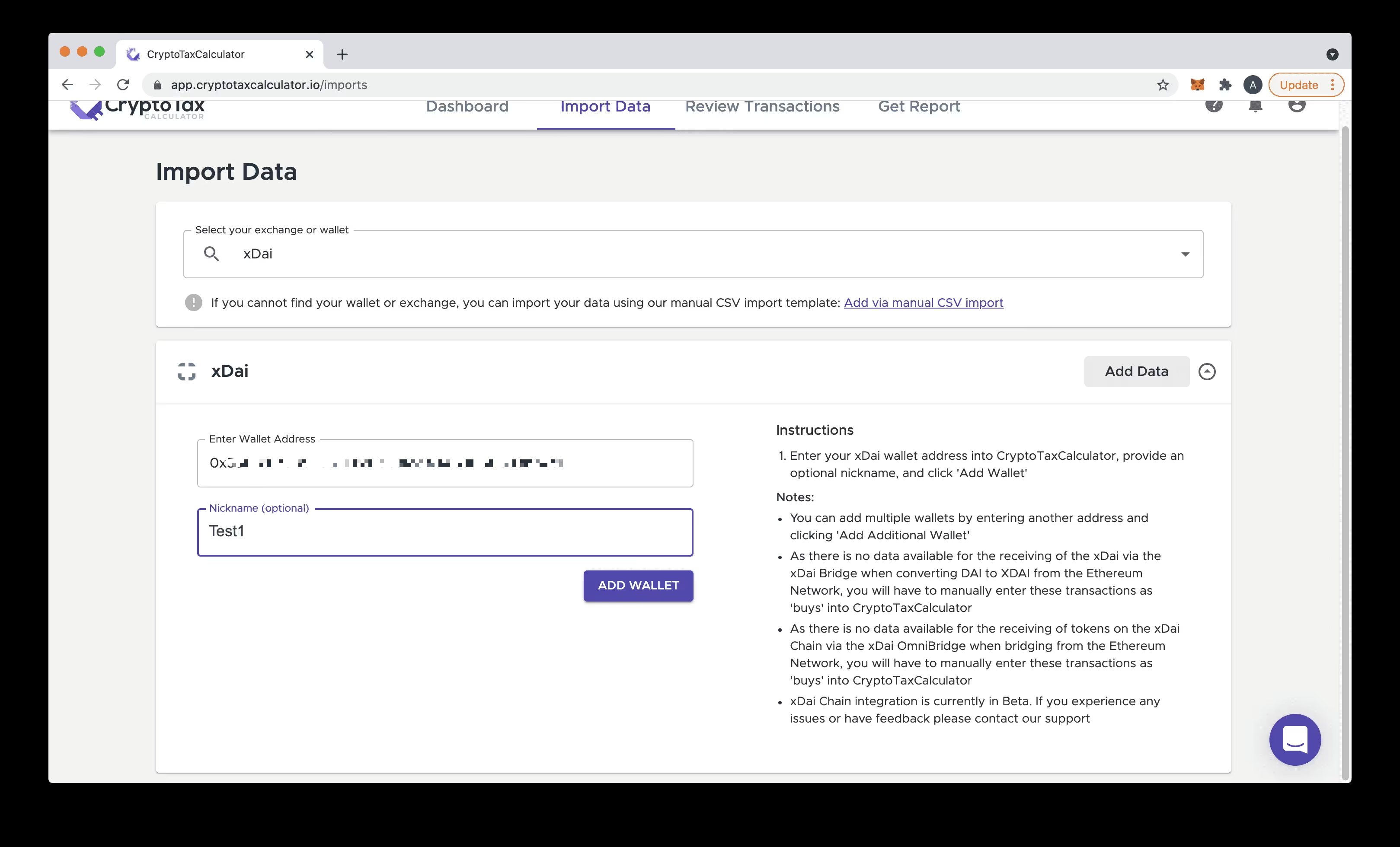
In Crypto Tax Calculator enter xDai into the search field or scroll down and select from the list.

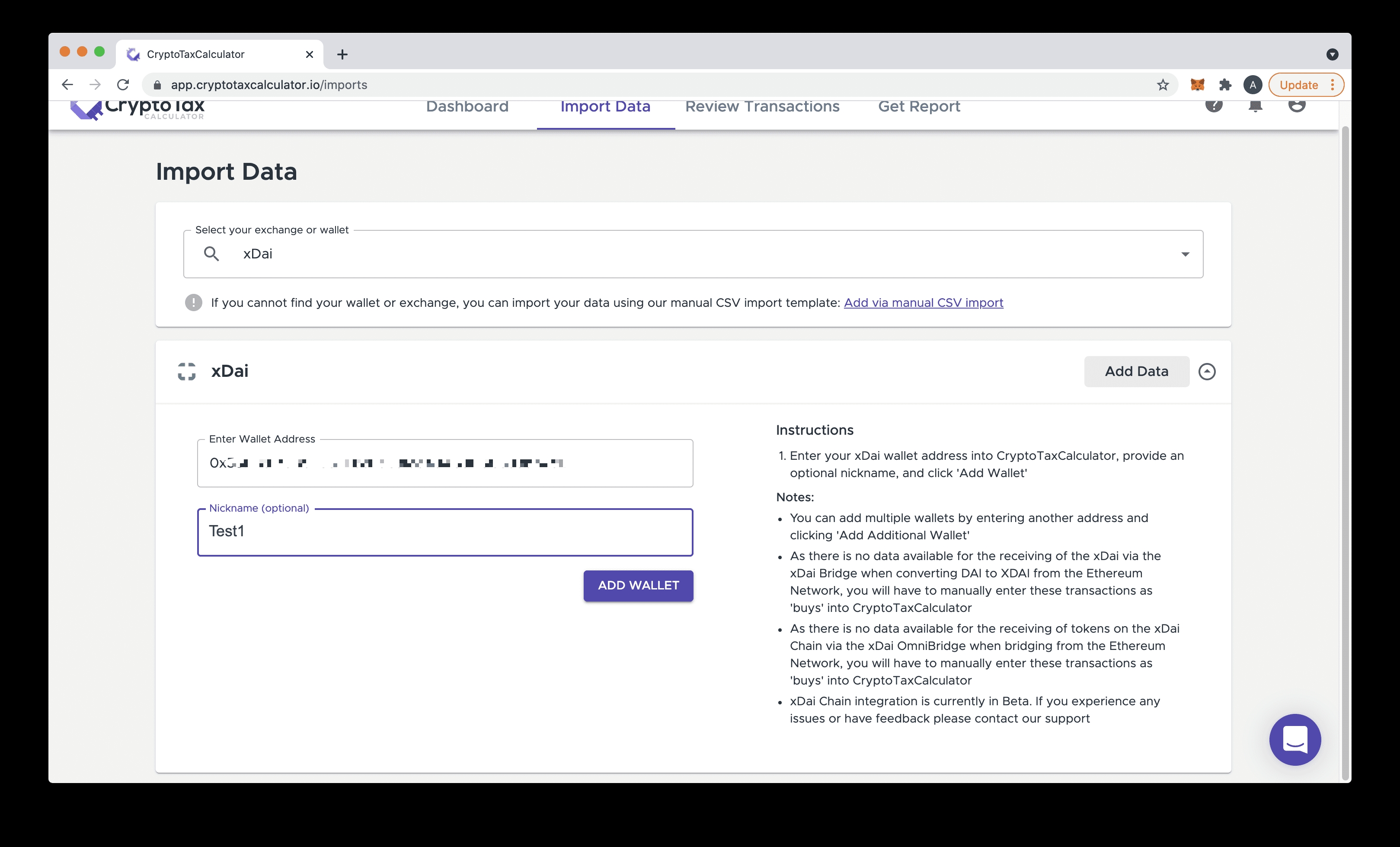
Enter this xDai wallet address into Crypto Tax Calculator, provide an optional nickname, and click Add Wallet. It is possible to add multiple wallet addresses after you add the first.
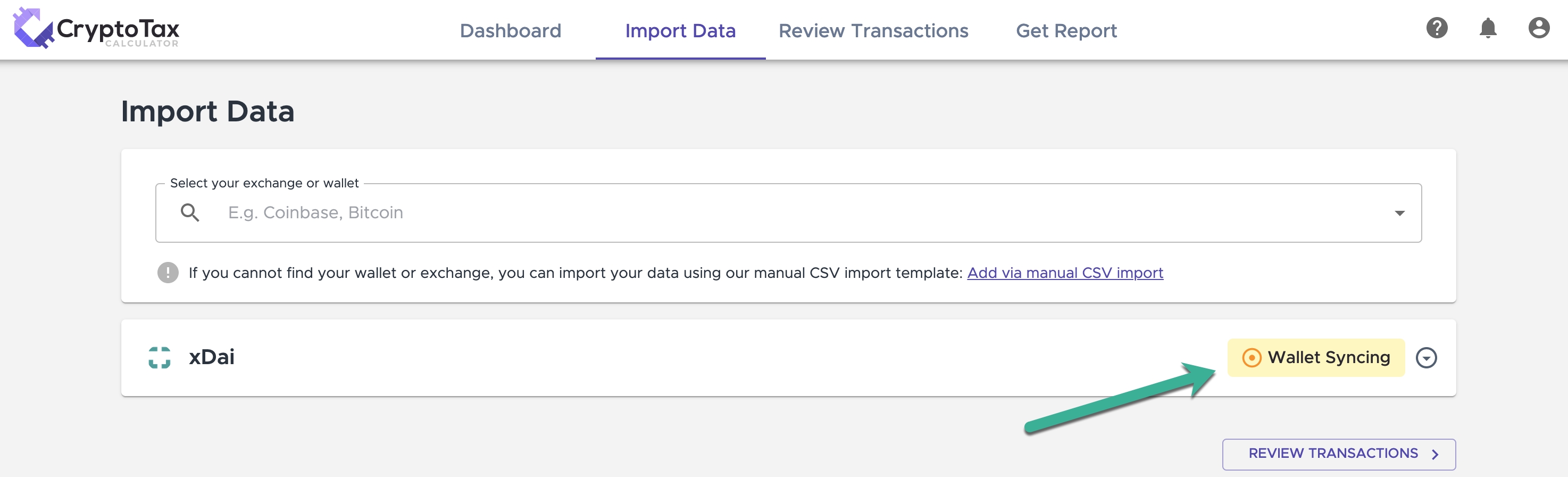
Your wallet will now sync and Crypto Tax Calculator will pull in all the transactions associated with this wallet from the xDai blockchain.
Tax Guide for xDai Chain Projects & DApps
Once you've imported your xDai Chain wallet, you will see that your transactions on xDai have been pulled in, and some have already been auto-categorized. If Crypto Tax Calculator has not been able to automatically determine the type of the transaction, you may need to manually adjust and/or categorise some transactions. For more details regarding the transaction categories which are available on Crypto Tax Calculator, please refer to our guide How to correctly categorise transactions. The remainder of this guide provides an overview of our support for various xDai protocols.
xDai Bridge
To start trading on xDai Chain, you will need to have some amount of XDAI in your xDai Chain wallet. If you have converted DAI from an existing blockchain (such as Ethereum) into XDAI via the xDai Chain Bridge this conversion will trigger a Capital Gains Tax (CGT) event. Similarly, when you bridge XDAI back to DAI, this will trigger a CGT event. As the bridging occurs between two chains, you will need to import both your Ethereum Wallet and your xDai Chain wallet to obtain the complete transaction history between the two chains.
Bridging from DAI (Ethereum Network) to XDAI (xDai Chain)
In this scenario, when you bridge from DAI to XDAI you are disposing of DAI (triggering a CGT event) and acquiring XDAI. Crypto Tax Calculator can automatically determine the disposal of the DAI when it is sent to the xDai Bridge. There are two sides of this transaction; the Ethereum Network side, and the xDai Chain side.
Ethereum Network: To correctly determine the cost base of the disposal of DAI, you will need to import your associated Ethereum wallet that was used for the xDai Bridge. We will then automatically categorise this disposal of the DAI:

xDai Chain: Due to the nature of how the XDAI is minted during the bridging process (as detailed by xDai here) there will be no associated purchase of the XDAI recorded as part of your xDai Chain transaction history (once imported). You will need to manually create a transaction with the acquisition of this xDAI via the bridge:

Bridging from XDAI (xDai Chain) to DAI (Ethereum Network)
In this scenario, when you bridge from XDAI to DAI you are disposing of XDAI (triggering a CGT event) and acquiring DAI. Crypto Tax Calculator can automatically determine the disposal of the XDAI when it is sent to the xDai Bridge. There are two sides of this transaction; the xDai Chain side, and the Ethereum Network side:
xDai Chain: Once your xDai Chain wallet is imported, you will be able to see the disposal of the XDAI when it is sent to the xDai Bridge:

Ethereum Network: To correct determine the cost base of the acquired DAI, you will need to import your associated Ethereum wallet where you received the DAI from the xDai Bridge. We will then automatically categorise the acquisition of the DAI.
xDai OmniBridge
The xDai OmniBridge is a cross-chain bridge used to convert any ERC20 token between the Ethereum Network to xDai Chain. Crypto Tax Calculator supports both the bridging from the Ethereum Network to xDai Chain and back from the xDai Chain to the Ethereum Network. Due to the underlying implementation of the bridging, ERC20 tokens which are bridged via the OmniBridge are a different asset to the native token. As a result, the bridging of tokens between the two networks triggers associated CGT events. For details regarding the difference between Bridged and Native ERC20 tokens and the tax implications of converting between these tokens, please refer to the next section.
Bridging ERC20 Tokens from Ethereum to xDai
In this scenario, when you bridge any ERC20 token from Ethereum to xDai you are disposing of the native ERC20 token (triggering a CGT event) and acquiring a xDai-bridged version of the token. Crypto Tax Calculator can automatically determine the disposal of the ERC20 when it is sent to the xDai OmniBridge. There are two sides of this transaction; the Ethereum side, and the xDai Chain side.
Ethereum Network: To correctly determine the cost base of the disposal of ERC20 token, you will need to import your associated Ethereum wallet which was used for the xDai OmniBridge. We will then automatically categorise this disposal of the ERC20 token:

xDai Chain: Due to the nature of how the bridged token is minted during the bridging process, we are not able to auto categorise the purchase of the 'bridged token' recorded as part of your xDai Chain transaction history. You will need to manually update the transaction category to Buy:
The original transaction as imported via xDai Chain:

Update the transaction by selecting Buy from the available options:

The report will refresh and the transaction will be now correct categorized:

Bridging from xDai back to Ethereum ERC20 tokens
In this scenario, when you convert your xDai 'bridged' tokens back to their ERC20 equivalent native tokens on Ethereum via the xDai OmniBridge, you are disposing of the bridged token (triggering a CGT event) and acquiring the ERC20 native token. Crypto Tax Calculator can automatically determine the disposal of the bridged token when it is sent to the xDai OmniBridge. There are two sides of this transaction; the xDai Chain side, and the Ethereum Network side:
xDai Chain: Once your xDai Chain wallet is imported, you will be able to see the disposal of the bridged token when it is sent to the xDai OmniBridge:

Ethereum Network: To correct determine the cost base of the acquired DAI, you will need to import your associated Ethereum wallet where you received the ERC20 token from the xDai OmniBridge. We will then automatically categorise the acquisition of this token:

Bridged Tokens (Pegged Tokens) vs Native Tokens
xDai Chain maintains a list of 'Bridge Tokens from Ethereum' as can be seen here. Despite the bridged tokens and the native tokens being 'pegged' to the same price, when you bridge from Ethereum to xDai Chain, the original token you bridge is sold, triggering a CGT event, and you receive the 'bridged' or 'pegged' version of the token. For example:
You wish to bridge 10 'xDAI Stake' ERC20 tokens which you have in your Ethereum wallet to the xDai Chain via the OmniBridge so you can trade them on Honeyswap.
From your Ethereum wallet, you send the 10 tokens via the OmniBridge to your xDai Chain wallet. This is a disposal (not a transfer) of the tokens, which triggers a CGT event.
You receive approximately 10 'Stake from Ethereum' Bridged tokens on your xDai Chain wallet. This is an acquisition, (not a transfer) of the tokens. This does not trigger a CGT event.
Similarly, when you bridge back from xDai Chain to Ethereum, the bridged token is sold, triggering a CGT event, and you acquire the 'native' ERC20 token.
Wrapping & Unwrapping of XDAI and WXDAI
Crypto Tax Calculator automatically detects the wrapping of XDAI to WXDAI and the unwrapping of WXDAI to XDAI, and automatically categorises these transactions as detailed below:
When you wrap XDAI to WXDAI (Wrapped XDAI), you are disposing of XDAI (triggering a CGT event) and acquiring WXDAI
When you unwrap WXDAI back to XDAI, you are disposing of WXDAI (triggering a CGT event) and acquiring XDAI
Honeyswap DEX
To import your Honeyswap transaction history, you simply need to import your xDai wallet address into Crypto Tax Calculator as detailed earlier in this guide. Crypto Tax Calculator automatically detects and categorises Honeyswap DEX trading activity. We support the following types of transactions on Honeyswap DEX:
XDAI to token swaps
Token to token swaps
Wrapping and unwrapping XDAI
Adding liquidity to a pool (V2 Liquidity)
Removing liquidity from a pool (V2 Liquidity)
For further information regarding the different trading activity available on Honeyswap and their associated tax implications please review our Honeyswap Tax Guide.
Les informations fournies sur ce site Web sont de nature générale et ne constituent pas des conseils fiscaux, comptables ou juridiques. Il a été préparé sans tenir compte de vos objectifs, de votre situation financière ou de vos besoins. Avant d'agir sur la base de ces informations, vous devez évaluer leur pertinence par rapport à vos propres objectifs, votre situation financière et vos besoins et demander conseil à un professionnel. Cryptotaxcalculator décline toutes garanties, engagements et garanties, expresses ou implicites, et n'est pas responsable de toute perte ou dommage de quelque nature que ce soit (y compris une erreur humaine ou informatique, négligente ou autre, ou une perte ou un dommage accidentel ou consécutif) découlant de, ou dans connexion avec, toute utilisation ou confiance dans les informations ou les conseils contenus dans ce site Web. L'utilisateur doit accepter l'entière responsabilité associée à l'utilisation du matériel de ce site, quel que soit le but pour lequel cette utilisation ou ces résultats sont appliqués. Les informations contenues sur ce site Web ne remplacent pas les conseils d'un spécialiste.