Product Update: Stocks have landed in Summ. See your crypto and shares in one place
Summ now supports shares and ETFs alongside crypto for Australian investors. Track your whole portfolio in one place and file ATO-ready reports across both.


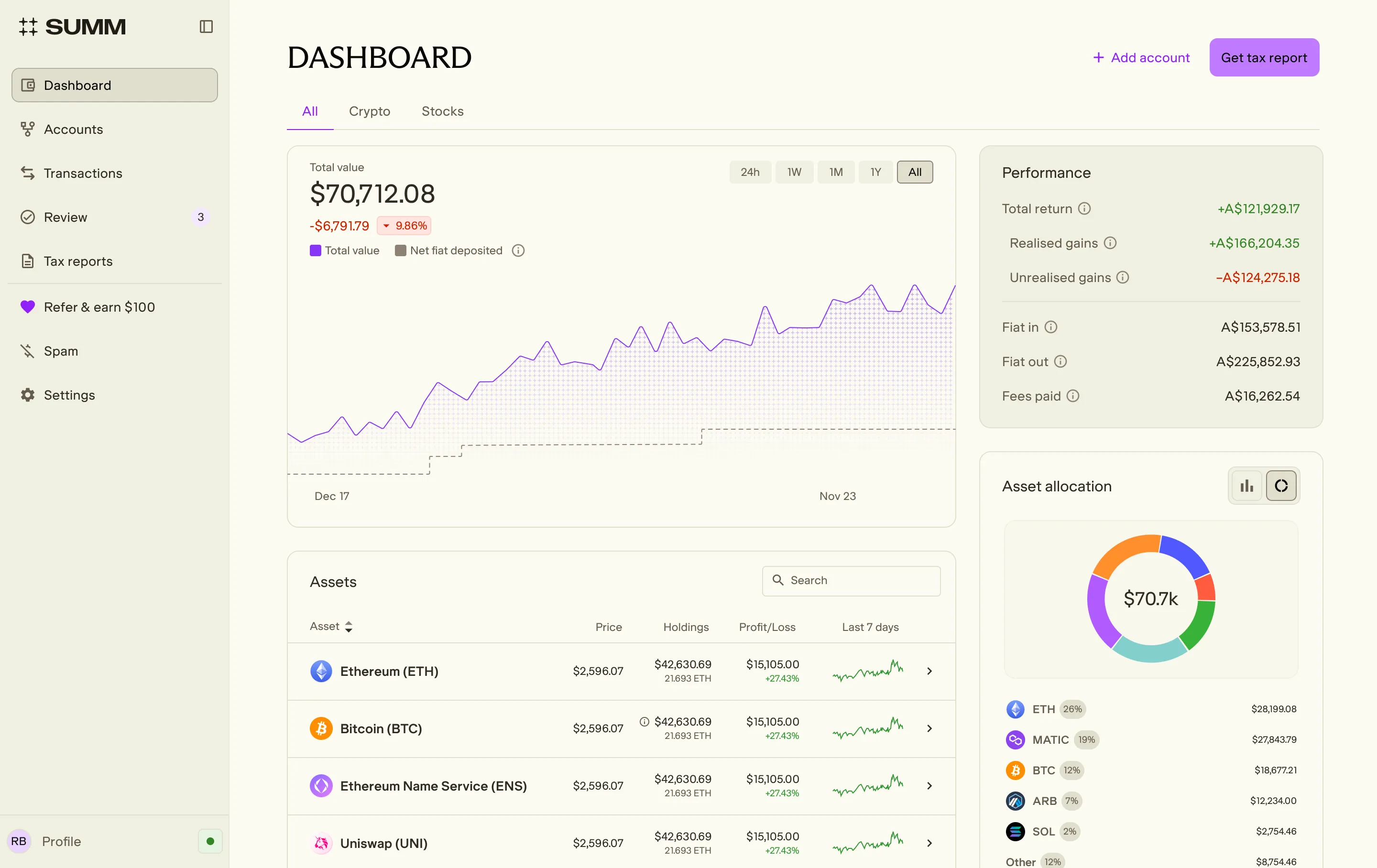
Summ now supports shares and ETFs alongside crypto, for Australian investors, across both Australian and US listed markets. It all sits in one dashboard, in AUD, and lands in your tax reports. If you hold shares or ETFs, with or without crypto, the days of stitching your portfolio together by hand are done.
One portfolio, not three tabs and a spreadsheet
Almost nobody keeps their investments in one place. Your shares sit with a broker, or two. Your crypto sits on an exchange or in a wallet. The full picture only exists in a spreadsheet you keep meaning to update. Come tax time, you piece it all together by hand and hope you didn't miss anything.
Now there's one place for it. Summ tracks your whole portfolio and gets you tax-ready across shares, crypto, or both, no spreadsheet required.
How it works
Three steps, start to finish.
- Add your accounts. Crypto connects directly from an exchange or wallet, or by CSV. Stocks are added by CSV: export your trading history from your broker and upload it under Accounts.
- Summ works out your gains. It builds a buy-and-sell history for each holding across your accounts, sorts your dividends, and applies the relevant ATO rules to your capital gains.
- Get your report. Your shares and crypto land together on the Capital Gains and ATO myTax reports. Lodge them yourself through myGov, or hand a clean, explainable set of records to your accountant.
Choose your view: stocks, crypto, or see it all
One dashboard shows shares, ETFs, dividends and crypto together, in AUD. View the whole portfolio at once, or filter to just stocks or just crypto, whichever you need. Because both asset classes live in one place, you can finally see your gains and losses across the two together.
ATO-ready tax reports for crypto and shares
When it's time to file, your shares and crypto land on the same Capital Gains and ATO myTax reports. Summ works out your gains across both, so you can lodge through myGov yourself or hand a clean set of records to your accountant.
Built for investors who want the full picture
The best calls come from seeing all of it, not half. With crypto and shares side by side, you can spot which holdings are pulling their weight and which are dragging, track performance over time, and watch your unrealised gains move.
Check whether your allocation is genuinely balanced or quietly riding on one bet, and even see the fees you've paid across every platform, the number brokers usually hide. The whole picture, in one place, so the decisions stay yours.
The fiddly stuff, handled
Summ catches the small changes that are easy to miss.
- Corporate actions. Share splits, demergers, return of capital and ticker (symbol) changes are handled automatically, with your cost base (the original price you paid for an asset, used to work out your capital gain or loss when you sell) adjusted as they happen.
- Dividends and franking credits. Dividends are generated from your holdings, and franking credits (the credit for tax a company has already paid on a dividend) are carried into your ATO report.
- US shares. Foreign income and any foreign tax paid on your US holdings are worked out for you. Set your withholding rate to 15% or 30% in settings to match how you report.
- Dividend reinvestment. If you take your dividends as extra shares rather than cash (a DRP or DSSP), switch it on per asset and Summ adds each reinvestment to your cost base for you.
US and AU shares and ETFs, supported today
Australian and US listed shares and ETFs, the markets where most Australian investors hold their money, tracked in AUD right alongside your crypto. Corporate actions, dividends, franking credits, US foreign income and dividend reinvestment are all handled for you.
Coming soon: support for trades in other markets, micro-investing, and more brokers.
Coming from Sharesight or Navexa? Bring your history with you
Switching trackers usually means re-keying years of trades by hand. Not here. Export your portfolio history from Sharesight or Navexa and bring it across to Summ by CSV, so your record comes with you rather than starting from a blank page.
Supported brokers
Import your trading history by CSV from 11 brokers: Bell Direct, CommSec, Interactive Brokers, NAB Trade, Pearler, SelfWealth, Stake, Superhero, Tiger Trade, Vanguard Personal Investor and Westpac Share Trading. More coming soon.
Here's the payoff: crypto and shares on the one return, with losses offset across both. Your whole portfolio, one place, one report.
Add your stocks today, or sign up for free to get started. Questions or feedback? Contact support.
The information provided on this website is general in nature and is not tax, accounting or legal advice. It has been prepared without taking into account your objectives, financial situation or needs. Before acting on this information, you should consider the appropriateness of the information having regard to your own objectives, financial situation and needs and seek professional advice. Summ (formerly Crypto Tax Calculator) disclaims all and any guarantees, undertakings and warranties, expressed or implied, and is not liable for any loss or damage whatsoever (including human or computer error, negligent or otherwise, or incidental or Consequential Loss or damage) arising out of, or in connection with, any use or reliance on the information or advice in this website. The user must accept sole responsibility associated with the use of the material on this site, irrespective of the purpose for which such use or results are applied. The information in this website is no substitute for specialist advice.
More resources

The Best Portfolio Tracker in Australia for 2026
We compare the best portfolio trackers in Australia for 2026. Summ, Sharesight and Navexa reviewed on tracking, ATO tax reporting, crypto support and pricing.
Read More
Summ partners with Stake to power crypto tax reporting for Stake Super
Stake Super members can hold crypto in their SMSF, with tax reporting powered by Summ. Here is what the partnership means for you.
Read More
Buying your first crypto in 2026? The proposed tax changes matter less to you than to anyone else
The proposed CGT changes have dominated crypto media for months. For first-time investors, the practical impact is smaller than the headlines suggest. Here is what actually applies if you are buying your first crypto in 2026.
Read More