If you’ve been using VirgoCX, it’s important to understand how to report your crypto taxes. Like most exchanges, VirgoCX does not automatically report, calculate, or issue tax forms for you. It’s up to users to report their gains, losses, and income from the platform.
The good news is that Crypto Tax Calculator makes calculating your VirgoCX taxes quick and easy by automatically importing your data and generating comprehensive tax reports.
Quick steps
- Create an account on Crypto Tax Calculator or log in if you already have one.
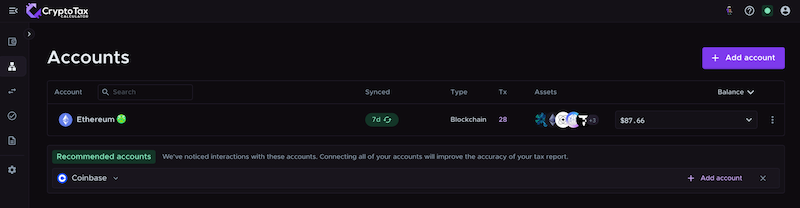
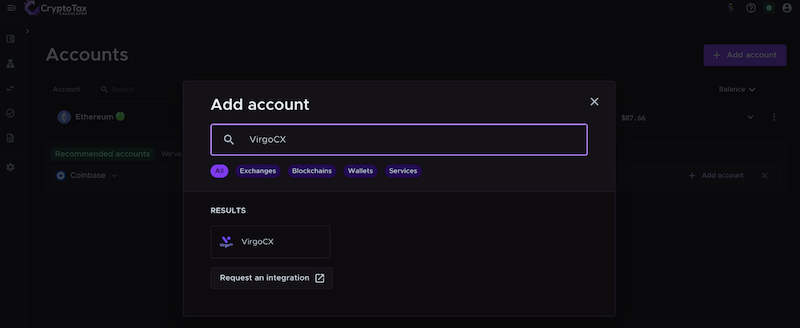
- Select VirgoCX in the Accounts list.
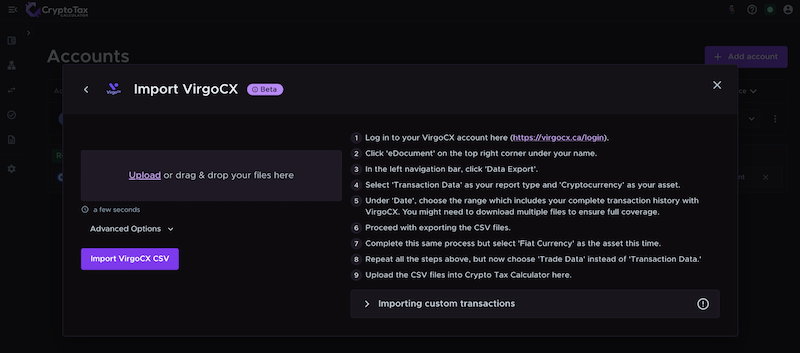
- Import your VirgoCX transactions using CSV.
- Let our software calculate your gains, losses, and income.
- Download your tax report and file it with your taxes.
{{virgocx-cta1}}
Disclaimer: The information in this guide is general in nature and not written for a specific tax jurisdiction or audience.
Do I need to pay taxes on VirgoCX?
If you have been transacting on VirgoCX during the tax year, then it’s likely you will need to pay crypto tax based on your trading activity.
In Canada, anytime you sell crypto for fiat, trade crypto-to-crypto, or earn crypto income (e.g., through staking or rewards on VirgoCX), a capital gains taxable event will be triggered.
However, in Canada, only 50% of your capital gains are taxed. The exact tax you owe (capital gains or income tax) will depend on the specifics of each transaction.
Do I have to pay tax if I only bought crypto on VirgoCX but didn’t sell?
In Canada, you do not pay any tax when you purchase or hold crypto.
It is only when you later dispose of that crypto – i.e., sell it or trade it for another asset – that a taxable event occurs.
If you haven’t sold, traded or moved the crypto you bought, you likely don’t have gains or losses to report for those holdings yet. However, you should still keep records.
And if you earned any crypto (through staking or rewards on VirgoCX), those could be taxable as income even if you haven’t sold them.
Additionally, if you used VirgoCX to purchase crypto but then moved it into another wallet or exchange, you may need to pay tax on the gas fees used if they were paid in crypto.
Crypto Tax Calculator tracks your cost basis for all linked accounts so that when you eventually sell, your prior purchases on VirgoCX are accounted for.
What VirgoCX transactions are taxable?
The following are common transactions on cryptocurrency exchanges like VirgoCX that are relevant to tax:
| Event |
Tax implication |
| Selling crypto |
Capital gains tax (50%) |
| Crypto-to-crypto swaps |
Capital gains tax (50%) |
| Rewards from staking, interest or yield |
Income tax |
In Canada, proceeds earned from selling investments are typically taxed differently from money from regular income. In crypto, your transactions may be subject to either capital gains tax or business income tax, depending on the nature of your transaction.
Capital Gains tax events on VirgoCX
Whenever you sell or make a crypto-to-crypto swap on VirgoCX, you are disposing of an asset.
If the value of the crypto at the time of sale/trade is higher than when you acquired it, you have a taxable capital gain.
If it’s lower, you have a capital loss (which can often be used to offset other gains).
It’s important to keep in mind that compared to many other countries, the CRA has a different way of calculating cost basis when determining overall capital gains – it uses the Adjusted Cost Basis method. This includes the superficial loss rule, which prevents you from claiming a capital loss if you sell crypto and buy it back within 30 days and still own it at the end of that period.
However, Crypto Tax Calculator will automatically calculate these gains and losses for each trade using your imported transaction data, accounting for fees according to the CRA’s rules.
Income tax on VirgoCX
If you received crypto as a reward on VirgoCX for activities such as staking, lending, or referral bonuses – those tokens are usually considered income in Canada.
The value of the crypto at the time and date you received needs to be reported as income. It also forms the cost basis if you later sell the asset.
Crypto Tax Calculator will automatically categorise income tax events and treat them according to your local tax rules.
Does VirgoCX report to the CRA?
In Canada, all major cryptocurrency exchanges – like VirgoCX – must register as a money services business (MSB) with the Financial Transactions and Reports Analysis Centre of Canada (FINTRAC). Since the purpose of FINTRAC is to prevent tax fraud, it’s likely that your customer data and transactions are shared with the CRA.
The CRA likely participates in data-sharing programmes with exchanges like VirgoCX. They may use blockchain analytics tools, bank data-sharing, and KYC and AML data to link your identity to your trading activity.
Where do I find VirgoCX tax forms?
Exchanges like VirgoCX do not currently provide tax forms with a convenient summary of your tax obligations.
Instead, you’ll need to export your transaction data in a CSV file, and then use that to calculate your tax manually or using software like Crypto Tax Calculator.
It’s important to remember that any assets you transfer onto the platform will be missing an accurate cost basis, which is essential for accurately calculating your taxes. Again, this is where Crypto Tax Calculator can help by establishing a cost basis based on your other cryptocurrency accounts and wallets.
Here’s how to download your VirgoCX transaction data:
- Log in to your VirgoCX account.
- Click 'eDocument' on the top right corner under your name.
- In the left navigation bar, click 'Data Export'.
- Select 'Transaction Data' as your report type and 'Cryptocurrency' as your asset.
- Under 'Date', choose the range which includes your complete transaction history with VirgoCX. You might need to download multiple files to ensure full coverage.
- Proceed with exporting the CSV files.
- Complete this same process but select 'Fiat Currency' as the asset this time.
- Repeat all the steps above, but now choose 'Trade Data' instead of 'Transaction Data.'
You can then upload your transaction data to Crypto Tax Calculator using this CSV. Crypto Tax Calculator will then combine this data with any other accounts or wallets you connect to provide you with an accurate tax report ready to submit to your tax agent, accountant, or the CRA.
You can connect as many supported exchange accounts, wallets or blockchains as you like, with reports available for all previous years on a single plan.
{{virgocx-cta1}}
What is the best crypto tax software for VirgoCX?
We may be slightly biased, but we think Crypto Tax Calculator is the best tax software for VirgoCX.
Crypto Tax Calculator analyses all of your VirgoCX transactions to calculate capital gains, income and expenses. You can add as many accounts as you like from other supported exchanges, wallets and DeFi protocols, streamlining the tax process and saving you a headache.
There’s no need to worry about meeting the reporting standards of your local tax authority either. Crypto Tax Calculator generates tax reports that comply with the requirements of numerous tax authorities, including the IRS, HMRC, ATO, CRA, and many more.
With a single account, you have all your transaction data in one place, and the heavy lifting will be done for you for years to come.
But don’t just take our word for it. Crypto Tax Calculator has a 4.8-star rating on Trustpilot, with countless positive reviews. It is trusted by accountants worldwide and is the official tax partner of Coinbase and MetaMask, two of the largest crypto platforms in the world.
{{virgocx-calloutbox-1}}
{{virgocx-cta1}}
How to file your VirgoCX tax report
Here’s what to do with your new crypto tax report:
- Review your tax report. After importing, you can generate a tax report for VirgoCX and any other accounts you linked. This report will detail your net capital gains, losses, and income from crypto for your chosen financial year. Review it to make sure everything looks correct. If something looks off, return to the Review tab to ensure all transactions are categorized correctly; check the Accounts tab to ensure all your accounts and their transactions have been added.
- Download and complete the necessary tax forms. Crypto Tax Calculator can produce specific forms or summaries needed for filing. For example, if you live in Canada, it can produce a report ready to upload to Wealthsimple. There are also specific forms like Schedule 3 - Capital Gains form that contain the relevant information for crypto. Crypto Tax Calculator’s reports are designed to be tax-office compliant, making this straightforward.
- File before the deadline. Make sure you file your taxes before the April 30 deadline in Canada. Properly reporting your VirgoCX crypto activity will keep you compliant and help you avoid any penalties.
Disclaimer: This guide is for general information only and is not tax advice. Cryptocurrency tax laws vary by region. Please consult a tax professional for advice tailored to your circumstances.
Sources
The information provided on this website is general in nature and is not tax, accounting or legal advice. It has been prepared without taking into account your objectives, financial situation or needs. Before acting on this information, you should consider the appropriateness of the information having regard to your own objectives, financial situation and needs and seek professional advice. Summ (formerly Crypto Tax Calculator) disclaims all and any guarantees, undertakings and warranties, expressed or implied, and is not liable for any loss or damage whatsoever (including human or computer error, negligent or otherwise, or incidental or Consequential Loss or damage) arising out of, or in connection with, any use or reliance on the information or advice in this website. The user must accept sole responsibility associated with the use of the material on this site, irrespective of the purpose for which such use or results are applied. The information in this website is no substitute for specialist advice.